Digital Experience
December 19, 2026
Learn more about the latest enhancements and bug fixes from the past two weeks, along with the latest news and how-to articles and videos.
Thank you for your continued dedication and contributions. Let’s keep striving for excellence together!
Discover more about updates to the DX platform and access training materials on the DX Training website.
Enhancements and Bug Fixes
Font Size Within Statistic Microcontent
The font size for a link within a Statistic microcontent was larger than the rest of the font. This issue has been fixed.
Topics Pages
Some website Topics pages were listing many duplicate topics. This has been fixed.
Accordion Title Field
The title field for an Accordion has been expanded to allow for 160 characters.
To view a list of the current reported issues, visit the DX Training website.
TRAINING CORNER
Stay up to date with the latest training resources designed specifically for content managers. Whether you are looking to enhance your skills or streamline your website updates, this section will keep you informed and ready to tackle any new challenges. Visit the DX Training site to brush up.
|
|
 |
Drupal Toolbar
Need a refresher on what all the icons on your website content toolbar do? Visit WYSIWYG (What you see is what you get) Toolbar Elements on the DX Training website to learn more about what each tool can do.

. . . . . . . . . . . . . . . . . .
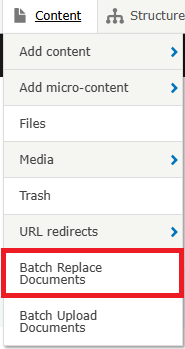
HOW TO: Batch Replace Documents
Batch replacing documents (uploading multiple documents at once to replace already existing documents) can be a time saver. You must ensure that the replacement file names are exactly the same as the documents you're replacing, or you'll create an additional document that won't be linked anywhere. Learn more about how to batch replace documents on the DX Training website.
. . . . . . . . . . . . . . . . . .
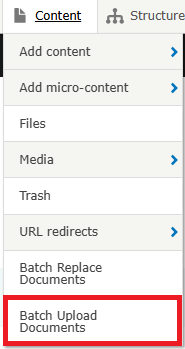
HOW TO: Batch Upload Documents
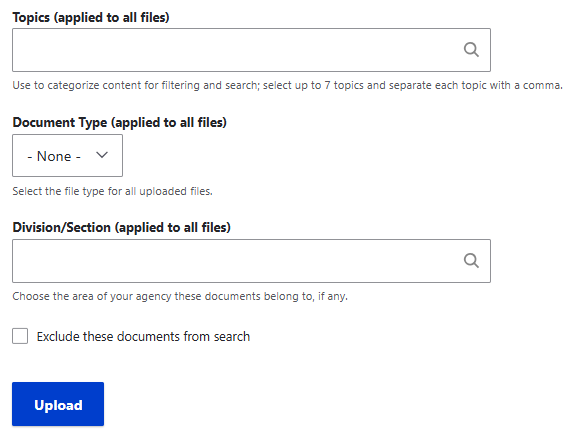
The Batch Upload Documents feature can be used to upload a few to many documents at one time. This feature is especially useful if you're uploading several documents that you'd like to apply the same filters such as topics, document type, or division. You can apply these filters once to all the documents you're uploading. Learn more about how to batch upload documents on the DX Training website.
YouTube Channel
New and updated training videos are being added monthly to the DOM DoIT Digital Experience YouTube Channel and linked within DX Training site pages. You can subscribe to the channel to be notified when new videos are added.
|
|
 |
Weekly DX Training Classes
The weekly DX course is designed for new users and those looking for a refresher on the platform basics. You can register directly on the DX Training site: Weekly DX Training Classes.
Weekly Content Manager Office Hours
Need help or have website questions? Join our live office hours every Thursday from 1-2 p.m. CDT. No registration is needed - simply click the live meeting link available on the DX Training page during the scheduled time. Sharean Morishita will be there to assist with troubleshooting, platform refreshers, or any other questions you have.
|
|
 |
MSF&W Accessibility Weekly Office Hours
Every Wednesday at 9 a.m. you can ask MSF&W's accessibility experts your questions. If you are having trouble figuring out how to fix a table or form or need help understanding appropriate alternate text, just pop into the meeting. No reservation is required. Visit Accessibility Training on the DX Training site for the Teams meeting link.
NOTE: There will be no MSF&W Office Hours December 24, or December 31. Office Hours will resume January 7, 2026.
MSF&W Accessibility Training Playlist
You can find past MSF&W accessibility training recordings of topics such as Accessible Images, PowerPoint, Excel Tables, Forms, and more within the DOM Digital Experience YouTube Channel.
Qualtrics Office Hours
Join Qualtrics virtual office hours every Tuesday and Thursday for live support from Qualtrics experts. You can find all office hour details and additional training opportunities at Qualtrics Training and Support.
|