Digital Experience
Special Accessibility Edition
December 5, 2025
Please share this resource with leadership and
teammates who may be interested within your agency.
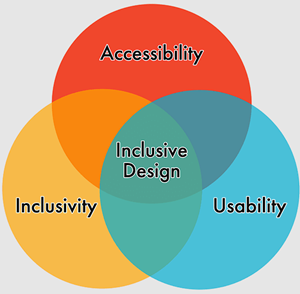
Accessibility and Inclusivity
All digital documents and web content should be easy for everyone to access. Website accessibility is about making websites and tools easier for people who may be using assistive technologies like screen readers, which are devices that speak the text that appears on a screen. People who are deaf or hard of hearing may use captioning. People whose disabilities affect their ability to grip or use a mouse may use voice recognition software to control their computers and other devices with verbal commands.
Missing alt text on images, poor color contrast, missing captions on videos, and inaccessible online forms are just some of the barriers to accessible digital content.
Title II of the ADA (Americans with Disabilities Act) prohibits discrimination against people with disabilities in all services, programs, and activities of state government. State agencies must take steps to ensure that their communication is effective and accessible for all.
Agencies must ensure that digital documents meet the accessibility standards set by the Web Content Accessibility Guidelines (WCAG) Version 2.1, Level AA. This requirement applies to all digital content provided or made available by state agencies. The deadline for compliance is April 24, 2026.
For resources on Accessibility and Inclusivity, visit the DX Training website.
Digital Documents
Government agencies must ensure that digital documents meet the accessibility standards set by the Web Content Accessibility Guidelines (WCAG) Version 2.1, Level AA. Digital documents include PDFs, Word documents, spreadsheets, presentations, forms, and more.
The options for compliance are:
-
Archive
To qualify as archived content, documents must meet four conditions:
- The content was created before April 24, 2026, the date state government must comply with this rule, or reproduces paper documents or the contents of other physical media (audiotapes, film negatives, and CD-ROMs for example) that were created before the government must comply with this rule, AND
- The content is kept only for reference, research, or recordkeeping, AND
- The content is kept in a special area for archived content, AND
- The content has not been changed since it was archived
-
Remediate or Convert
-
Remediate - If you need assistance working with the vendor for bulk document remediation, please contact Natalie Sipes at natalie.sipes@dom.iowa.gov or Todd Peterson at todd.peterson@dom.iowa.gov.
-
Convert - Converting fillable forms (PDF, Google, Microsoft, Seamless, etc.) into Qualtrics forms is more efficient and accessible. It meets WCAG 2.1 AA accessibility standards. For more information or assistance, please contact Jessica Van Heuveln at jessica.vanheuveln@dom.iowa.gov or learn more by visiting the Understanding Qualtrics CX article.
-
HTML
HTML pages allow for things like buttons and animations, are more mobile friendly, search engines can easily crawl and index HTML pages, and they take less time to load. Web pages created in Drupal for your website are HTML pages. Learn more about Going HTML Over PDF on the DX Training website.
-
Remove
If the document is not needed, remove it from your website.
Editoria11y Accessibility Checker
Acquia Optimize
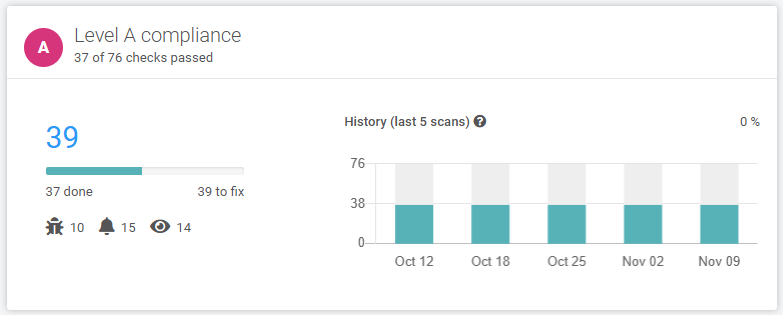
To make sure your website is staying compliant, be sure to view your Acquia Optimize reports. Use the Accessibility tab to check for Level A and Level AA compliance. It will alert you to issues like missing alt text for images, incorrect order of headings, bolded paragraph titles that should or could be a heading style, spacing being used to create columns or white space, and more. It will also alert you to possible errors in focus order or keyboard traps that affect assistive devices. Access your Acquia Optimize reports.
For assistance or questions about using Acquia Optimize, visit the weekly Content Manager office hours, submit a ServiceDesk Plus ticket, or visit Understanding Acquia Optimize on the DX Training website.
 Qualtrics Forms and Surveys
Qualtrics enables agencies to create surveys, projects, dashboards, and more to support constituents by improving productivity, efficiency, and trust.
Qualtrics provides a solution that meets WCAG 2.1 AA accessibility standards and builds constituent trust by maintaining a consistent State of Iowa branding look and feel.
In addition, Qualtrics operates in a FedRAMP High-authorized environment, making it a secure platform for storing and managing data.
A wide range of resources are available on the DX Training website. To get started, visit Understanding Qualtrics CX to learn how Qualtrics can support your accessibility project.
Weekly Content Manager Office Hours
Need help or have accessibility questions? Join our live office hours every Thursday from 1-2 p.m. CST. No registration is needed - simply click the live meeting link available on the DX Training page during the scheduled time. Sharean Morishita will be there to assist with accessibility questions or any other questions you have.
|
|
 |
MSF&W Accessibility Weekly Office Hours
Every Wednesday at 9 a.m. CST you can ask MSF&W's accessibility experts your questions. If you are having trouble figuring out how to fix a table or form or need help understanding appropriate alternate text, just pop into the meeting. No reservation is required. Visit Accessibility Training on the DX Training website for the meeting link.
NOTE: There will be no MSF&W Office Hours December 17, December 24, or December 31. Office Hours will resume January 7, 2026.
MSF&W Accessibility Training Playlist
You can find past MSF&W accessibility training recordings of topics such as Accessible Images, PowerPoint, Excel Tables, Forms, and more within the DOM Digital Experience YouTube Channel.
Qualtrics Office Hours
Join Qualtrics virtual office hours every Tuesday and Thursday for live support from Qualtrics experts. You can find all office hour details and additional training opportunities at Qualtrics Training and Support.
Other Accessibility Resources
|