Digital Experience
October 17, 2025
Learn more about the latest enhancements and bug fixes from the past two weeks, along with the latest news and how-to articles and videos.
Thank you for your continued dedication and contributions. Let’s keep striving for excellence together!
Discover more about updates to the DX platform and access training materials on the DX Training website.
NEWS
2025 Government Experience Awards
|
The Center for Digital Government (CDG) has announced the winners of the 2025 Government Experience Awards honoring the states, cities, counties, and agencies delivering more accessible, equitable, and engaging digital services.
The State of Iowa was recognized for Outstanding Achievement for State Government Experience, and was also recognized as a winner in the Project State Government Experience category (projects with a single focus area) for GovConnectIowa: Modernizing State Services Through Innovation and Accessibility.
|
|
 |
Enhancements
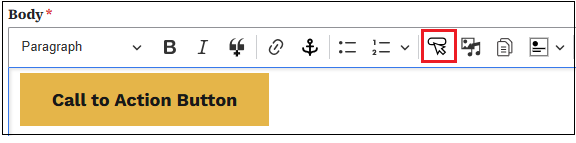
Call to Action Button
You can now add a Call-to-Action button within your pages. The button is located on the WYSIWYG toolbar. Insert the button in your page and type your descriptive text. Providing a link for the button is required.
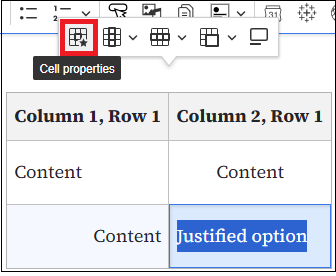
Allow Centering Within Table Cells
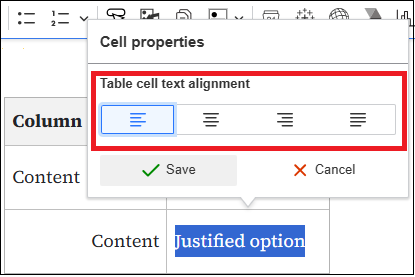
Aligning of text is now allowed within table cells. After you've created your table and entered some text in a cell, highlight the text and the table options mini-toolbar will appear. Select the first table icon with the star, then choose the alignment you'd like for that cell. There is a justified option as well, but you'll need a large amount of text for that option to work. Documentation will be coming soon on the DX Training website.
Allow Formulas and Special Characters in Tables and Book Pages
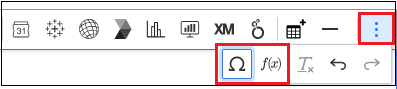
Adding formulas and special characters is now available for tables, Book pages, and Basic pages. Special characters are allowed in a few other pages as well. You'll be able to determine when they are available if the icon is in your WYSIWYG toolbar. You can find the mini-toolbar for those by selecting the three vertical dots at the end of your WYSIWYG toolbar. A dropdown toolbar will appear with the available options. Where special characters only are available, the icon will appear in the regular WYSIWYG toolbar. Documentation will be coming soon on the DX Training website.
Marked as Archive Column Added to Agency Manager All Document Reports
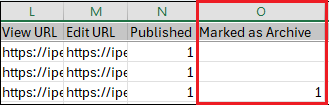
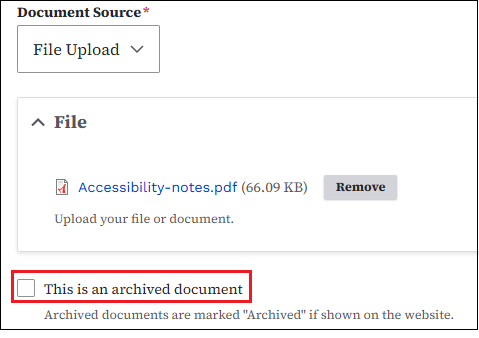
A new column showing if a document has been marked as archive has been added to the All Documents report in Drupal. If the Marked as Archive column is showing a 1 in the column, the document has been marked as an archived document in your Media Library. If there is nothing in the column, the document has not been marked as archived. To mark a document as archived, search for it in your Media Library and check the box next to This is an archived document.
TRAINING CORNER
Stay up to date with the latest training resources designed specifically for content managers. Whether you are looking to enhance your skills or streamline your website updates, this section will keep you informed and ready to tackle any new challenges. Visit the DX Training site to brush up.
|
|
 |
HOW TO: Moderated Content
How do I find all my website content that is in Draft, Review, or Archived status?
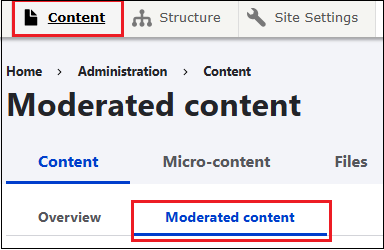
To find it, click the Content button to go to the Content Library. You'll see all the content page types listed. To find content in Draft, Review, or Archived status, click the Moderated Content tab located to the right of the Overview tab. Look in the Moderation state column to determine the status of your content.
Learn more about working with content on the DX Training website.
 . . . . . . . . . . . . .
HOW TO: Use Plain Language
We want people to understand what we are saying and writing. Sometimes we create barriers instead of bridges when we communicate. Plain language is a style that uses simple sentences, everyday vocabulary, and clear structure. Plain language tries to remove those barriers. Plain language = access for all.
|
|
 |
Why? According to recent data from the U.S. Department of Education, more than half
of Americans between the ages of 16 and 74 read below a sixth-grade level. Written
material should be at a level most of the population can understand.
- Keep sentences short
- Give each fact or idea its own sentence
- Use bullets or lists
- Explain acronyms or provide a glossary for long documents
- Avoid sarcasm and subtle humor
- Stay clear of slang
- Use an active tone, not a passive tone
Example: "I will answer your email" instead of "Your email will be answered"
Learn how Acquia Optimize can help you improve your website's Readability Score.
YouTube Channel
New and updated training videos are being added monthly to the DOM DoIT Digital Experience YouTube Channel and linked within DX Training site pages. You can subscribe to the channel to be notified when new videos are added.
|
|
 |
Weekly DX Training Classes
The weekly DX course is designed for new users and those looking for a refresher on the platform basics. You can register directly on the DX Training site: Weekly DX Training Classes.
Weekly Content Manager Office Hours
Need help or have website questions? Join our live office hours every Thursday from 1-2 p.m. CDT. No registration is needed - simply click the live meeting link available on the DX Training page during the scheduled time. Sharean Morishita will be there to assist with troubleshooting, platform refreshers, or any other questions you have.
|
|
 |
Qualtrics DX Office Hours
Need help with DX Qualtrics? Join our virtual office hours for live expert support.
- Office Hours: Tuesdays 10-10:30 a.m. from November 4 to December 30.
- Office Hours: Thursdays 1-1:30 p.m. from November 6 to December 18.
Live training classes are also available. Visit Qualtrics Office Hours and Training Classes on the DX Training website.
Please note that this training is intentionally for Agency Managers only as they will be the only agency reps with ability to view the dashboards and digital assist.
Application Accessibility Assessment Weekly Office Hours
Application Assessment Office Hours are open each Monday from 11 a.m.-12 p.m. CDT with Todd Peterson. Feel free to drop in to ask your questions or if you would like assistance in determining if an application's accessibility should be assessed.
Bulk Document Remediation Weekly Office Hours
Bulk Document Remediation Office Hours are open each Tuesday from 9-10 a.m. CDT with Todd Peterson. Feel free to drop in if you have questions about whether a doc(s) needs to be remediated, removed, or archived, or questions about having Allyant and the IowAccess Doc Remediation project assist with document remediation.
MSF&W Accessibility Weekly Office Hours
Every Wednesday at 9 a.m. you can ask MSF&W's accessibility experts your questions. If you are having trouble figuring out how to fix a table or form or need help understanding appropriate alternate text, just pop into the meeting. No reservation is required. Visit Accessibility Training on the DX Training site for the Teams meeting link.
MSF&W Accessibility Live Training - Accessible Images
The next MSF&W Accessibility Training session is scheduled for Thursday, Oct. 23, 1-2 p.m. CDT. This live training session will focus on Creating Accessible Images - Appropriate Alternate Text. Register for this training session.
|