Digital Experience
October 3, 2025
Learn more about the latest enhancements and bug fixes from the past two weeks, along with the latest news and how-to articles and videos.
Thank you for your continued dedication and contributions. Let’s keep striving for excellence together!
Discover more about updates to the DX platform and access training materials on the DX Training website.
NEWS
Open Office Hours Added for Qualtrics DX (Agency Managers Only)
Last month we launched Qualtrics DX and provided training to all the Agency Managers on Digital Assist and DX Dashboards. Agency Managers, please join the virtual office live support hour with Qualtrics experts on Tuesday, Oct. 7, from 1-2 p.m. Whether you have questions about getting access, using specific features, or need help following up on something, we’re here to help. No appointment needed - just drop in and get the answers you need. Visit the DX Training website for the Teams meeting link.
We’re fully launched in Qualtrics DX and currently fine-tuning Qualtrics CX!
Attention, everyone!
If you're looking for helpful Qualtrics information and demonstrations, be sure to check out the playlists on the DOM DoIT Digital Experience YouTube channel and explore the resources available on the DX website.
YouTube: Qualtrics Playlist | Qualtrics DX Playlist | Qualtrics CX Playlist
DX Training Website: Understanding Qualtrics | Understanding DX | Understanding CX
. . . . . . . . . . . . . . . . . .
Update from Lullabot
-
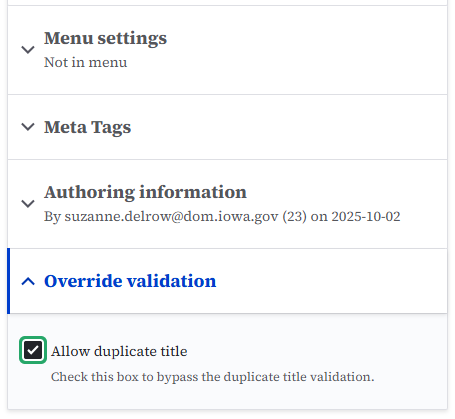
Duplicate page title error
If you enter a duplicate page title, you'll receive the error "There is existing content: (Page title) with identical values for the title field. If you want to bypass the title validation, you can check the 'Allow duplicate title' box under 'Override validation.'"
If you receive this error creating a new page or microcontent, look at the right-side menu of your page and look for a dropdown menu titled 'Override validation.' Check the box for 'Allow duplicate title' and continue to save your page.
TRAINING CORNER
Stay up to date with the latest training resources designed specifically for content managers. Whether you are looking to enhance your skills or streamline your website updates, this section will keep you informed and ready to tackle any new challenges. Visit the DX Training site to brush up.
|
|
 |
HOW TO: Understanding Your Orphaned Page Report
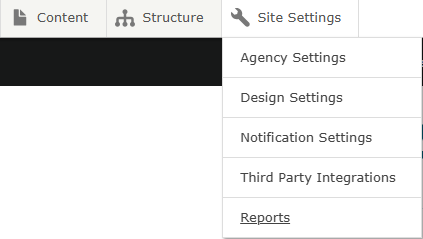
Orphaned pages are published content pages that don't appear in any menu. Check your agency Orphaned Page report in Drupal Site Settings > Reports > Orphaned Pages. If you see any listed pages that you need, add them to your navigation. If they are pages no longer being used, you can archive or delete. This helps ensure your content is indexed for search and accessible to users. Learn more about orphaned pages on the DX Training website.
 . . . . . . . . . . . . . . . . . .
HOW TO: Taxonomy
Taxonomy is a way to organize content into categories. This helps to find pages easily and link related pieces together.
The most used taxonomy category is 'Topics.' Add terms to your Topics taxonomy category to group information into specific topics. You can then create Listing pages and Automatic lists using these categories or taxonomy terms. For example, if you tag all your pages of training information with the taxonomy term 'training,' you can then create a Listing page or Automatic list with all the pages you've tagged with 'Training.' This would save a lot of time trying to find all those pages and separately add them one by one as a bulleted list on a page.
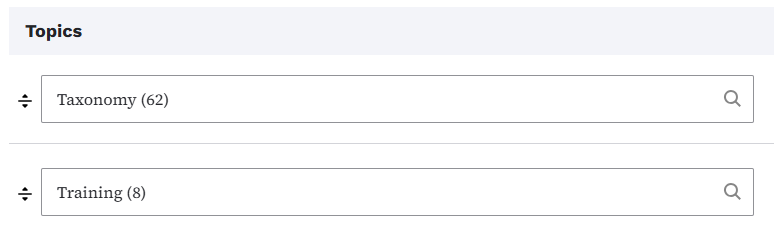 It will also help when you are searching for a particular page within your Content Library. You may not remember the title of a page, but you know it was tagged with the taxonomy term 'Training.' You can search for that content by topic to find it. Learn more about taxonomy.

YouTube Channel
New and updated training videos are being added monthly to the DOM DoIT Digital Experience YouTube Channel and linked within DX Training site pages. You can subscribe to the channel to be notified when new videos are added.
|
|
 |
Weekly DX Training Classes
The weekly DX course is designed for new users and those looking for a refresher on the platform basics. You can register directly on the DX Training site: Weekly DX Training Classes.
Weekly Content Manager Office Hours
Need help or have website questions? Join our live office hours every Thursday from 1-2 p.m. CDT. No registration is needed - simply click the live meeting link available on the DX Training page during the scheduled time. Sharean Morishita will be there to assist with troubleshooting, platform refreshers, or any other questions you have.
|
|
 |
Application Accessibility Assessment Weekly Office Hours
Application Assessment Office Hours are open each Monday from 11 a.m.-12 p.m. CDT with Todd Peterson. Feel free to drop in to ask your questions or if you would like assistance in determining if an application's accessibility should be assessed.
Bulk Document Remediation Weekly Office Hours
Bulk Document Remediation Office Hours are open each Tuesday from 9-10 a.m. CDT with Todd Peterson. Feel free to drop in if you have questions about whether a doc(s) needs to be remediated, removed, or archived, or questions about having Allyant and the IowAccess Doc Remediation project assist with document remediation.
MSF&W Accessibility Weekly Office Hours
Every Wednesday at 9 a.m. you can ask MSF&W's accessibility experts your questions. If you are having trouble figuring out how to fix a table or form or need help understanding appropriate alternate text, just pop into the meeting. No reservation is required. Visit Accessibility Training on the DX Training site for the Teams meeting link.
MSF&W Accessibility Live Training - Accessible Images
The next MSF&W Accessibility Training session is scheduled for Tuesday, Oct. 7, 9-10 a.m. CDT. This live training session will focus on Creating Accessible Images - Appropriate Alternate Text. Register for this training session.
Qualtrics DX Office Hours (Agency Managers Only)
Need Help with Qualtrics DX? Agency Managers, please join the virtual office live support hour with Qualtrics experts on Tuesday, Oct. 7, from 1-2 p.m. Whether you have questions about getting access, using specific features, or need help following up on something, we’re here to help. No appointment needed - just drop in and get the answers you need. Visit the DX Training website for the Teams meeting link.
|