Digital Experience
July 25, 2025
Learn more about the latest enhancements and bug fixes from the past two weeks, along with the latest news and how-to articles and videos.
Thank you for your continued dedication and contributions. Let’s keep striving for excellence together!
Discover more about updates to the DX platform and access training materials on the DX Training website.
NEWS
Acquia Optimize Page Expanded on DX Training Site
Acquia Optimize (formerly Monsido) is a website governance tool to help you monitor and improve your website. It gives you a look at your website’s health by tracking broken links, readability scores, and accessibility issues. This information is key for making your site user-friendly and accessible.
The 'How Do I Work with Acquia Optimize?' page on the DX Training site has been expanded to help you make the most of this tool by including many commonly asked questions about running on-demand site scans, common errors, creating policies, locating and fixing broken links, and more. This information is available at How Do I Work with Acquia Optimize?
|
Enhancements and Bug Fixes
Reports Now Exclude Items in Trash
The following Drupal reports will now exclude items that are in the Trash.
-
All Documents
-
Basic Pages with Short Body Fields
-
Orphaned Pages
-
Content with Duplicated Titles
-
Content with Duplicated Summary Fields
-
Images with Alt Text Report
-
Automatic Lists
-
Listing Pages
This should improve the accuracy of these reports.
TRAINING CORNER
Stay up to date with the latest training resources designed specifically for content managers. Whether you are looking to enhance your skills or streamline your website updates, this section will keep you informed and ready to tackle any new challenges. Visit the DX Training site to brush up.
|
|
 |
HOW TO: Using Related Files
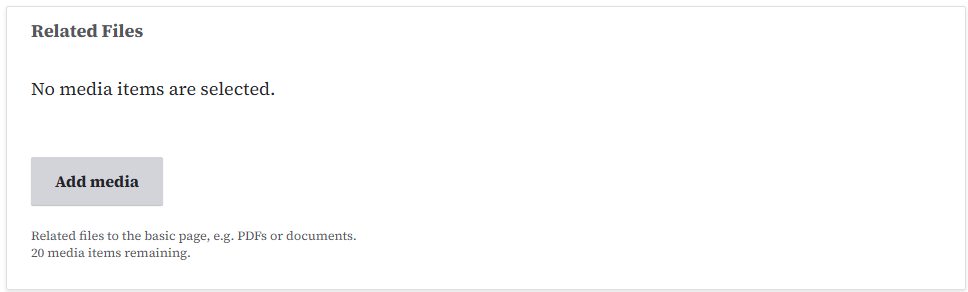
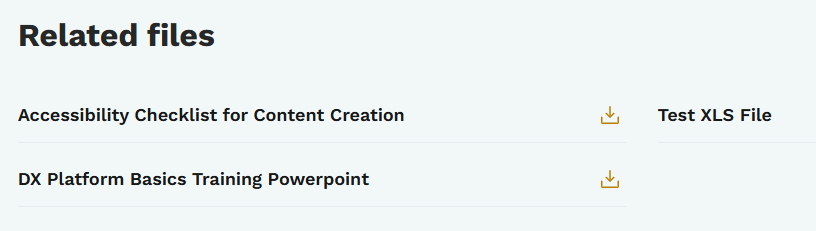
It's best practice to use the Related Files field rather than create a Link Collection list to share additional related information about a topic. The main reason to use Related Files is when Drupal reports on file usage, it doesn't see or count a document if it is being used in a Link Collection. If you link to that document in the Related Files section, however, Drupal now knows that document is being used/linked from another page and can record and report that usage. The Related Files section is available on Book pages, How Do I pages, Location pages, and News pages. Learn more about utilizing Related Files.
How Related Files will look once you add them:
HOW TO: Choose Which Content Type to Use
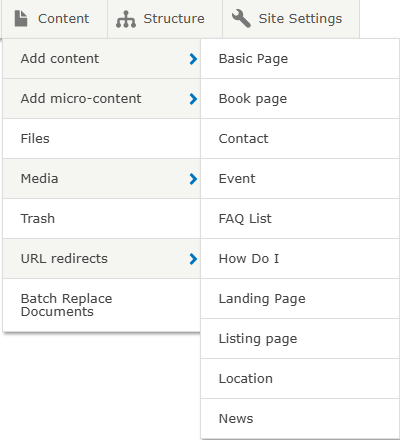
Undecided on which content type to use for your new website page? Here's some information to help you choose. The Which Content Type Should I Use? page on the DX Training site contains explanations of each type of page and what they are best used for. Most have videos to guide you through the process of planning, creating, and adding content to your new page.
YouTube Channel
New and updated training videos are being added monthly to the DOM DoIT Digital Experience YouTube Channel and linked within DX Training site pages. You can subscribe to the channel to be notified when new videos are added.
Weekly DX Training Classes
The weekly DX course is designed for new users and those looking for a refresher on the platform basics. You can register directly on the DX Training site: Weekly DX Training Classes.
Weekly Office Hours
Need help or have questions? Join our live office hours every Thursday from 1-2 p.m. CDT. No registration is needed - simply click the live meeting link available on the DX Training page during the scheduled time. Sharean Morishita will be there to assist with troubleshooting, platform refreshers, or any other questions you have.
Application Accessibility Assessment Weekly Office Hours
Application Assessment Office Hours are open each Monday from 11 a.m.-12 p.m. CDT with Todd Peterson. Feel free to drop in to ask your questions or if you would like assistance in determining if an application's accessibility should be assessed.
Bulk Document Remediation Weekly Office Hours
Bulk Document Remediation Office Hours are open each Tuesday from 9-10 a.m. CDT with Todd Peterson. Feel free to drop in if you have questions about whether a doc(s) needs to be remediated, removed, or archived, or questions about having Allyant and the IowAccess Doc Remediation project assist with document remediation.
Accessibility Weekly Office Hours
Every Wednesday at 9 a.m. you can ask MSF&W's accessibility experts your questions. If you are having trouble figuring out how to fix a table or form or need help understanding appropriate alternate text, just pop into the meeting. No reservation is required.
Accessibility Training
The next MSF&W Accessibility Training session is scheduled for August 5 at 9 a.m. CDT. This live training session will focus on Microsoft Excel accessibility. Register for this training session.
|