Digital Experience
Learn more about the latest enhancements and bug fixes from the past two weeks, along with the latest news and how-to articles and videos.
Thank you for your continued dedication and contributions. Let’s keep striving for excellence together!
Discover more about updates to the DX platform and access training materials on the DX Training website.
NEWS
Content Gardening Update
The first Content Gardening Cohort is coming to an end this week. DAS and Volunteer Iowa have worked hard and made some real progress to improve their sites, including:
- Lullabot delivered detailed reports on document usage and relevance to support decisions around keeping, deleting, or remediating documents
- Improved structure and organization of pages for an easier flow for users and search
- Improved accessibility across links, images, documents, and page structure
- Archived ROT content, including unpublished, to clean up the admin experience in the back end
- Hands-on guidance with Lullabot for continued improvements
HHS is up next beginning the week of July 7. To learn more about the Content Gardening, visit About the Content Gardening Project on the DX Training site.
New Agency Content Reports Available
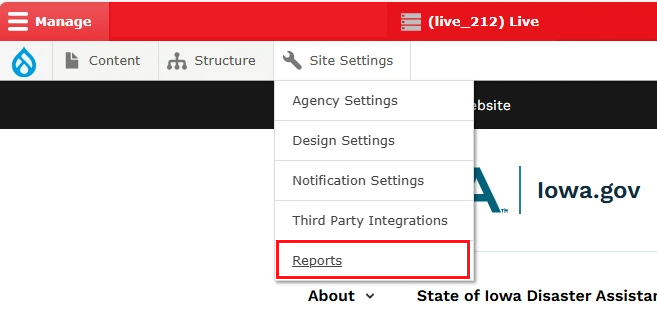
Multiple Agency Content Reports are now available for Administrators and Agency Managers to download and export. Thirteen different reports are available to help you manage your content and keep your website updated. To learn more about these reports, visit How Do I Access Agency Content Reports? on the DX Training site.
Enhancements and Bug Fixes
Callout Text Not Wrapping Around Images
Text in a callout was not wrapping around images properly and was disappearing behind the images. That issue has been fixed.
Web Page Alerts Issue Resolved
We have fixed the problem where web page alerts remained visible and could not be removed.
Updated Contact and Location Heading Styles
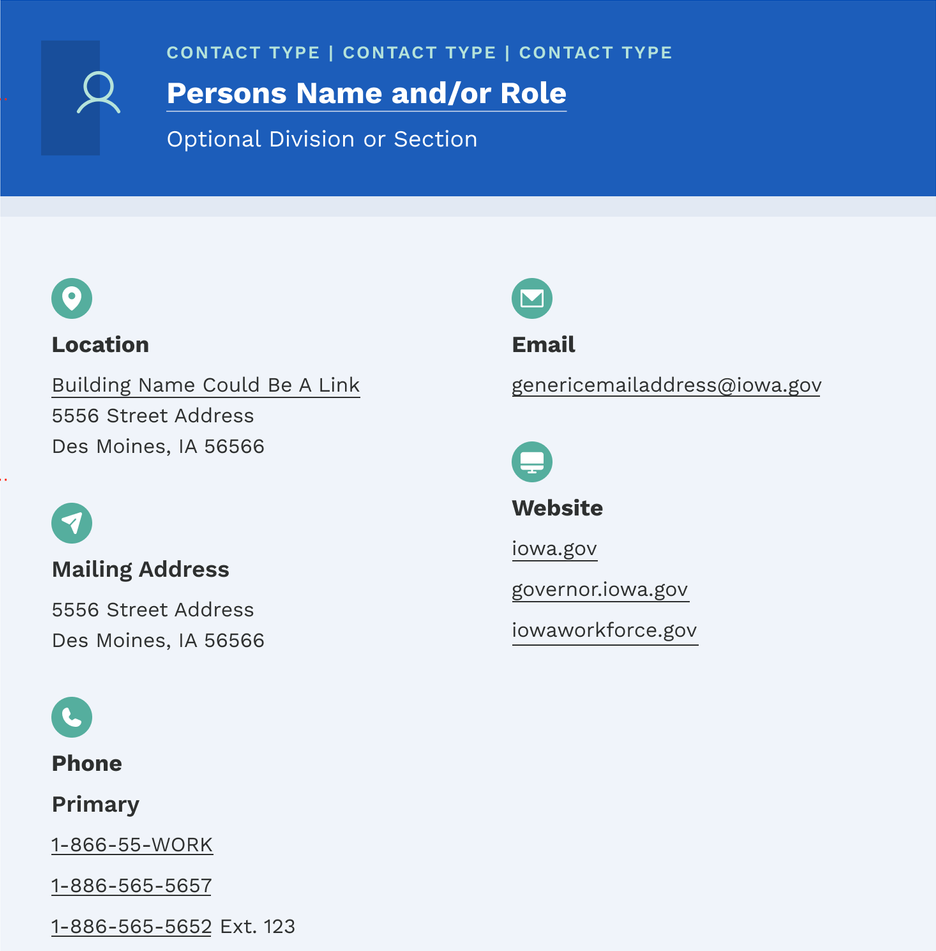
Links to Contact and Location information are styled as headings, but it hasn't been visually clear that these headings are clickable links. This causes accessibility issues. The updated design includes a light underline under the title of the location/contact by default. The hover treatments will remain the same and show a bolder gold underline.
TRAINING CORNER
Stay up to date with the latest training resources designed specifically for content managers. Whether you are looking to enhance your skills or streamline your website updates, this section will keep you informed and ready to tackle any new challenges. Visit the DX Training site to brush up.
|
|
 |
How To: Log in Using Okta
For a website author on any DX Platform website, we recommend you log in to your site using the “Okta” tile on your login.iowa.gov dashboard. Learn more about logging in with Okta.
How to: Accessibility Information and Training
Learn about website content accessibility, how to create or edit content to be accessible, what are accessibility standards, and what tools are available to help content managers. Find the answers on the DX Trainings site's Accessibility page.
YouTube Channel
New and updated training videos are being added monthly to the DOM DoIT Digital Experience YouTube Channel and linked within DX Training site pages. You can subscribe to the channel to be notified when new videos are added.
Weekly DX Training Classes
The weekly DX course is designed for new users and those looking for a refresher on the platform basics. You can register directly on the DX Training site: Weekly DX Training Classes.
Weekly Office Hours
Need help or have questions? Join our live office hours every Thursday from 1-2 p.m. CST. No registration is needed - simply click the live meeting link available on the DX Training page during the scheduled time. Sharean Morishita will be there to assist with troubleshooting, platform refreshers, or any other questions you have.
PDF Remediation Weekly Office Hours
PDF Remediation Office Hours are open each Tuesday from 9-10 a.m. CST with Todd Peterson. Feel free to drop in if you have questions about whether a doc(s) needs to be remediated, removed, or archived, or questions about having Allyant and the IowAccess Doc Remediation project assist with document remediation.
Application Assessment Weekly Office Hours
Application Assessment Office Hours are open each Wednesday from 11 a.m.-12 p.m. CST with Todd Peterson. Feel free to drop in to ask your questions or if you would like assistance in determining if an application's accessibility should be assessed.
Accessibility Training
Accessibility training sessions will be taking a few months off. The next session is scheduled for August 5 at 9 a.m. CST This live training session will focus on Microsoft Excel accessibility. Register for this training session.
|