Digital Experience
Learn more about the latest enhancements and bug fixes from the past two weeks, along with the latest news and how-to articles and videos.
Thank you for your continued dedication and contributions. Let’s keep striving for excellence together!
Discover more about updates to the DX platform and access training materials on the DX Training website.
NEWS
Content Gardening Phase II Launch
The State of Iowa is launching a new initiative called Content Gardening to support agencies in improving their websites through better content strategy, governance, accessibility, broken link fixes, and plain language enhancements.
This project will follow a phased cohort model and involve collaborative training and improvement efforts alongside Lullabot, Qualtrics CX, Accessibility, and the DOM teams.
To learn more about the project and the schedule, visit the Content Gardening page on the DX Training site.
Drupal 11 Upgrade
What is happening:
Lullabot will be upgrading all DX Platform Production sites to Drupal 11.
When is this happening:
Scheduled for June 1-June 15, 2025.
What is the impact:
This upgrade is for current modules. Authors should not expect any major changes outside of the UI placement and design.
The upgrade will bring a new UI design which replaces the top red bar and content navigation button links moving to the left side, and the colors will change from red to white and blue.
Drupal 11 navigation items remain the same, just move to the left side.
CURRENT ENHANCEMENTS AND BUG FIXES
Flickr Embed Scroll Bar Issues
The issue with side and bottom scroll bars appearing for a Flickr photo album embed has been fixed.
404 Error When Linking from the WYSIWYG Bar
The bug that was causing a 404 error when trying to link to a remote file from the WYSIWYG formatting menu bar has been fixed.
GOT A BUG? Submit a ServiceNow Ticket for Fast Fixes!
|
Is something not working as expected? If you encounter a bug or any issue, don’t wait - submit a ServiceNow (SN) ticket right away! Reporting problems as soon as possible is essential to ensuring a quick resolution and keeping everything running smoothly.
You can also check the DX Training Report Page for updates on reported issues and a quick link to submit your own bug reports.
|
|
 |
TRAINING CORNER
Stay up to date with the latest training resources designed specifically for content managers. Whether you are looking to enhance your skills or streamline your website updates, this section will keep you informed and ready to tackle any new challenges.
|
|
 |
How To: Content vs Microcontent
Need a refresher on content vs microcontent, and where microcontent can be placed?
-
Content are pages that are linked and available to the general public.
-
Microcontent are smaller pieces of content added to a content page. These are not linked or available directly, but they do add more context, highlight information, or provide interactive elements to a page.
Visit the DX Training site to brush up.
How To: Links from govDelivery Bulletins
If you'd like to link to a website or page listed in a govDelivery bulletin, don't copy the link from the bulletin. Instead, find the URL of the page or website and use the direct link. Links from govDelivery bulletins can add extra coding and may eventually cause the link to become inactive.
|
|
 |
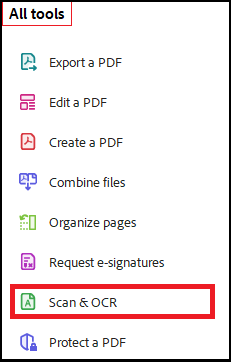
How To: Make a Scanned Document Accessible Using Adobe Acrobat
It's possible to take a scanned document and use the built-in Adobe OCR feature in Acrobat to scan that text and remediate to make it accessible.
The basic steps are:
- Open the document scan in Adobe Acrobat.
- Go to the 'All Tools' menu and select 'Scan & OCR.'
- In the Scan & OCR pane, choose 'In this file' and click 'Recognize Text' to convert scanned images into editable text.
For a more in-depth look at the process, visit Adobe's tutorial.
|
|
 |
YouTube Channel
New and updated training videos are being added monthly to the DOM DoIT Digital Experience YouTube Channel and linked within DX Training site pages. You can subscribe to the channel to be notified when new videos are added.
Weekly DX Training Classes
The weekly DX course is designed for new users and those looking for a refresher on the platform basics. You can register directly on the DX Training site: Weekly DX Training Classes.
Weekly Office Hours
Need help or have questions? Join our live office hours every Thursday from 1-2 pm. No registration is needed - simply click the live meeting link available on the DX Training page during the scheduled time. Sharean Morishita will be there to assist with troubleshooting, platform refreshers, or any other questions you have.
Accessibility Training
Accessibility training sessions will be taking a few months off. The next session is scheduled for August 5 at 9 a.m. This live training session will focus on Microsoft Excel accessibility. Register for this training session.
|