Digital Experience
Happy Friday everyone!
We have some exciting new enhancements and bug fixes.
Thank you for your continued dedication and contributions. Let’s keep striving for excellence together!
Discover more about updates to the DX platform and access training materials on the DX Training website.
Current Enhancements
Here’s an overview of the key updates from the past two weeks:
Editoria11y Accessibility Checker Released to All Roles
You may have noticed new 'badges' or icons on your content when editing. The Editoria11y Accessibility Checker has been added for all users. When you open content for editing, you'll see either a red, blue, or yellow icon in the lower right indicating items flagged for review. A red icon indicates the number of items flagged and shows additional red icons that are exclamation points in a red circle to note each item. A yellow icon indicates a manual review is needed to identify a possible accessibility issue. A blue icon with a check mark indicates no items were flagged.
A demonstration of Editoria11y is scheduled during weekly office hours on Thursday, March 27, at 1 pm. Join the demonstration and discussion.
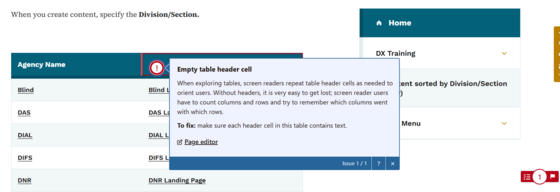 The red icon in the lower right indicates this content has one warning to review.
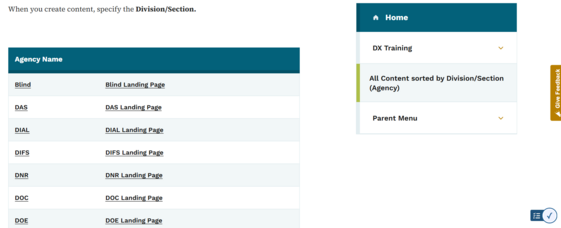 The blue checkmark icon on this content indicates no issues were found.
Contact Type Details Field to Allow for Bulleted or Numbered Lists
A new feature allows an author of any level to use a bulleted (or unordered) list <UL> or and ordered/numbered list <OL> inside the Contact Type Details Field input area. Learn more about how to work with contact types.
Improved Menu Navigational Items - Link Hover Style
Navigation menu links now have a hover style to show that top-level navigation menu items are links. This means when you put your cursor over a top-level menu item link, it will change color. That makes it easier for the user to determine if that menu link item that does not have a drop down menu is clickable. This feature is now live on all sites.
Bulk Downloads and Exports
This new feature allows bulk downloads and exports by manually checking some or all of the listed content items. For media items that use the remote field external URL link, those documents won't be downloaded. Documents no longer need to be downloaded one at a time but can be downloaded in one .zip file with this new feature.
Topics Field Added to Microcontent Types
A topics field has been added to the Microcontent Types of Accordion, Call Out, Link Collection List, Automatic List, Statistics, and Visual Link Collection. This field can be used to categorize content for improved filtering and searching.
Agency Manager Content Notification
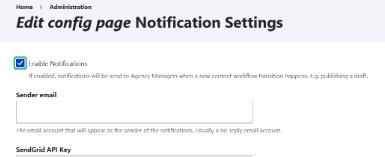
Agency Managers will now receive notifications when content moves from Draft or Review to Published.
This ensures better visibility and oversight of content changes. If an Agency Manager oversees multiple accounts, they will receive separate notifications for each status change update.
 |
Navigational Menu Author Updates
Previously only Publishers and Agency Managers could save the edits they made on a published page as a draft or review status for published pages within a child menu navigation.
Writers and editors are now able to use the draft and review status for published child menu navigation pages.
Improved Year Dropdown for Listing Pages
The Year dropdown on listing pages has been improved for better usability. Now only years that contain content—such as documents, news, and basic pages—will be displayed. For example, if a listing page includes documents from 2024, 2021, and 2020, only these years will appear in the dropdown, making it easier to filter relevant content.
Enhanced Control Over Edit Alerts
Agency Managers now have the ability to backdate alerts using the 'Authoring Information' section. This is what allows a specific 'Created On' date to be set for when an alert appears as published.
 |
|
Got a Bug? Submit a ServiceNow Ticket for Fast Fixes!
Is something not working as expected? If you encounter a bug or any issue, don’t wait—submit a ServiceNow (SN) ticket right away! Reporting problems as soon as possible is essential to ensuring a quick resolution and keeping everything running smoothly.
You can also check the DX Training Report Page for updates on reported issues and a quick link to submit your own bug reports.
|
Training Corner
Stay up-to-date with the latest training resources designed specifically for content managers. Whether you are looking to enhance your skills or streamline your website updates, this section will keep you informed and ready to tackle any new challenges.
Style Guide
If you have new users within your agency, please ensure they are introduced to the enterprise voice, tone, and style guide available on the DX training site: Enterprise Voice Tone Style Guide.
Monthly DX Training Classes
The monthly DX course is designed for new users and those looking for a refresher on the platform basics. You can register directly on the DX Training site: Monthly DX Training Classes.
Weekly Office Hours
Need help or have questions? Join our live office hours every Thursday from 1–2 pm. No registration is needed—simply click the live meeting link available on the DX Training page during the scheduled time. Sharean Morishita will be there to assist with troubleshooting, platform refreshers, or any other questions you have.
Accessibility Training and Office Hours
|