|
Having trouble viewing this email? View it as a Web page.
 January 1, 2026

 Crime prevention resolutions for 2026
As we turn the page to 2026, many people are focused on renewing healthy habits, sharpening finances, or spending more time with family. But one area that often gets overlooked, and can make a big difference, is improving personal and home safety. A few simple changes can help prevent crime, protect your property, and give you greater peace of mind in the year ahead.
-
Strengthen your home security. Start with the basics: lock doors and windows, even when you’re home. Consider upgrading old locks, installing doorbell cameras, or adding motion-activated lighting. If you already have a security system, make sure everyone in your household knows how to operate it.
-
Keep your digital life secure. Cybercrime continues to rise, so make 2026 the year you take online safety seriously. Use strong, unique passwords for every account, enable two-factor authentication, and be cautious about clicking on unexpected links or sharing personal information. Regularly update your devices to protect against new threats.
-
Stay alert while out and about. Whether you’re shopping, running errands, or traveling, paying attention to your surroundings is one of the simplest ways to reduce your risk. Avoid leaving valuables visible in your car, park in well-lit areas, and trust your instincts if something feels off.
-
Avoid scams. Scammers are constantly changing tactics, so staying informed is essential. Be wary of unsolicited phone calls, texts, or emails, especially those demanding payment or personal information. Verify charities before donating, double-check offers that seem too good to be true, and resist pressure to act quickly. When in doubt, pause and confirm.
-
Build community connections. Strong neighborhoods are safer neighborhoods. Introduce yourself to neighbors, join or revitalize a neighborhood watch, or use local community apps to stay informed.
-
Commit to reporting concerns. If you see something suspicious, online or in person, don’t hesitate to report it. Timely reporting helps prevent small issues from becoming bigger problems.
Start 2026 with confidence by making crime prevention part of your resolutions.
 Stay informed about crime in your neighborhood
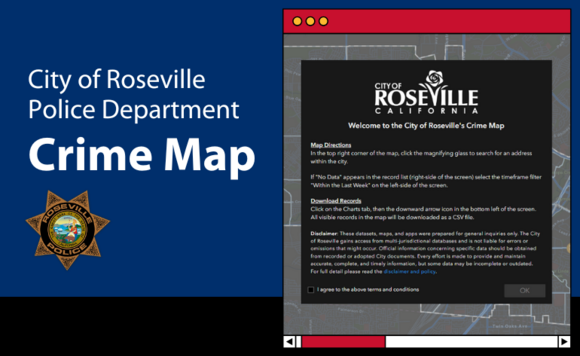
Staying aware of what’s happening in your community is one of the best ways to protect yourself and your property. Roseville residents can stay up to date on local crime trends by regularly checking our Crime Log and Crime Map.
Crime Log
Posted every two weeks on the Police Department website, the Crime Log highlights select incidents reported during that period. Its purpose is to help you stay alert and take simple, proactive steps, like securing valuables, recognizing common scam tactics, and improving home security. Please note: The Crime Log is not a complete list of all crimes in Roseville. It’s a snapshot intended to provide helpful insights, not a comprehensive count.
City of Roseville Crime Map
For a fuller picture of crime activity, the Crime Map offers a more detailed, interactive view of reported incidents citywide. Because it captures a wider range of data than the Crime Log, you may notice differences in the volume and types of crimes shown.
Staying informed empowers you to make safer choices. A few minutes spent reviewing these tools can help you stay aware, prepared, and better protected
 California DMV to introduce new license plate format in 2026
Planning to buy a new vehicle in 2026? If so, you might notice your new license plate looks a little different.
The California Department of Motor Vehicles will roll out a new license plate format next year because the current system is nearly out of available combinations. The existing 9-series configuration, which ends with 9ZZZ999, is expected to run out sometime in 2026.
The new format will follow a “Numeral Numeral Numeral Alpha Alpha Alpha Numeral” pattern (for example, 126NEW1). This update will create a fresh pool of combinations to support the state’s growing number of registered vehicles and is expected to last for more than a decade.
 Online safety for kids
It’s 2026, an ideal time to review how to keep your kids safe online. A strong first step is protecting their devices from hackers and scammers.
The Federal Trade Commission (FTC) recommends the following ways to help safeguard kids while they use phones, tablets, and laptops. For younger children, you’ll need to handle these steps yourself. As they get older, teach them how to secure their devices and develop smart online habits.
-
Turn on automatic updates. Enable automatic updates on all devices to keep apps, browsers, and operating systems protected.
-
Use strong, unique passwords. Make sure your kids’ accounts and devices use strong, unique passwords. Consider helping teens set up a password manager or use built-in password generators. Remind them not to leave their devices unattended in public.
-
Secure your home Wi-Fi. Change your router’s default name and password, turn off remote management, and log out as the administrator once setup is complete. This protects everyone in your household.
-
Use parental controls. Parental controls can reinforce good online habits and create safer digital spaces for kids. To better manage spending, consider disabling in-app purchases or requiring a password for all purchases on phones and tablets.
For more guidance on protecting kids online and supporting their safety, privacy, and healthy development, visit ftc.gov/KidsOnline.
Beat: 7
Date: November 18
Neighborhood: Sun City
In March 2025, the victim began using a dating website and met a woman with whom he quickly moved to communicate via iMessage. The relationship became serious, and he began sending her money. The suspect claimed a family member had passed away and left her approximately 455 kilograms of gold. She stated that over $1 million was required to remove the gold from storage and asked the victim for financial assistance with the associated fees, claiming she would owe taxes in Thailand and the United States. An individual claiming to be an attorney later contacted the victim, requesting $700,000 for legal assistance and assuring the victim he would receive $9 million from the gold. Subsequently, the suspect claimed her daughter became severely ill and required a kidney transplant, soliciting additional money for the surgery. Over the following months, the victim transferred a total of over $1 million to cover the purported gold taxes, medical expenses, and legal and miscellaneous costs. Around July 2025, the victim realized he was being scammed and filed a report with the FBI, but he has not received a follow-up.
Prevention Tip: Exercise extreme caution when asked for money by someone you have only met online, especially if the requests are for large sums or involve elaborate, emotional, or high-reward stories (such as inheritances, large business deals, or medical emergencies). Never wire money or send gift cards to individuals you have not met in person and fully vetted.
Beat: 2
Date: November 9
Neighborhood: Johnson Ranch
The victim reported that while installing a newer version of Norton antivirus software, multiple pop-ups appeared on his computer. Concerned, he searched online for Norton’s customer service number and left a voicemail at the number he found. The voicemail did not identify a company, and the victim was unsure if it belonged to Norton. Two minutes later, he received a call from a female stating she had received his voicemail, claiming to be with Norton customer service. She transferred him to an individual posing as a Norton technician. The victim allowed remote access to his computer, and the suspect informed him that several viruses were present. The suspect then gained access to the victim’s wife’s Amazon account, made $4,000 to $5,000 in fraudulent gift card purchases, and obtained the security numbers from the victim.
Prevention Tip: Independently verify customer service numbers through the company’s official website, and never grant remote access to your device unless you are certain of the representative’s legitimacy.
Beat: 3
Date: November 5
Neighborhood: Hillcrest
The victim reported that on November 3, 2025, at approximately 6 p.m., he posted a Facebook advertisement to sell a table for $50. A user expressed interest and stated he would send his cousin to pick up the item, paying in advance through PayPal. The user instructed the victim to upgrade to a business account to receive payment. Shortly after, the victim received an email instructing him to send two $1,000 transactions, which he believed were part of the account upgrade process. After sending the funds, he was notified that his PayPal account had been locked by supposed "PayPal Representatives." The user then instructed him to send a $500 Apple gift card to unlock the account. After the card information was provided and the funds were withdrawn, the victim realized it was a scam and ended communication.
Prevention Tip: Payment platforms do not require users to send money, gift cards, or upgrades to receive funds. Verify all account-related requests by logging in directly through the official website or app.
|