NOTICE OF PREPARATION OF AN ENVIRONMENTAL IMPACT REPORT AND COMMUNITY MEETING/EIR SCOPING MEETING
Project Crossings - 8825 National Blvd.
NOTICE IS HEREBY GIVEN to all responsible agencies and interested parties that the City of Culver City (City), as the Lead Agency, will be preparing an Environmental Impact Report (EIR) pursuant to the California Environmental Quality Act (CEQA) Guidelines Section 15082. This Notice of Preparation (NOP) has been prepared to describe the Project and identify the scope of environmental issues recommended to be addressed in the EIR, and to seek your comments on what environmental effects and alternatives the EIR should study. You are being notified of the City’s intent, as Lead Agency, to prepare an EIR for this Project, as it is in an area of interest to you and/or the organization or agency you represent. The EIR will be prepared by consultants under direction of the City and submitted to the Planning Division for independent review and certification.
PROJECT TITLE: Project Crossings
APPLICANT/OWNER: Culver Crossings Properties, LLC
PROJECT ADDRESS: 8825 National Boulevard and 8771 Washington in Culver City, California, 90232 (Culver City Parcel); and 8876, 8884, 8886 and 8888 Venice Boulevard and 8827and 8829 National Boulevard in Los Angeles, California, 90232 (Los Angeles Parcel).
DUE DATE FOR PUBLIC COMMENTS ON THE NOP: 5:30 PM on Monday, December 20, 2021
COMMUNITY MEETING/EIR SCOPING MEETING: 6 PM – 8 PM on Monday, December 6, 2021
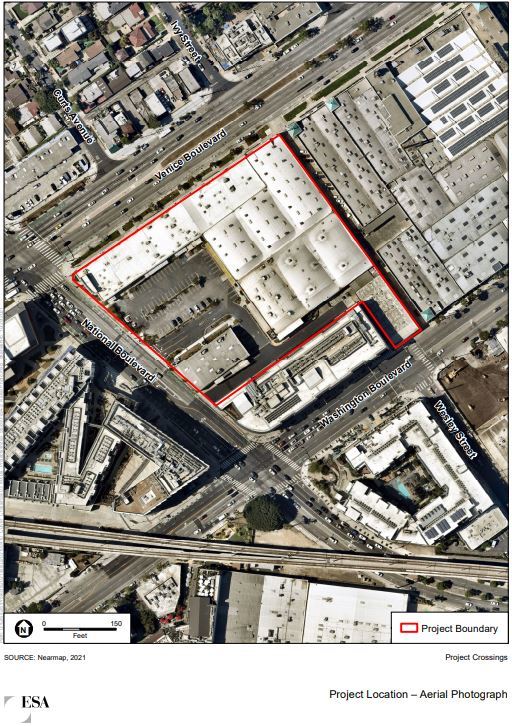
PROJECT LOCATION: The Project Site is bounded by Venice Boulevard to the north, Washington Boulevard to the south, National Boulevard to the west, and existing commercial uses to the east. The Project Site is comprised of two properties, one located in the City of Culver City (Culver City Parcel) and one located in the City of Los Angeles (Los Angeles Parcel). See attached figure.
PROJECT DESCRIPTION: The Project Site is currently improved with low-rise warehouses that have been converted into retail and office uses as well as surface and enclosed parking lots serving the existing uses on the Project Site. The Project would demolish the existing buildings on the Project Site and construct two four- to five-story buildings that would provide a total of 536,000 sf of new office floor area, which is intended to be occupied by Apple, Inc. The two buildings would have the ability to be connected via a shared wall. The Project would provide a total of 1,215 vehicular parking spaces within two separate three-level subterranean garages under each proposed building. The Project would also provide 162 bicycle parking spaces, including spaces for employees and visitors, short-term spaces, and long-term spaces in compliance with respective City codes. The proposed office buildings would be designed to accommodate creative office uses and could include associated production spaces for multimedia content creation and capture as well as amenities for building tenants including a cafeteria, coffee stations, employee shuttle service, and other ancillary uses typical of an integrated office complex development. The Project would also include pedestrian-facing
landscaping at the ground floor on National Boulevard and Venice Boulevard, as well as an internal courtyard for the use of employees and occasional private tenant events.
ENVIRONMENTAL ISSUES TO BE ADDRESSED IN THE EIR: The Culver City Current Planning Division has determined based on an Initial Study that an EIR will be required to analyze the environmental effects of the Project. Environmental issues identified as having the potential to result in significant impacts that require further evaluation in the EIR include: Air Quality (all but odors), Cultural Resources (historic and archaeological resources), Energy, Geology and Soils (all but landslides, septic tanks), Greenhouse Gas Emissions, Hazards and Hazardous Materials (all but airport hazards and wildland fires), Hydrology and Water Quality (all but inundation), Land Use and Planning (consistency with plans and policies), Noise (all
put aircraft noise), Public Services (fire protection and police protection), Transportation, Tribal Cultural Resources, and Utilities and Service Systems (water, wastewater, and electric power). The Initial Study is available for review on the Culver City Planning Division website , or at City Hall, the Current Planning Division 2nd floor, and the Culver City Julian Dixon Library.
PUBLIC COMMENT PERIOD FOR NOP: The Current Planning Division welcomes and will consider all comments regarding the potential environmental impacts of the Project and issues and alternatives to be addressed in the EIR. All comments will be considered in preparation of the EIR. The comment period for the NOP begins on Thursday, November 4, 2021, and ends on Monday, December 20, 2021. Written comments should be received on or before Monday, December 20, 2021, at 5:30 PM. Written comments should refer to the Project by name and be addressed to:
Jeff Anderson, Interim Current Planning Manager
City of Culver City Current Planning Division, 2nd Floor
9770 Culver Boulevard, Culver City, CA 90232
Phone: (310) 253-5727 Email: jeff.anderson@culvercity.org
COMMUNITY MEETING/EIR SCOPING MEETING: A virtual Community Meeting and EIR Scoping Meeting will be held on Monday, December 6, 2021. In accordance with the City of Culver City Community Meeting Guidelines, the purpose of the 2nd Official Community Meeting is for the Applicant to present the Project, solicit the community’s comments on the Project, and receive feedback on the Project prior to submitting entitlement applications to the City. In accordance with CEQA, the purpose of the EIR Scoping Meeting is for the City to solicit input and written comments from agencies and the public on environmental issues or alternatives they believe should be addressed in the EIR
The meetings will be held in an online format using Zoom to share information regarding the Project and the environmental review process. You may join, view, and participate in the meeting by using the Zoom application, by your web browser, or by phone. Register for the virtual meeting by visiting: Project Crossings Webinar .This will provide you with a confirmation and join link, as well as call-in numbers. City staff, environmental consultants, and Project representatives will be available during these meetings, with the Community Meeting being held first, followed by the EIR Scoping Meeting. Each meeting will begin with a presentation and be followed by a question-and-answer session. The meetings will be open to the public and all stakeholders. Questions may be submitted via email in advance of the meeting at jeff.anderson@culvercity.org, however there will also be opportunities for verbal questions taken at the meetings. A separate more detailed instructions page is included in this communication.
The Community Meeting will begin at 6 PM and end at approximately 7 PM and will be followed by the EIR Scoping Meeting at approximately 7 PM to 8 PM.
Copies of the documentation can be reviewed online using the above link, or by requesting copies from the Current Planning Division Office, City Hall, Second Floor, 9770 Culver Boulevard, Culver City, CA 90232-0507 (handicapped accessible location). City Hall business hours are 7:30 a.m. – 5:30 p.m., Monday through Friday, except alternate Fridays. Please telephone in advance to assure staff availability at (310) 253-5710.
Jeff Anderson, Interim Current Planning Manager November 2, 2021
Virtual Meeting Instructions
A virtual Community Meeting/EIR Scoping Meeting will be held on the proposed Project and the scope of environmental documentation on Tuesday, December 6, 2021. In accordance with the City of Culver City Community Meeting Guidelines, the purpose of the 2nd Official Community Meeting is for the Applicant to present the Project, solicit the community’s comments on the Project, and receive feedback on the Project prior to submitting entitlement applications to the City. In accordance with CEQA, the purpose of the EIR Scoping Meeting is for the City to solicit input and written comments from agencies and the public on environmental issues or alternatives they believe should be addressed in the EIR.
The meetings will be held in an online format using Zoom to share information regarding the Project and the environmental review process. City staff, environmental consultants, and project representatives will be available during these meetings, which will each begin with a presentation and be followed by a question-and-answer session. The meetings will be open to the public and all stakeholders. Questions may be submitted via email in advance of the meeting at jeff.anderson@culvercity.org, however there will also be opportunities for verbal questions.
The Community Meeting will be from 6 PM–7 PM and will be followed by the Scoping Meeting between approximately 7 PM – 8 PM.
How to Participate
Joining, viewing and participating in the virtual meeting can be done a few different ways. Below are instructions on joining using the Zoom application, by your web browser or by phone. Instructions about providing oral comment during the meeting, as well as how to receive tech support prior to and during the virtual meeting, are also outlined.
Register for the virtual meeting through Zoom by visiting: Project Crossings Webinar . This will provide you with a confirmation and join link as well as call-in numbers.
Joining the EIR Scoping Meeting
Zoom Application (Preferred Method)
• For the best experience we recommend downloading and installing Zoom on your computer before the meeting begins. You can download the Zoom software in advance or at the moment you join the meeting for free at Zoom Download
Zoom Through Web Browser
• You do NOT need to install Zoom software on your computer to participate and provide comments. When you click on the meeting link provided at registration a new browser tab or window will open (depending on your browser settings). To join the meeting, click the link near the bottom of the window that states “start from your browser”. We recommend Google Chrome, Safari or Firefox.
Join by Phone
• Dial: +1 (877) 853-5247
• Webinar ID: 898 6476 5637
• Phone Shortcuts:
− *6 to mute and unmute yourself
− *9 to raise your hand
• Note: if you are calling into the meeting you will not be able to see the visual content presented, but you can listen and participate. Copies of the presentation will be provided on the City’s website after the meetings.
Providing Oral Comments
As you enter the Zoom meeting you will be automatically put on mute. To speak during the session, you will need to virtually raise your hand and a moderator will unmute you. Here’s how to raise your hand and speak during the meeting:
- Mouse over the bottom of the Zoom application and locate the hand icon.
- Select the hand icon to virtually raise your hand or dial *9 if you are joining by phone.
- A moderator will call your name and unmute you to speak.
Once you have been called on your hand will be lowered and if you would like to speak again you will need to press the hand icon or press *9 to be placed back in the queue.

 |
|
Audio Check
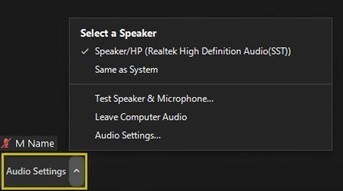
You are encouraged to test your audio connection prior to joining the meetings. Click the “Audio Settings” on the lower left and make sure the microphone and speaker are assigned to the correct device. You also can do your audio check while you are waiting for the meeting to start.
|
Tech Support
To provide a seamless experience for all users there will be tech support prior to the virtual meetings as well as during. If you are having issues before and would like assistance, please contact meetingsupport@esassoc.com.
During the virtual meetings there will be support on hand to assist in a technical issues that may arise. To contact support during the meetings you can utilize the chat function and message to the support team where someone will contact you separately to resolve the issue.

|