|
Workday Update Coming Soon!
Starting Monday, September 22, you’ll see some changes to Workday that will impact how you fill out and approve timecards and how you search for job opportunities within the county, among other improvements. Here’s a preview of Workday 2025R2:
You Can Find Me In The Hub
With this new version of Workday, employees and managers will find information they use daily in a single location, or “hub,” for ease of access. For example:
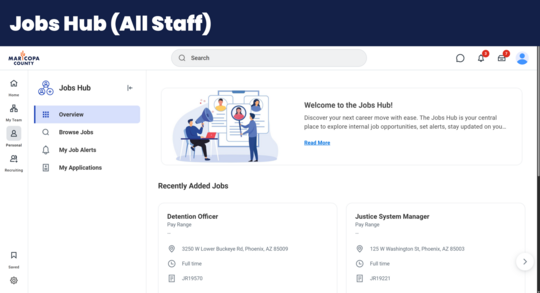
Jobs Hub—Find an overview of recent jobs added; a tab for browsing all open jobs; the status of any applications in process; and a way to sign up for Job Alerts, all in one spot.
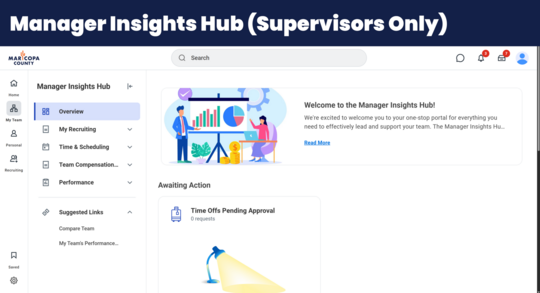
 Manager Insights Hub—Manage recruitment efforts; browse work schedules and time off; review employee compensation and performance; and much more, all in one spot.
 All of this information currently exists in Workday; now it’ll just be more convenient to find!
Time After Time
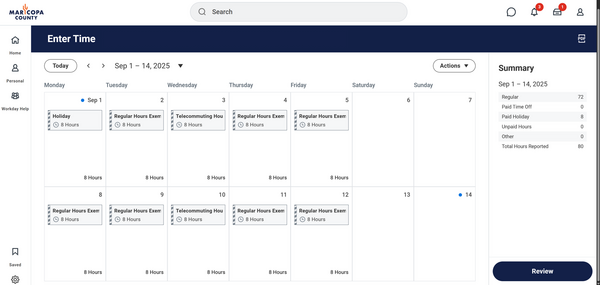
Right now, Workday shows hours worked in weekly increments. But with this enhancement, you’ll now be able to see an entire pay period in one screen instead of navigating between weeks.
|
|
Side to Side
There will also be a few changes to how you navigate on the Workday home page.
|
|
|
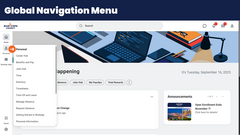
The global navigation menu, which you currently have to click into, will now be automatically open, accessible, and customizable on the left side of your home screen.
|
|
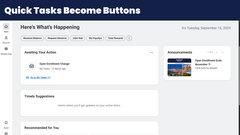
The current Quick Tasks section will go away and, instead, you’ll have those tasks as buttons near the top of the home screen.
|
|
|
We’re confident these updates will make your Workday experience even better.
Thanks for staying adaptable as we continue to make improvements!
-The HR Team
|
|
|
|