|
New Look, Better Workday Navigation
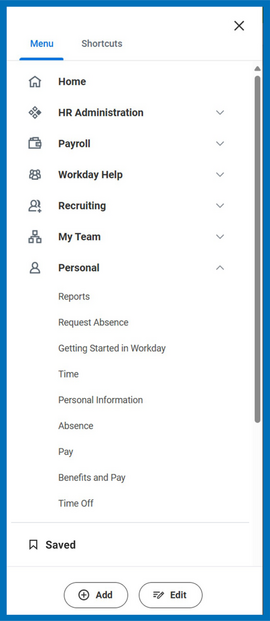
Starting Monday, May 12th, you’ll notice a refreshed look in Workday with the launch of the Global Navigation Menu. This new menu organizes your applications into clearly labeled categories, such as Workday Help, My Team, and Personal, making it easier to find what you need at a glance.
While the layout looks different, the functionality you rely on remains the same. The only major change is that the ‘Home’ button has moved to the new Global Navigation Menu, instead of being accessed from your user profile.
Spend less time scrolling and more time getting things done!
You can still add, remove, and reorder your apps just like before, but now with the added benefit of drop-down menus that let you expand or collapse sections. Anything you’ve saved for later in Workday will continue to be accessible using the ‘Saved’ button at the bottom of the menu.
|
|
Before:
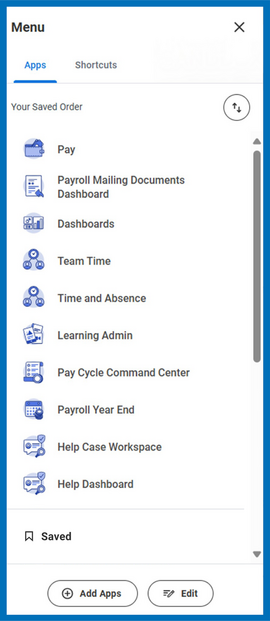
The current menu shows your Workday apps in a single, scrollable list.
|
After:
The new Global Navigation Menu organizes apps into new groups with expandable and collapsible sections. The ‘Home’ button now appears in the menu, while the ‘Add,’ ‘Edit,’ and ‘Saved’ buttons will remain at the bottom.
|
|
Coming Soon: The New Benefits and Pay Hub
Beginning in June 2025, you’ll see a new app in your Global Navigation Menu: Benefits and Pay Hub.

From the Benefits and Pay Hub home page, you'll gain easy access to your most recent pay and deductions, current benefits costs, total annual rewards package, and more, all in one place!
We’re confident these updates will make navigating Workday smoother and more intuitive. Thanks for staying adaptable as we continue to work diligently to improve your experience in Workday!
|
Sincerely,
Maricopa County Human Resources
|
|
|
|