ALERT - Please be aware there has been a recent increase in phishing email scams against Maricopa County employees.
The Office of Enterprise Technology (OET) recently welcomed Robert O'Connor as our new Maricopa County Chief Information Security Officer (CISO). Robert has over 25 years of experience in information technology. Most recently, Robert worked as the Deputy Director of Information
Security for Enterprise Systems at the Central Intelligence Agency. With his arrival, the Information Security Team will be producing time-sensitive information security awareness messages, such as the message below.
This and future emails serve as a reminder to remain DILIGENT when using email as well as educate you about how cyber criminals will use our busy email habits plus our natural tendency to trust against us, in order to obtain personal information.
Please take each of these messages seriously as they represent real threats to the Maricopa County infrastructure and our employees.
What is
Phishing?
Phishing is a form of fraud in which the attacker tries to learn information
such as login passwords or account information by pretending to be a
reputable business or person, in an email, instant message (IM), or other
communication channels.
Summary
Always remember:
- Never click on a link. Either type the
real website name directly into a web browser or call the person/company.
- Timing is essential to fighting a threat.
-
If
you are ever uncertain about an email, contact the Information Security Team for help
immediately:
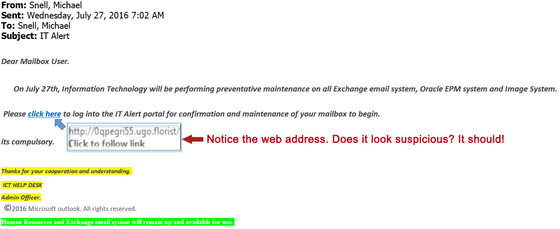
Does the web address of the click here link look suspicious to you? We hope you said yes, because it is suspicious!
Details
Look for these telltale warning signs of a malicious email:
1. Slow Down - STOP, LOOK, and VERIFY – Start at the top of an email
From:
Is the email from a trusted source or someone you
know?
If it is, are you expecting the
email?
To:
If the From and the To
addresses are the same or look suspicious, it probably is.
Subject:
Do you recognize the subject?
Does the subject contain a sense of urgency or suggest that something negative will occur if you do not take immediate action?
Body of
the
email:
Does the email contain a sense of
urgency or suggest that something negative will occur if you do not take action?
Are there misspellings or an improper use of the English language used in
the email?
Is the email asking you to click on a link or open a document to update your credentials? Remember, NO ONE should ever ask you to click on a link or open a document
requiring you to update your credentials!
What
are the actions you are asked to take? Are they risky?
Email
signature:
Does the email signature contain a Maricopa County logo or proper
Maricopa County contact number for the sender?
If the
email signature is from an outside entity who you recognize and the email is at
all questionable, contact the individual
directly.
2. Fake
Outlook Web Access (OWA) pages are a common way of stealing employee usernames and passwords.
Once a cyber criminal steals your username and password through a
fake OWA page, he will now have the ability to operate as you via email and
start sending phishing emails from you as a trusted source within the County
network.
If an email is asking you to log on to an OWA page or
some type of Google Docs link or a Google Drive link, STOP!
DO NOT ENTER YOUR CREDENTIALS (username and password)
This risk may appear in your email.
The
County will never send you any type of credential renewal or change request via email .
Your credentials should not be entered via a link unless you have been
explicitly advised to do so by your agency IT contact or OET.
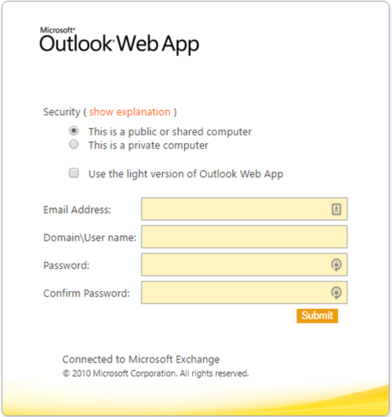
Does this look like a legitimate OWA site? It's not!
|