Hinge Health is for anyone living with joint and muscle pain, like a throbbing back, aching knees, or a weak ankle. The personalized program combines gentle exercises to target and relieve pain with 1-on-1 support from a dedicated physical therapist and health coach.
Whether your goal is to hike more, work in the garden, or take the stairs (or all three), you can get on the road to pain relief with exercises that can be done anytime, anywhere, in as little as 10 minutes. The digital clinic for joint and muscle pain gets people moving and keeps them moving to reduce unnecessary surgeries and opioid use.
Hinge Health offers personalized care plans, clinical care teams, and ongoing customization that meets members’ needs.
Hinge Health also offers a monthly webinar series. Find registration information and online seminars on topics like:
Don’t Miss the Chance to Get Your Annual Eye Exam!
The Eye Guys are traveling to locations listed below. Don’t miss out on scheduling your comprehensive eye exam using your VSP benefits. Call The Eye Guys to schedule an appointment at (907) 376-3917.
Eye Exams Are More Than A Quick Eye Check.
Through a WellVision Exam®, the Eye Guys will get a better view of your eyes and overall health. They’ll look for eye health problems, such as glaucoma, macular degeneration, and diabetic eye disease. They’ll also look for signs of health conditions, like high blood pressure, high cholesterol, and diabetes. Plus, you can discuss day-to-day concerns like allergies or digital eye strain.
Upcoming 2026 Events
|
Location
|
Event Times
|
|
Wasilla – 285 E Parks Hwy
|
January 23 & 27
|
|
Cordova – Cordova Civic Center – 601 1st St
|
January 23 – 26th
|
|
Seward – The Breeze Inn – 303 N. Harbor St
|
January 28 – 30th
|
Appointments are appreciated! Before your appointment, create an account on vsp.com and log in to review your coverage details.
Get the eye care you need to stay healthy. Questions? Call VSP at (800) 877-7195 or visit vsp.com.

The new year is here, and it is time to review your account and submit your 2026 Income Related Monthly Adjustment Amount (IRMAA) reimbursement request!
Reminder: What is an IRMAA?
Certain high-income retirees are required to pay an extra premium surcharge, known as an Income Related Monthly Adjustment Amount, or IRMAA. This is similar to the surcharge for high-income enrollees in the Medicare Part B plan. If you are an individual or a married couple earning more than the threshold, you will be required to pay an extra surcharge for being enrolled in the AlaskaCare Employer Group Waiver Program (EGWP) because it is a group Medicare Part D plan. Retirees whose household income is below this threshold will not be subject to the IRMAA premium surcharge.
What do you need to know?
- You need to set up your HRA account every year, since IRMAA surcharges are based on your annual income and your income may change from year to year.
- If you are not assessed a Part D IRMAA surcharge, this does not apply to you.
- To receive the reimbursement, you should submit your claim and letter as soon as possible, but no later than 12 months after the last day of the current year. For example: The deadline for submitting your 2025 IRMAA for reimbursement is December 31, 2026.
How do I know if I have to pay a Part D IRMAA surcharge in 2026?
Each year, if you are Medicare-eligible, you will be notified by the Social Security Administration about your plan. This includes if you are required to pay an IRMAA and at what amount. The Social Security Administration uses your Modified Adjusted Gross Income (MAGI) to determine if the IRMAA applies to you and, if so, how much you will have to pay. MAGI is the sum of:
- Adjusted Gross Income (AGI), which can be found on the last line your IRS 1040 tax form (line 37 on form 1040, line 21 on form 1040A, or line 4 on form 1040EZ), plus
- Any tax-exempt interest income (line 8b on form 1040).
The Social Security Administration requests income information from the IRS for the tax year that is two years prior to the surcharge year. IRMAA is automatically re-determined each year as long as you file an income tax return.
How to Set Up Your IRMAA Reimbursement with Optum Rx:
Once you have your letter from Social Security or a Medicare Bill that shows your 2026 Part D IRMAA surcharge, you can submit your reimbursement request by following the instructions below. You may submit your documents early to OptumRx if you have them available, but claims received prior to January will not be processed until the start of the new year.
Follow these steps to establish your 2026 IRMAA HRA account online:
- Register and/or log in to your Optum Rx.com account either online or through the mobile app.
- Navigate to the AlaskaCare IRMAA Reimbursement Form by taking the following steps:
- On the top of the main page, click the "Information Center" tab.
- Click "Programs and Forms".
- Click on the "AlaskaCare IRMAA Reimbursement" section. There you will find the digital enrollment form as well as the paper version.
- To submit your reimbursement request digitally (the faster method), click and submit the IRMAA HRA Digital Enrollment Form.
- Upload as an attachment, a copy or image of your letter from Social Security or a Medicare Bill that shows what your Part D IRMAA surcharge is.
- Optum Rx will confirm your eligibility and set up your Health Reimbursement Account (HRA) with Optum Bank within 5 to 7 business days of receipt.
- Once your HRA has been set up with Optum Bank, they will send you a Welcome Packet within 5 to 7 business days, which will include information on signing up for Direct Deposit.
- If you currently have Direct Deposit set up with Optum Bank, that information does not need to be submitted again.
- Once you receive your Welcome Packet, log in to OptumBank.com to view your HRA account status/balance or to sign up for Direct Deposit.
If you have any questions on how to submit your documents online or if you do not have internet access and would like to submit paper documentation, please contact OptumRx at (855) 409-6999.
As of January 1, 2026, AlaskaCare Retiree Health Plan members have access to additional telemedicine providers for acute care, dermatology, and behavioral health with a $25 copay through Teladoc Health. This means you can talk to a licensed healthcare provider by phone or video from wherever you are, 24/7. Make sure your account is set up so you can be ready to schedule a visit when you need care.
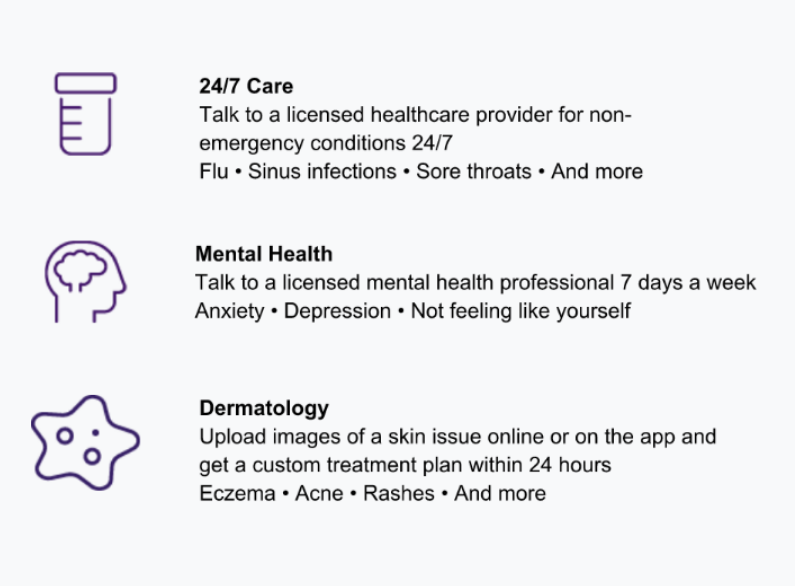 Talk to a doctor 24/7 for $25 per visit

- Visit https://myrnb.alaska.gov/.
- Sign in using your myAlaska username and password. This is the same username and password you use if you file online for a Permanent Fund Dividend (PFD) with the State of Alaska. If you do not have a myAlaska username and password, you will need to establish these credentials prior to using myRnB. If this is the case, click "Create a myAlaska account" and follow the steps provided.
- Once signed in, you will be taken to the myRnB portal page.
- If this is your first time logging on to myRnB, you will need to verify your Last Name, Date of Birth, and the Last 4 Digits of Your Social Security Number, then click “Next”.
Once successfully logged in, you will see the myRnB landing page. Click "myDocuments" near the top of the screen. Here, you will find your direct deposit confirmations titled “Warrants”, annual tax documents, and other documents related to your account.
For assistance with myRnB, contact the Member Education Center at (907) 465-4460 in Juneau or toll-free at (800) 821-2251 Monday through Thursday from 8:30 a.m. to 4 p.m. and Friday from 8:30 a.m. to 3 p.m. Alaska Time

The AlaskaCare Health Plan has partnered with Aetna to create a quiz that will provide a personalized wellness guide to our members. It will also be an opportunity to share your experience with the AlaskaCare Health Plans, and inspire others to connect with their health benefits. The quiz will be sent out separately through Aetna as "Your Personalized Wellness Guide."
|