|
|
It is already August and it seems that summer is going fast, so I hope this new format of the TIME System Newsletter finds you enjoying the weather or looking forward to cooler weather.
This edition features something near and dear to CIB, Security Awareness reminders. Please see the article and ensure all required personnel in your agency take the annual Security Awareness training in Acadis. Also, please read and disseminate the Phishing Awareness article!
CIB offers two investigative tools to agencies: message recalls and SENTRI. Please make sure your investigators see this article. SENTRI and message recalls can offer helpful information.
Wisconsin has two more new license plate types, Iola Car Show and Rotary International. Please see the related article for querying and entering these new plates.
As always, if there is anything that CIB can do for you or your agency, please reach out. We also would like your feedback on this new format for the TIME System Newsletter and suggestions for future articles.
Thank you,
|
|
|
Security Awareness training is mandatory for all personnel with unescorted access to criminal justice information. All personnel must complete the appropriate level of training prior to their assignment, and the training must be renewed on an annual basis.
Security Awareness is now a stand-alone module in Acadis; it is no longer included with any of the recertification tests, nor is it included with Module 1 – TIME System Intro training. Two tiers of security awareness training were created to accommodate different roles within your agency. Full access is designed for personnel whose primary daily responsibilities involve directly handling criminal justice information or maintaining CJI processing systems, such as law enforcement officers, dispatchers, and IT support providers. Conversely, Limited access is tailored for support staff (cleaning, maintenance, etc.) who do not directly interact with the data but routinely work in areas where it is processed or stored.
CIB strongly encourages agencies to assign Security Awareness training to users through Acadis. Doing so eases tracking and streamlines compliance. For individuals without an Acadis account, a paper version is available on WILENET: https://wilenet.widoj.gov/cib/time-system-training-materials-manuals-forms
|
|
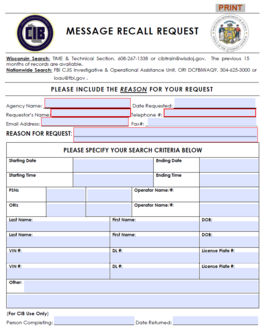
CIB has two TIME System tools that many users are unfamiliar with: Message Recalls and System Email Notification to Record Inquiry (SENTRI). These tools can be useful in assisting with investigations; we hope to give a quick overview here.
A Message Recall allows an agency to view TIME System transactions that have occurred during the past 15 months.
There are a variety of reasons that an agency could perform a Message Recall, but agencies often overlook utilizing it for criminal investigations. The results may provide an investigator with some of the following scenarios:
- Determining if an agency made an inquiry into a particular individual or item of property.
- Placing an individual at the scene of a crime or miles away from the scene.
- Substantiate or discredit an alibi.
- Determining if a record for a person or item of property was previously entered into CIB or NCIC databases and subsequently removed.
- Track the route of an individual (suspects, witnesses, runaways).
To perform a Message Recall, a “Message Recall Request” form must be submitted to cibtrain@wisdoj.gov. Blank forms are available on Wilenet. Please make sure to fill out the reason for the request so that we can verify it is for a criminal justice purpose and so we can include the results that you need.
As noted on the recall form, the FBI can do nationwide searches and have logs going back to the early 1990’s. Requests to the FBI can be sent via administrative message to ORI DCFBIWAQ9, via email to ioau@fbi.gov, or by calling 304-625-3000.
The second tool available is called a System Email Notification to Record Inquiry (SENTRI). Law enforcement agencies can request to be notified if a person or vehicle is queried in the future (for up to 1 year). If the information is queried by a Wisconsin agency or an out-of-state agency querying a WI database, the SENTRI requesting agency will be notified by email with the information pertaining to who ran the query, date, time, and the agency name. TIME System logs are processed overnight, and the email notification is sent at 6:30AM on the day following the inquiry in the TIME System. Any authorized user from the agency can fill out the form; it does not have to be a TIME Agency Coordinator (TAC). The requestor must choose one of the following criteria to submit the form:
- Last Name
- Last Name & DOB
- License Plate Number
- VIN
The request must also include:
- An email address for the notifications to be sent to. The requesting agency must notify CIB of any changes to this email address.
- An ending date not to exceed 1 year. The requesting agency must renew the request each year.
- A law enforcement reason for the request.
- A signature by a supervisor or manager within the requesting agency.
A SENTRI form may be utilized when an agency is unable to attain a warrant but wants to question a person of interest. An email notification will alert the agency when that individual is queried through the TIME System. The notification can provide the agency with an approximate location and allows the agency to follow up with the querying agency to find out if more information was obtained. An example email is below:
This is an automated notification from the TIME System S.E.N.T.R.I.
A TIME System transaction has been received that matches the data you requested to be tracked. If you would like to discontinue this notification, please contact CIB at 608-266-0335.
|
Alert Criteria
|
Last Name
|
|
VADER
|
|
System
|
Msg Key
|
Date/Time
|
PSN
|
ORI
|
ORI Agency
|
Operator
|
Last Name
|
First Name
|
|
TIME
|
781A
|
6/30/2026 20:23:32
|
6051
|
WI0560200
|
NEW RICHMOND POLICE DEPART
|
USER
|
VADER
|
DARTH
|
The SENTRI form is now available on Wilenet. If you have any questions about either of these forms, do not hesitate to reach out to cibtrain@wisdoj.gov.
|
|
|
|
The TIME System Control Center (TSCC) receives approximately 30 locate requests per day. Locate requests are processed manually and are time-consuming. To improve efficiency, we are asking agencies to review their policies and procedures to eliminate the following types of unnecessary requests.
-
Requesting a locate on a record that is no longer in the system: If you are not locating the record immediately after hit confirmation; please query the record to confirm if it is still active in the system. If the record has been removed, a locate request does not need to be sent. TSCC often receives locate requests for records that have already been removed from the system.
-
Requesting a locate on your agency’s own CIB-Only record: If a record was entered by your agency and exists only in the CIB database and not NCIC, do not request a locate. Your agency can modify, cancel, or place a detainer on the record directly.
|
|
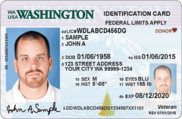
There have been discrepancies regarding how agencies should enter an out-of-state DOT issued ID card when entering records into CIB/NCIC (e.g., warrants or missing persons). CIB trainers have concluded that all out-of-state DOT issued ID card numbers must be entered as alias driver’s license numbers.
Although out-of-state DOT issued ID cards fall under the definition of “Personal Identification Number” in the Miscellaneous Identifying Number (MNU) field, that field does not allow for agencies to specify the issuing state or the ID card’s year of expiration. The MNU field is also limited to 12 characters, which does not accommodate the length of all out-of-state ID cards. Most CAD systems are designed to run driver’s license numbers in command lines, so if the ID card is entered as an MNU, the dispatcher will not receive a hit. If someone queries the Portal XL form for an out-of-state ID/OLN, it will not look for the miscellaneous number. Some agencies may not have the ability to search by Miscellaneous ID # depending on their querying capabilities.
If another state has distinct DL and ID responses (such as Illinois), enter both and document in the miscellaneous remarks which one is an ID card. Keep in mind that you can enter up to 9 additional OLN numbers when supplementing records.
|
|
|
|
Effective June 2026, the Wisconsin Department of Transportation (WisDOT) now offers a special license plate from Iola Car Show, Inc.
This organization coordinates the Iola Car Show and Swap Meet which has been held annually for more than 50 years and serves as a fundraiser for approximately 120 non-profit, civic and community organizations. This plate has a gradual shading of silver/gray background with the Iola Car Show logo on the far-left side and black lettering. The plate will allow for up to six characters for personal plates.
To query the Iola Car Show license plate, use code “CV.” To enter the plate as lost or stolen in CIB/NCIC, use code “OR.”
At the end of July 2026, DOT began issuing a new specialty plate from Rotary International. This service organization promotes integrity and peace through their fellowship of business, professional and community leaders. Rotary International has seven areas of focus: Promote peace; fight diseases; provide clean water; sanitation, and hygiene; save mothers and children; support education, grow local economies and protect the environment.
The plate will be blue along the top and bottom with white lettering and the words “Rotary-Service Above Self” along the bottom. There will be a yellow Rotary International symbol on the left side of the plate.
To query the Rotary International plate, use code “CV.” To enter the plate as lost or stolen into CIB/NCIC, use code “OR.”
|
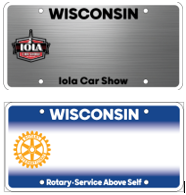 Iola Car Show and Rotary International License Plate examples
|
|
|
Have you gotten an email lately that you were not expecting or looks strange? How about one with an empty body and just an attachment that is to just you? If so, then you may be the target of a potential phishing attack. Phishing attacks are one of the most widely used and easiest methods hackers utilize to get into government and corporate computer networks. So, what gives, why are they so successful? The easy answer, you!
Phishing attacks rely on one of the most basic human behaviors, curiosity. You get an email or a text message on your phone, and it asks you to do something which opens a door to your devices or networks by playing on human emotions such as fear, hope, excitement, and even anger. If you weren’t paying attention or didn’t realize it was nefarious, many people would just easily click on the links or open the attachments that were sent. However, in today’s high stakes digital world, clicking on that one link or opening that unknown attachment can be detrimental to not just you, but your coworkers, your employer, even the state or nation depending on how far things can get.
What can you do? One acronym that comes to mind is RNIP: Recognize, Notify, Isolate, Protect.
- Recognize the threat by observing where the request came from and do not click or open anything in the request.
- Notify your next level of authority/chain of command of the potential threat.
- Isolate the threat by blocking the sender or number where the request originated from.
- Protect your devices and networks by deleting the message and ignoring the request.
Agencies in Wisconsin that connect to the TIME System are governed by the CJIS Security Policy and as such, all users of the systems are required to complete Security Awareness training annually. It’s up to all users to be aware of the threats to the TIME/NCIC systems that phishing (email), smishing (text/SMS), and vishing (voice) can cause and how to avoid falling victims to these forms of attack. The Crime Information Bureau has seen a large increase of phishing/smishing/vishing attacks against our law enforcement and criminal justice partners over the past few years and based on future threat intelligence projections, the numbers are only looking to go up with the progression of technology.
System integrity and security is everyone’s responsibility so it’s imperative that users stay vigilant and be aware of their actions. Many times, it is beneficial to communicate with your surrounding coworkers and friends about what you are experiencing and if possible, ask them to assist you in verifying potential attacks. If you are unsure if you are experiencing a possible phishing attack, speak up early and before you do anything, always remember to RNIP.
Stay vigilant, friends!
|
|
 Banner for City of Green Bay with CIB Logo for Conference
|
|
|
|
|