At our most recent Access Equity Office Hours session, we had a couple of takeaway questions we couldn’t answer in the meeting. We contacted the B2Gnow support team at omwbe@diversitycompliance.com (you can also use the Help & Support section once you’re logged into Access Equity), responded to the originators of the questions and wanted to share the answers with you.
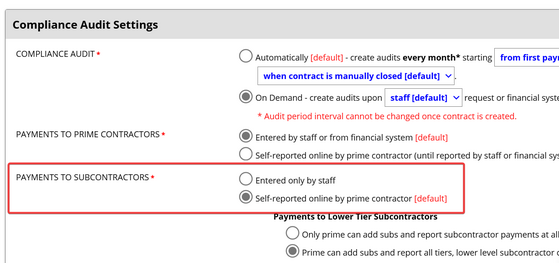
1. If you want the option of notifying the Prime when you open a monthly audit on your contract, you will need to have the setting for PAYMENTS TO SUBCONTRACTORS on ‘Self-reported online by prime contractor’, rather than on ‘Entered only by staff’.
2. If a previously confirmed audit payment has been updated or changed the Prime is not notified automatically. You will need to send them an email or a message using Alert function on the contract.
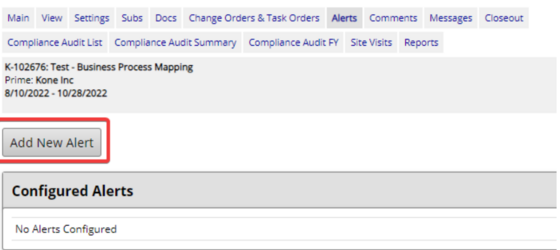 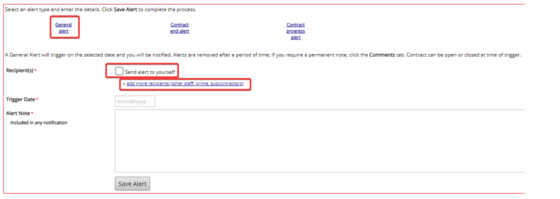
You can find the instructions for sending Alerts starting on page 45 of the User Guide.
There was another question asking for ways to get your Contract Managers more involved with the needs of Access Equity. We floated the idea of adding the Contract Manager into the Buyer/Project Manager field but we needed to test that to see if that user would be included when messages are sent out through the Alert function.
Unfortunately, only the Contract Agents and Admins are included. You could give your Contract Managers access to the system as Contract Agents, have them take the training we created so they can learn how the system works, and then include them in any alerts you send to the vendors. You can also assign them as Secondary Contract Agents on the contract itself to provide more accountability.
Please contact us with your questions at AccessEquity@omwbe.wa.gov and join us for office hours every other Wednesday at 2pm.
|