 Updates
-
Stop administration and return 2025-2026 COVID-19 vaccine using the Vaccine Return process once you receive your first shipment of the 2026-2027 formulation.
- Reconcile inventory of 2025-2026 COVID-19 vaccines in the IIS using the category "Spoiled" and reason "Expired BUD"
- Remember to submit the return before inactivating the vaccine in the IIS
-
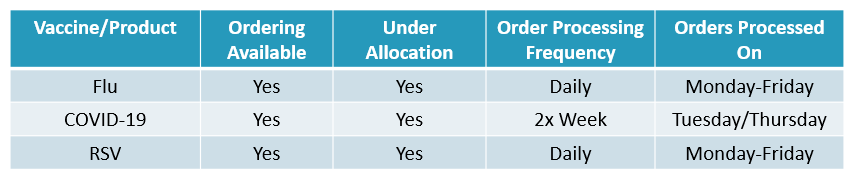
Processing of COVID-19 vaccine orders has increased to twice weekly on Tuesdays and Thursdays.
-
FluMist is currently unavailable to order in the IIS as our allocation has been exhausted.
- Ordering will resume when additional allocation is received.
Ordering Guidance
-
Use last year's data to plan orders. Review your clinic's monthly vaccine administration from the 25-26 respiratory season and use the Recommended Order Quantity (ROQ) calculation to determine appropriate quantities.
- Use the Pediatric Respiratory Doses Administered Spreadsheet 2025-26 to review administration data from past seasons. Check out the tabs at the bottom of the spreadsheet to see data for RSV, Flu, and COVID-19 vaccines.
- The ROQ calculator helps determine how many doses of vaccine your facility should order. The calculator does not account for seasonality or other factors that may impact need.
- If there is not enough vaccine in allocation, orders will be reduced based on the Vaccine Allocation and Equity Plan
- Allow at least 3 days for order approval from time of submission for accountability checks
- Orders need to be in "Pending State Approval" status in the IIS by close of business the weekday before the processing day
Additional Resources
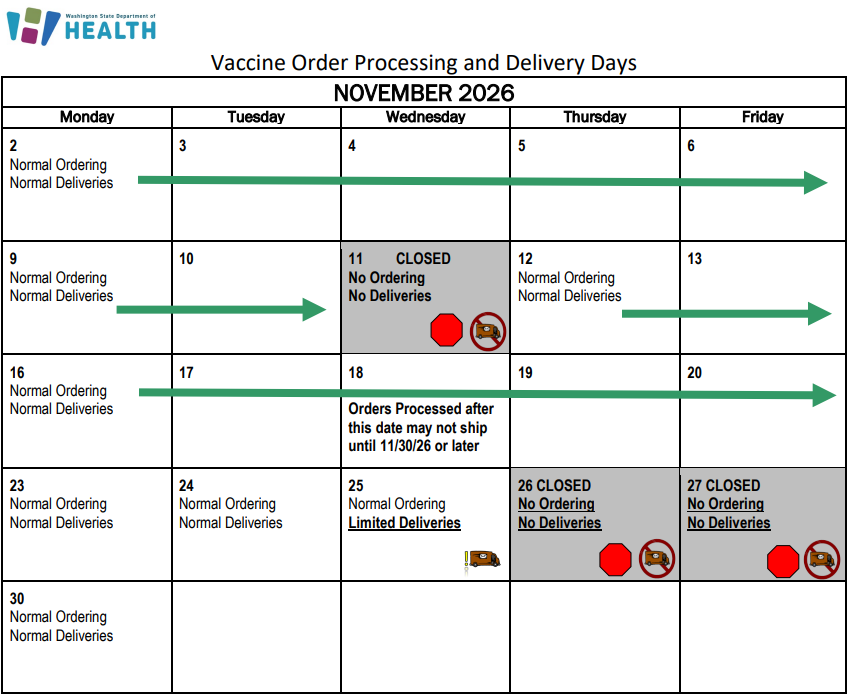
With the holidays quickly approaching, please plan your vaccine orders carefully to account for shipping delays and limited or unavailable shipping days. You may place orders outside your usual schedule as needed to maintain adequate inventory.
Keep enough vaccine on hand to cover potential delays, but avoid over-ordering. In the event of a power outage, excess inventory could lead to significant losses.
To help ensure orders are processed quickly, please make sure your accountability reports are up to date before placing an order. If needed, update your shipping hours in your provider agreement.
For more information, please visit our website and review the holiday shipping calendar.
As of Monday, McKesson has transitioned to an automatic UPS pickup process for returning empty EcoFlex coolers. This change follows successful pilot testing and is designed to make cooler returns easier and more convenient for providers.
With this update, providers no longer need to schedule a pickup manually. Please note: This change applies only to empty EcoFlex cooler returns. The process for reporting and handling spoiled or expired vaccines remains unchanged.
How the New Process Works
-
Automatic pickup: UPS will automatically schedule a pickup for empty EcoFlex coolers within 1–2 business days after delivery. Providers do not need to call UPS or schedule a pickup online.
-
Return labels still included: A standard UPS return label will continue to be included inside each cooler. If you prefer not to wait for the scheduled pickup, you may use the label to return the cooler through standard UPS shipping channels.
Important Reminders
-
Remove all vaccine products: Before returning the cooler, make sure all vaccines have been unpacked and transferred to appropriate vaccine storage.
-
Remove temperature monitors: Remove and dispose of temperature monitors according to standard procedures.
-
All Washington State Childhood Vaccine Program providers are included in this new return process.
-
Missed pickups: If UPS cannot complete the initial pickup, it will automatically attempt pickup up to three additional times. If the cooler has not been collected after all three reattempts, contact McKesson Customer Service for assistance or use the UPS return label included in the cooler.
Questions or Need Assistance?
Please contact McKesson Customer Service for help with cooler returns.
Flyers explaining the updated process will be included with shipments. Please review and share this information with staff responsible for receiving vaccine shipments and returning coolers.
Thank you for your continued partnership in protecting vaccine integrity and ensuring a smooth return process.
This webinar reviewed temperature monitoring expectations, then walked through how to prepare for, respond to, and recover from a power outage to keep vaccines safe. If you missed the live session and want a refresher before winter weather, the recording and slides are now available.
Scary headlines of measles and pertussis are all too common lately. Pierce County Immunization Coalition invites you to their next healthcare provider education webinar covering the rise of vaccine preventable diseases and how to help your clinic give strong and consistent vaccine messaging. They have an exciting lineup of speakers to dive deeper into what we are seeing and what we can do about it.
- Dr. Mary Fairchok, MD, COL(ret) - board certified in pediatrics and infectious diseases at Mary Bridge Children's Infectious Diseases.
- Sharon Charbonnel - childhood measles and polio survivor.
- Dr. Amy Carter, MD, FAAP - Chief Medical Officer of Allegro Pediatrics
Date: October 22, 2026
Time: Noon -1:15pm PST
Register Here
Take a moment to check your vaccine storage units and thermometers to make sure their calibrations are up to date. Calibration expiration dates can usually be found on the calibration certificate.
When sending a thermometer out for calibration, use your backup thermometer to continue monitoring temperatures in the unit.
Remember: If temperature records are unavailable to verify vaccine viability, the vaccines must be wasted. Regular calibration checks help protect vaccine integrity and prevent unnecessary waste.
|