|
Reminder: DOH offices are closed Thursday, January 1st, 2026.
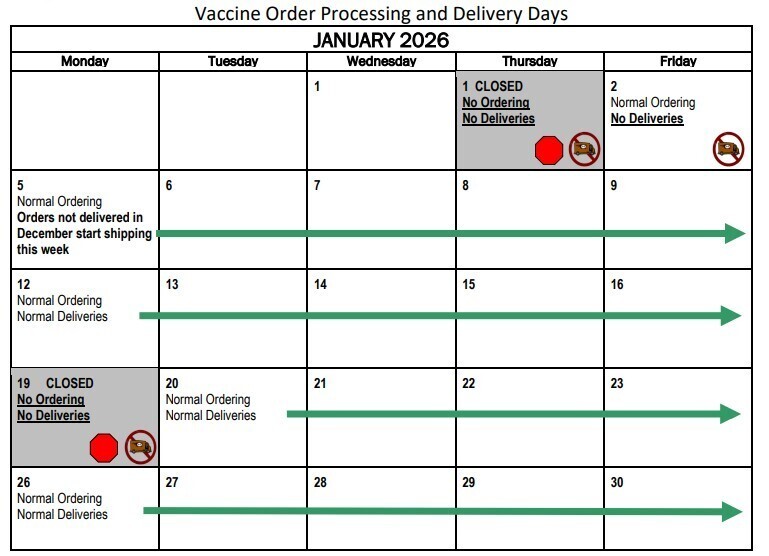
Please be mindful of shipping delays, limited or no shipping days, and plan your vaccine orders accordingly. Orders that were submitted after December 9th may not ship before January 5th. Please note that there will be no vaccine deliveries made during the week of New Year's. Please ensure your accountability reports are up to date prior to placing orders to ensure expedited processing. Check out the holiday shipping calendar on our website for more information.
Please note that the Vaccine Coordinator Training modules will be unavailable beginning December 31st, 2025 as we prepare updated content for the new year. The 2026 Vaccine Coordinator Training modules will be available starting January 15th, 2026. Thank you for your understanding.
All vaccine coordinators and back-ups will need to have completed the 2026 training modules for AVP Provider Agreement renewal, which will open in May.
Starting January 1, 2026, all temperature excursions must be reported immediately through your REDCap portal. Timely reporting of temperature excursions helps ensure vaccines remain safe and effective before being administered to patients. Prompt review of excursion details allows for quick determination of vaccine viability, protecting patients and preventing the use of compromised vaccine.
Please do not wait until you submit your monthly temperature logs to report an excursion.
To report a temperature excursion:
- Log in to your REDCap portal and select "Report temperature excursion and vaccine viability."
- Gather any viability information you have from the manufacturer and your DDLs, along with a list of the affected vaccines.
- Follow the prompts in the form and submit your report. We will reach out if we need any additional details.
- Once your excursion report is submitted, you won't need to complete another viability survey when submitting your monthly temperature logs. However, when you submit your monthly temperature logs you will still need to note the temperature excursion in your REDCap survey.
- At the beginning of your monthly survey under the storage unit affected select “Yes” for “Did a temperature excursion occur over this month for this unit?”
- At the end of the monthly survey, you’ll see this question: “Have you completed a vaccine viability survey for this excursion?" If you’ve already reported the excursion, simply select "Yes" and continue with the rest of the form.
If you have any questions or need help with a temperature excursion, please email us at waadultvaccines@doh.wa.gov and we will connect you with our Storage and Handling Coordinator.
Our Vaccine Temperature Monitoring Logs have been updated to make documentation easier and to meet current accessibility standards. All refrigerator, freezer, and ultra-cold storage logs are now combined into a single document. The new fully fillable PDF allows you to record daily temperature readings on your computer or print the form for handwritten entries.
Reminder: You must check vaccine temperatures twice each workday, when you start and end your shift, and write them on the log. Each morning, also record the highest and lowest temperatures the unit reached in the past 24 hours (the min/max reading). As a final step, reset or clear the min/max readings.
|