Vaccine Blurbs 23 - Get vaccinated and be protected against scary diseases

October 24, 2018

Washington State Childhood Vaccine Program

2018 VOMS Logo

In This Newsletter...

Last Week for Vaccine Choice!

Filling out the form is simple. Just choose your facility's preferred vaccine brands, then email or fax the completed form to us (email and fax information is on the form).

Don't forget: Meningococcal B vaccine is an option. Providers who do not choose a preferred brand will receive Bexsero.

Changes to order sets will be effective December 1st. Order sets cannot be changed when there is an order that is pending, waiting approval, or saved. If you are changing your order set, ensure all orders are approved or shipped.


Flu Season Update

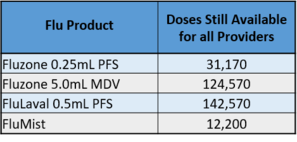
We have received all of our pre-ordered flu doses for this flu season. See the table below for the number of doses of each flu product still available for ordering:

1

FluMist vaccine will expire on 01-28-2019. Given the limited supply, be sure you can use all doses you order before the vaccine expires. FluMist is available on a first come, first served basis.


Administering Intranasal LAIV (FluMist)

Now that FluMist is available, review the following important tips to make sure patients receive an adequate dose:

  • Have the patient blow his/her nose before you give the vaccine.
  • The syringe should be positioned just at the nose opening.
  • The goal is to make a fine spray that sticks to the membrane walls of the nose – do that by pushing the plunger as quickly as possible.
  • Do not instruct the patient to sniff when you are giving the vaccine.
  • Give half the dose in each nostril.
  • If some of the dose runs out of your patient's nose, you don’t need to repeat the dose.

Watch the Administration of FluMist Quadrivalent video for more information.

Helpful Hints - Checking Report Submission

Every month, all providers enrolled in the Childhood Vaccine Program are required to submit three accountability reports: Doses Administered Report, Inventory Report, and Temperature Log. Your vaccine order will not be approved if these reports have not been submitted.

How do I check if my Doses Administered Report was submitted?
2

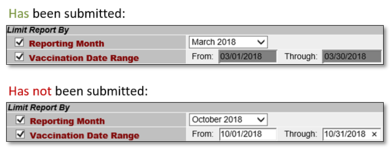
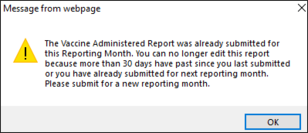
Go to the Vaccine Administered Report screen (Lot Numbers >> Doses Administered Report). When you select a reporting month, you will get a pop up message if you have already submitted a doses administered report for that month.

Additionally, if a report has already been submitted, the date range fields will be greyed out. If the report has not been submitted, the date fields will remain white and the “through” date will be editable.

3

How do I check if my Inventory Report was submitted?

On your reconciliation page, you can see the date that your Inventory report was last submitted. As a bonus, you can also see the last date your Doses Administered report was submitted!

4

How do I check if my Temperature Log was submitted?

Temperature logs should be emailed directly to WAChildhoodVaccines@doh.wa.gov every month. If you would like to verify receipt, enable the “read receipt” notification. You can also ask your Provider Support Specialist to confirm that we received your report.

If you are unable to scan and email your temperature log, you can fax it to 360-236-3811. If faxed, however, we are unable to provide confirmation upon receipt.