|
|
Greetings DAHP'ers!
This is your mobile phone quarterly reminder to:
-
COMP Portal - Log into the Comp Portal app on your mobile device. Check your Notifications section in the app to see if you require updates.
-
Teams App - Open your Teams app so you receive notifications.
-
Backup Photos to OneDrive - Open your OneDrive app to prompt your photos to automatically download. Tap on your profile in the top left corner and confirm there is a scrolling blue circle next to Camera Backup and a countdown showing the number of items left in the backup. Keep your app open until you see a green checkmark and "Backup complete" here.
-
Empty OneDrive Recycle Bin - In your OneDrive app, tap your profile in the top left corner and tap on Recycle Bin (just below Camera Backup). Select the files in here and permanently delete them to empty your OneDrive Recycle Bin. This is in addition to emptying the Recycle Bin on your desktop, so be sure to empty both.
-
Voicemails - Manage your voicemails.
-
Downloaded Records - Transfer all records from your mobile device, label them based on content, and file them for records retention.
How do I send in a ticket to WaTech?
- Navigate to https://watech.servicenowservices.com/
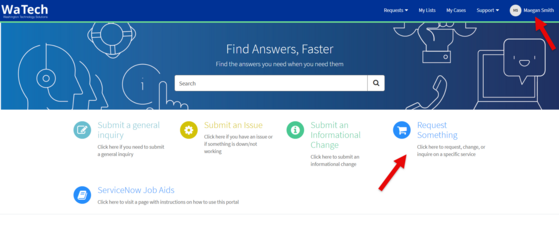
- Make sure you're logged into your single sign-on Microsoft account in the top right corner.
- On the main page, click on the "Request Something" option.
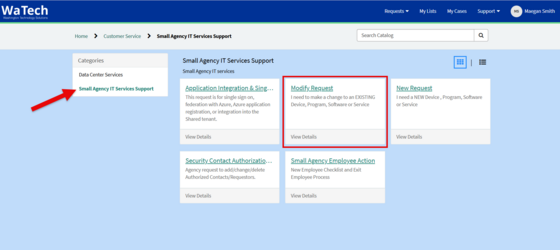
- Next, select "Small Agency IT Services Support" in the "Categories" column on the left.
- Most tickets will fall under the "Modify Request" option.
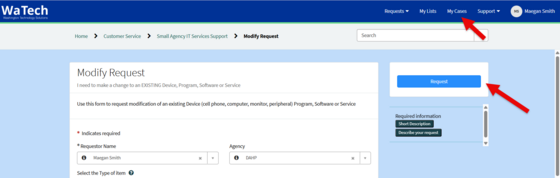
- Finally, fill out the prompts and click the blue "Request" button to create a WaTech ticket.
- You will receive an email confirmation once you've created a ticket.
- To view all of your tickets, click "My Cases" on the top right, next to your profile.
- Yo
|
|
|
|