|
English | Español | አማርኛ | 中文 | 한국어 | Tiếng Việt | العربية | فارسی | اردو
Kristen Rucinski - Principal Allison Ovalle - Assistant Principal
Gunston Gazette
August 21, 2026
School Office Hours: 8:00 a.m. - 4:00 p.m.
First-Day Ready
Be First-Day Ready. The first day of school, Monday, August 24, is just around the corner! Check out these back-to-school tips to make sure your child gets off to a great start. Doors open at 8:20 a.m. Also find out what will be new this school year.
|
Back to School Night
Wednesday, September 9th, 6:00pm - 7:30pm
Back-to-School Checklist
We’re Eager to Welcome You Back to School!
As summer winds down, we are looking forward to welcoming students back to our classrooms. Use the following list to help make sure your child is ready!
☑️ Sign Up for SIS ParentVUE - Needed for Bus Numbers
Access your student’s attendance records, grades, and assignments at any time with SIS ParentVUE. Contact our registrar at 703-541-3600 if you need an activation code. Find out more about SIS ParentVUE. Also, download the new ParentVUE mobile app so you can access your child’s records easily from anywhere!
Update Your Contact Information
Be sure you receive important information! Update your phone number(s) and/or email address(es) by clicking “My Account” and reviewing the “Online Verification/Update.” On that form, you can also update immunization records, health information, and emergency contacts.
☑️ Update Immunizations and Records
Immunizations are required for all students to attend school in Virginia. This is an important part of protecting them from certain diseases and keeping them healthy.
When your child is immunized, remember to request a copy of their immunization record and bring that to our front office or submit the record via SIS ParentVUE as soon as possible. Find more information on FCPS’ website.
☑️ Learn About School Meals
Families need to provide their children with money to purchase meals at school or send them with a packed lunch. Alternatively, families may apply to receive free and reduced-price meal benefits, pending approval.
☑️ Bookmark the School Year Calendar
Be sure to bookmark the FCPS school year calendar to keep track of school holidays, breaks, and observances:
- Days marked blue with an “H” are student holidays. Schools are closed on these days.
- Days marked orange with an “O” are religious and cultural observance days (or evenings, if only half marked). There is school on these days, but certain events that cannot be made up may not be scheduled on these days.
- Days marked as TW, SD, and SP and in pink are holidays for students but working days for teachers and staff.
Please note that some holidays and observances, such as Eid al Fitr, may shift, and the calendar may be adjusted.
¡Estamos entusiasmados por recibir a todos de vuelta en la escuela!
Mientras el verano llega a su fin, nosotros nos preparamos para darles la bienvenida a los estudiantes en nuestros salones de clase. ¡Revise esta lista para que se asegure de que su niño está listo para el primer día!!
☑️ Inscríbase en SIS ParentVUE-Necesario para los números de autobús
Tenga acceso a los récords de asistencia, calificaciones y tareas asignadas a su estudiante, cuando lo necesite a través de SIS ParentVUE. Contacte al registrador de la escuela llamando al [email/phone number] si necesita un código de activación. Conozca más sobre SIS ParentVUE. Además, recuerde que puede descargar la nueva aplicación móvil ParentVUE para acceder fácilmente a la información de su estudiante desde cualquier lugar.
Actualice su información de contacto
¡Asegúrese de que pueda recibir información que es importante! Actualice sus números telefónicos y direcciones email haciendo clic en “Mi Cuenta” y revisando lo que aparece en la sección “Verificación/Actualización Online”. En este formulario, usted también puede actualizar los récords de vacunación, la información de salud y los contactos de emergencia.
☑️ Revise las Vacunas y los Récords de Vacunación
Las vacunas son obligatorias para todos los estudiantes que van a la escuela en Virginia. Este es un paso importante para protegerlos de ciertas enfermedades y mantenerlos saludables.
Cuando le ponga alguna vacuna a su niño, recuerde pedir una copia de su récord de vacunación y entréguela en la oficina principal de la escuela o envíela a través de SIS ParentVUE lo más pronto que le sea posible. Encuentre más información en la página web de FCPS.
☑️ Conozca más sobre las Comidas Escolares
Las familias deben darles dinero a sus estudiantes para comprar comidas en la escuela o enviarles un almuerzo preparado en casa. Como alternativa, pueden solicitar los beneficios de comidas gratuitas o a precio reducido, sujetos a aprobación.
☑️ Ponga el Calendario del Año Escolar en sus Favoritos
Asegúrese de poner en sus favoritos el calendario del año escolar de FCPS para que esté al tanto de los días feriados escolares, las vacaciones y las fechas especiales religiosas y culturales:
- Los días marcados con una “H” azul, son feriados para los estudiantes. Las escuelas estarán cerradas esos días.
- Los días marcados con una “O” naranja son días de observancia religiosa y cultural (o tardes, si solamente se marca medio día). Habrá clases esos días, pero ciertos eventos que no puedan reprogramarse, podrían no realizarse esos días.
- Los días marcados con las letras TW, SD, y SP en color rosa son feriados para los estudiantes, pero son días de trabajo para maestros y personal escolar.
Por favor, note que algunos días feriados o fechas especiales como Eid al Fitr, podrían cambiar y el calendario sería ajustado.
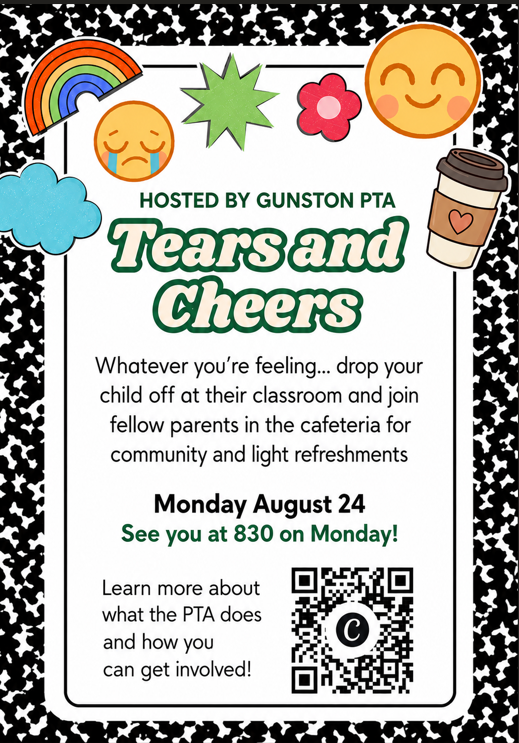
PTA Tears and Cheers
Whatever you're feeling...drop your child off at their classroom and join fellow parents in their classroom and join fellow parents in the cafeteria for community and light refreshments on Monday, August 24 at 8:30 a.m. Learn more about what the PTA does and how you can get involved!
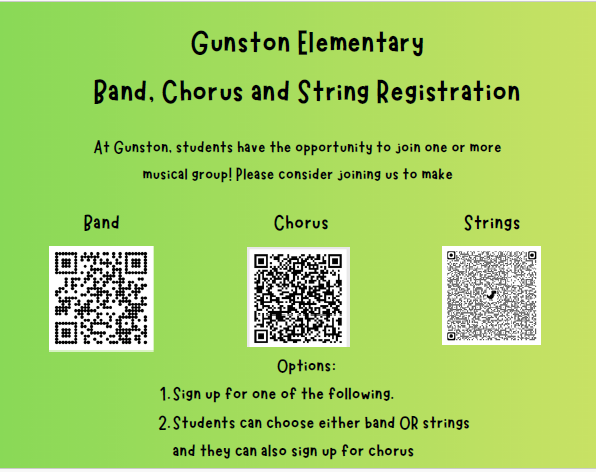
Gunston Elementary Band, Chorus
and String Registration
At Gunston, students have the opportunity to join one or more musical group! Please consider joining us. Students can choose band OR strings and they can also sign up for chorus.
School Meals
Help Your Child Navigate the Lunch Line
Check out some tips to help your child get through the lunch line quickly and have more time to eat:
- Teach your child their student ID number to receive meals at school.
- Sign up for and add money to MySchoolBucks to purchase meals at school.
-
Apply for free and reduced-price meals. Students who were approved for free and reduced-price meals last year are eligible for the first 30 days of school this year (or until a new application is processed). Families should submit a new application as soon as possible, so eligible students continue to receive meals at no cost.
If your child has any food allergies, learn how to submit accommodations for dietary restrictions and allergens.
Access menus for breakfast, lunch, and other school meals, as well as allergen and nutrition information.
Spanish: Ayude a su hijo a navegar por la fila del almuerzo
Ayude a su hijo a aprovechar bien el tiempo del almuerzo y a pasar rápido por la fila haciendo lo siguiente:
- Enséñele a su niño su número de ID de estudiante para que pueda recibir las comidas escolares (esto es nuevo para este año). Este número es el mismo que usan para entrar a sus dispositivos escolares y puede encontrarlo en SIS ParentVUE.
- Inscribiéndose y depositando dinero en “MySchoolBucks” para que pueda comprar comidas en la escuela.
-
Solicite comidas gratis o a precio reducido. Aquellos estudiantes que fueron aprobados el año pasado para recibir comidas gratis o a precio reducido, son elegibles para continuar recibiéndolas por los primeros 30 días de clases (o hasta que una nueva solicitud sea aprobada). Las familias deben hacer su solicitud lo más pronto posible, para que los estudiantes que sean elegibles continúen recibiendo sus comidas sin costo alguno.
Si su niño tiene cualquier alergia a algún alimento, aprenda cómo pedir Acomodaciones para restricciones alimentarias y alergias.
Encuentre los menús de desayuno, almuerzo, y otras comidas escolares, así como información sobre alergénicos y nutricional.
Study Help and Support in Schoology
Study Help and Support Available to Students in Schoology
A new Schoology Study and Support Hub is available for students in Schoology. This space was developed by the FCPS Educational Technology Team with input from students. It is designed to provide essential study tools and academic support resources directly to our learners.
Students can log in to Schoology and read their Schoology announcements or watch this video on the support hub for more information.
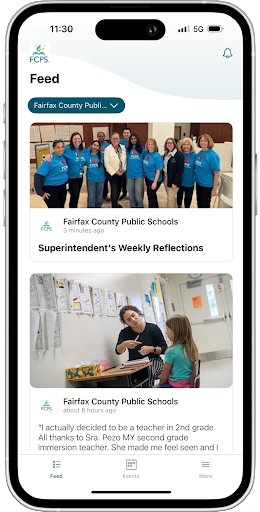
FCPS Mobile App
Get Ready for Day One with the FCPS App!
🎒As we gear up for the first day of school, make sure you have the FCPS mobile app downloaded! It's the quickest way to check the school year calendar, view lunch and breakfast menus, find school contacts, and jump to ParentVUE or Schoology from your phone.
Download the app from the Apple App Store or Google Play Store.
¡Prepárese para el primer día de clases con la aplicación de FCPS!
🎒Mientras nos preparamos para el primer día de clases, asegúrese de tener descargada la aplicación móvil de FCPS. Esta es la manera más rápida de consultar el calendario escolar, ver los menús de desayuno y almuerzo, comunicarse con su escuela y acceder a ParentVUE o Schoology directamente desde su teléfono
Descargue la aplicación desde Apple App Store o Google Play Store.
|
Lightspeed Updates
You Can Manage Student Web Access at Home
At Gunston ES, we acknowledge that parents are our students' first and most important teachers. Parents now have greater control over their child’s FCPS-issued device outside of school hours through Lightspeed Parent Portal.
In addition to monitoring weekly internet activity, parents can now also customize web access at home on FCPS devices through Lightspeed using Schedules and Web Rules.
With Schedules, you can set tailored times to automatically pause or restrict internet access. This makes it easier to enforce rules around homework time, family dinners, weekends, or bedtime.
In Web Rules, you can create Custom Block Lists to block specific, individual websites they do not want your child accessing at home. This allows parents greater control over what is happening online, under their own roof.
These new custom controls take effect at home, outside of school hours, and when the device is off the FCPS network. They will not override standard district filtering policies during the instructional day.
Customize Your Lightspeed Settings
All parents should be receiving weekly Lightspeed Online Student Activity Report emails. To set up these new features, click the “Log in or Register” button at the bottom of your weekly Lightspeed Online Student Activity Report email.
Visit the FCPS Lightspeed Parent Portal Guide for more information. If you have additional questions, submit a Parent Technology Support Ticket.
Parents are encouraged to discuss internet boundaries with their children so that they can understand the reasoning behind any limits and the differences between access at home and at school. Get tips on talking to your children about technology safety.
¿Sabía que puede administrar el acceso a internet de su estudiante en casa?En Gunston ES sabemos que las familias tienen un papel fundamental en acompañar a sus estudiantes en el uso de la tecnología. Por eso, ahora los padres pueden tener mayor control sobre el acceso a internet desde los dispositivos de FCPS cuando sus hijos lo usan en casa, a través del Portal para padres de Lightspeed.
Además de recibir información sobre la actividad semanal en internet, ahora puede establecer límites de acuerdo con las necesidades y rutinas de su familia utilizando las funciones Schedules (Horarios) y Web Rules (Reglas web).
Con Schedules (Horarios), puede elegir en qué momentos desea pausar o restringir automáticamente el acceso a internet. Por ejemplo, puede establecer límites durante la hora de hacer tarea, las comidas en familia, los fines de semana o antes de dormir.
Con Web Rules (Reglas web), puede bloquear sitios web específicos que no desea que su estudiante visite mientras usa su dispositivo de FCPS en casa. Así, usted puede decidir qué tipo de acceso es apropiado para su familia fuera del horario escolar.
Estas opciones funcionan únicamente fuera del horario escolar y cuando el dispositivo no está conectado a la red de FCPS. Durante la jornada escolar, continuarán aplicándose las reglas y filtros de internet establecidos por FCPS.
Personalice la configuración de Lightspeed
Las familias deberían estar recibiendo cada semana por correo electrónico el Informe de Actividad en Línea del Estudiante en Lightspeed. Para configurar estas nuevas funciones, haga clic en el botón “Log in or Register” (Iniciar sesión o registrarse) que aparece al final de su informe semanal.
Visite la Guía del Portal para padres de Lightspeed de FCPS para obtener más información. Si tiene preguntas adicionales, envíe una solicitud de soporte tecnológico para padres.
También recomendamos hablar con sus hijos sobre los límites que establezca para el uso de internet. Ayudarlos a entender por qué existen estas reglas les permitirá comprender mejor las diferencias entre el acceso a internet en casa y en la escuela. Encuentre consejos para hablar con sus hijos sobre el uso seguro de la tecnología.
Schoology
💻 Catch Up on Your Child’s Classwork in Schoology
Teachers use Schoology to post their classroom materials online; to provide a secure forum for students to discuss their ideas and collaborate on projects; and to assign and collect homework electronically. It helps students stay organized, and it keeps the class connected.
A Schoology Parent Account gives you access to:
- Your child’s classes.
- Your child’s upcoming assignments.
- School, class, and group announcements.
To access Schoology, parents will need to have an active SIS/ParentVUE account. Get more information on how to login and use Schoology.
💻 esté al Tanto de las Tareas de su Niño en “Schoology”Los profesores usan Schoology para publicar en línea sus materiales del aula; ofrecer un foro seguro para que los alumnos discutan sus ideas y colaboren en los proyectos; y para asignar y recibir tareas electrónicamente. Esta plataforma ayuda a los alumnos a mantenerse organizados y mantiene a la clase conectada.Una cuenta Schoology para padres les da acceso a:
- Las clases de su hijo.
- Los deberes que su hijo debe entregar.
- Anuncios de la escuela, de la clase y de los grupos.
Para poder tener acceso a Schoology, los padres necesitan tener su cuenta SIS/ParentVUE activa. Pueden encontrar más información sobre cómo iniciar sesión y usar Schoology en internet.
|
Schoology
New ParentVUE Mobile App Launching July 28 On Tuesday, July 28, a new ParentVUE mobile app will become available in the Apple and Google app stores. This new app provides parents and caregivers with a more secure sign-in. The current “classic” app will remain active for about six months. Families must download the new app by December 2026 to ensure they have continued mobile access to their child’s school data.
In the new app, families can enroll in multi-factor authentication (MFA) for FCPS Single Sign-On. While enrollment is optional, we strongly recommend that everyone enable this security feature.
Learn more about installing the new ParentVUE app. Parents needing assistance should submit a Parent Support Request.
Student IDs/Bus Tracking
New Student ID Cards Coming This Fall
This fall, every FCPS student will receive a student identification (ID) card as part of a divisionwide effort to modernize school transportation, improve communication with families, and strengthen student safety while traveling to and from school.
Every student who rides the school bus will need to tap on and tap off the bus every day using their new student ID card. Families can help by reinforcing this new habit with their child.
All students at our school will need to wear their student ID cards throughout the school day. We will be handing out the new student ID cards the first few weeks of school. More details will be shared soon.
Learn more about the new transportation system and student ID cards.
Family Information Phone Lines
Family Information Line Available in Nine LanguagesParents/caregivers who speak Amharic, Arabic, Chinese, English, Farsi, Korean, Spanish, Urdu, or Vietnamese may call a telephone information line for general information about FCPS. View the list of phone numbers.
Línea Telefónica de Información para Padres Disponible en Nueve IdiomasPadres/cuidadores que hablan Amárico, Árabe, Chino, Farsi, Coreano, Español, Urdu o Vietnamita pueden llamar a una línea telefónica de información para obtener información general sobre FCPS. Vea la lista de números de teléfono.
WhatsApp
Follow FCPS on WhatsApp
Is WhatsApp one of the ways you stay connected with family, friends, and your community? Now you can use it to stay connected with FCPS, too.
Follow the new FCPS WhatsApp Channel for helpful information and reminders throughout the school year, including important announcements, upcoming dates, tips for families, and more.
¡FCPS ahora en WhatsApp!
¿Usa WhatsApp para mantenerse en contacto con su familia, amigos y comunidad? Ahora también puede usarlo para mantenerse al día con todo lo que sucede en FCPS.
Siga el nuevo canal de FCPS en WhatsApp para recibir información útil y recordatorios durante todo el año escolar, como anuncios importantes, próximas fechas, consejos para las familias ¡y mucho más!
|