|
English | Español | አማርኛ | 中文 | 한국어 | Tiếng Việt | العربية | فارسی | اردو
Kristen Rucinski - Principal Allison Ovalle - Assistant Principal
Gunston Gazette
August 11, 2026
Office Hours
9:00am - 1:00pm
|
Calling all rising 6th graders!
Join us for a special lunch with the Gunston admin team on Thursday , August 13th from 12:30 PM – 1:30 PM. We'll enjoy pizza, get to know each other, and talk about your hopes and dreams for your final year at Gunston.
This event is just for students—please plan to drop off at 12:30 PM and pick up at 1:30 PM. Please complete this form to let us know if your 6th grader will attend!
https://docs.google.com/forms/d/e/1FAIpQLSdEpXIBPVlorN0xYwIz2iJ1LzxtbddSJUpA3rr5TbVRP9_kAQ/viewform
Looking forward to Chewing and Chatting!
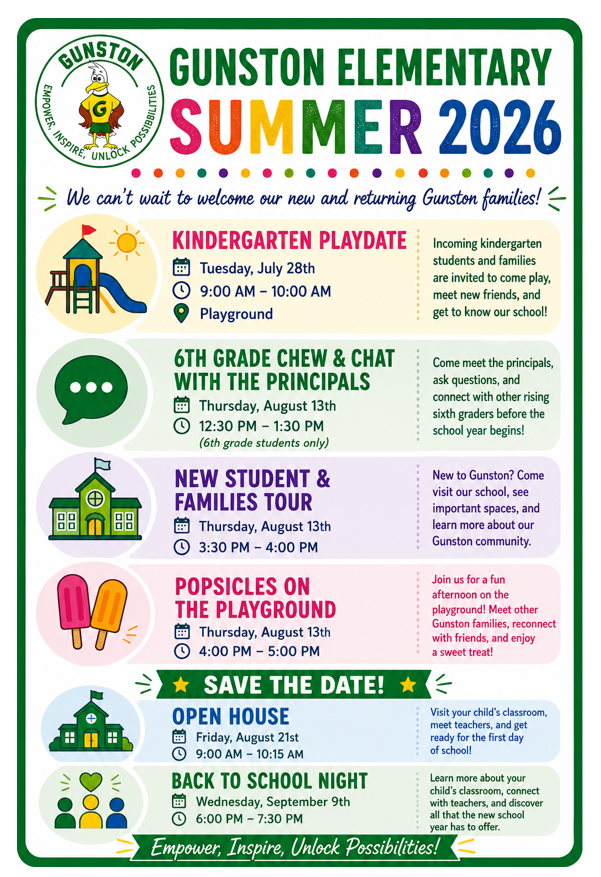
6th Grade Chew & Chat with the Principals
Thursday, August 13th
12:30pm - 1:30pm (6th grade students only)
New Student and Families Tour
Thursday, August 13th
3:30pm - 4:00pm
Popsicles on the Playground
Thursday, August 13th
4:00pm - 5:00pm
Open House
Friday, August 21st
9:00am - 10:15am
Back to School Night
Wednesday, September 9th
6:00pm - 7:30pm
Back-to-School Checklist
We’re Eager to Welcome You Back to School!
As summer winds down, we are looking forward to welcoming students back to our classrooms. Use the following list to help make sure your child is ready!
☑️ Sign Up for SIS ParentVUE
Access your student’s attendance records, grades, and assignments at any time with SIS ParentVUE. Contact our registrar at 703-541-3600 if you need an activation code. Find out more about SIS ParentVUE. Also, download the new ParentVUE mobile app so you can access your child’s records easily from anywhere!
Update Your Contact Information
Be sure you receive important information! Update your phone number(s) and/or email address(es) by clicking “My Account” and reviewing the “Online Verification/Update.” On that form, you can also update immunization records, health information, and emergency contacts.
☑️ Update Immunizations and Records
Immunizations are required for all students to attend school in Virginia. This is an important part of protecting them from certain diseases and keeping them healthy.
When your child is immunized, remember to request a copy of their immunization record and bring that to our front office or submit the record via SIS ParentVUE as soon as possible. Find more information on FCPS’ website.
☑️ Learn About School Meals
Families need to provide their children with money to purchase meals at school or send them with a packed lunch. Alternatively, families may apply to receive free and reduced-price meal benefits, pending approval.
☑️ Bookmark the School Year Calendar
Be sure to bookmark the FCPS school year calendar to keep track of school holidays, breaks, and observances:
- Days marked blue with an “H” are student holidays. Schools are closed on these days.
- Days marked orange with an “O” are religious and cultural observance days (or evenings, if only half marked). There is school on these days, but certain events that cannot be made up may not be scheduled on these days.
- Days marked as TW, SD, and SP and in pink are holidays for students but working days for teachers and staff.
Please note that some holidays and observances, such as Eid al Fitr, may shift, and the calendar may be adjusted.
¡Estamos entusiasmados por recibir a todos de vuelta en la escuela!
Mientras el verano llega a su fin, nosotros nos preparamos para darles la bienvenida a los estudiantes en nuestros salones de clase. ¡Revise esta lista para que se asegure de que su niño está listo para el primer día!!
☑️ Inscríbase en SIS ParentVUE
Tenga acceso a los récords de asistencia, calificaciones y tareas asignadas a su estudiante, cuando lo necesite a través de SIS ParentVUE. Contacte al registrador de la escuela llamando al [email/phone number] si necesita un código de activación. Conozca más sobre SIS ParentVUE. Además, recuerde que puede descargar la nueva aplicación móvil ParentVUE para acceder fácilmente a la información de su estudiante desde cualquier lugar.
Actualice su información de contacto
¡Asegúrese de que pueda recibir información que es importante! Actualice sus números telefónicos y direcciones email haciendo clic en “Mi Cuenta” y revisando lo que aparece en la sección “Verificación/Actualización Online”. En este formulario, usted también puede actualizar los récords de vacunación, la información de salud y los contactos de emergencia.
☑️ Revise las Vacunas y los Récords de Vacunación
Las vacunas son obligatorias para todos los estudiantes que van a la escuela en Virginia. Este es un paso importante para protegerlos de ciertas enfermedades y mantenerlos saludables.
Cuando le ponga alguna vacuna a su niño, recuerde pedir una copia de su récord de vacunación y entréguela en la oficina principal de la escuela o envíela a través de SIS ParentVUE lo más pronto que le sea posible. Encuentre más información en la página web de FCPS.
☑️ Conozca más sobre las Comidas Escolares
Las familias deben darles dinero a sus estudiantes para comprar comidas en la escuela o enviarles un almuerzo preparado en casa. Como alternativa, pueden solicitar los beneficios de comidas gratuitas o a precio reducido, sujetos a aprobación.
☑️ Ponga el Calendario del Año Escolar en sus Favoritos
Asegúrese de poner en sus favoritos el calendario del año escolar de FCPS para que esté al tanto de los días feriados escolares, las vacaciones y las fechas especiales religiosas y culturales:
- Los días marcados con una “H” azul, son feriados para los estudiantes. Las escuelas estarán cerradas esos días.
- Los días marcados con una “O” naranja son días de observancia religiosa y cultural (o tardes, si solamente se marca medio día). Habrá clases esos días, pero ciertos eventos que no puedan reprogramarse, podrían no realizarse esos días.
- Los días marcados con las letras TW, SD, y SP en color rosa son feriados para los estudiantes, pero son días de trabajo para maestros y personal escolar.
Por favor, note que algunos días feriados o fechas especiales como Eid al Fitr, podrían cambiar y el calendario sería ajustado.
FCPS App
Download the FCPS App Today!
The FCPS mobile app offers a customized platform to help keep you connected and informed, directly from your smartphone. Download the FCPS mobile app from the Apple App Store or Google Play Store.
With the app, you can:
-
View school calendars. See events, activities, holidays, and early dismissals.
-
Check school menus. See what’s for lunch and breakfast each school day.
-
Tap to contact. Quickly call attendance lines or email school staff.
-
Stay up to date. Get the latest news from FCPS.
-
Access key links. Jump to ParentVUE, Schoology, and the FCPS website in one tap.
No need to log in, just download and go! Learn more about the FCPS mobile app.
New ParentVUE App
New ParentVUE Mobile App Launching July 28 On Tuesday, July 28, a new ParentVUE mobile app will become available in the Apple and Google app stores. This new app provides parents and caregivers with a more secure sign-in. The current “classic” app will remain active for about six months. Families must download the new app by December 2026 to ensure they have continued mobile access to their child’s school data.
In the new app, families can enroll in multi-factor authentication (MFA) for FCPS Single Sign-On. While enrollment is optional, we strongly recommend that everyone enable this security feature.
Learn more about installing the new ParentVUE app. Parents needing assistance should submit a Parent Support Request.
New Student ID Cards
New Student ID Cards Coming This Fall
This fall, every FCPS student will receive a student identification (ID) card as part of a divisionwide effort to modernize school transportation, improve communication with families, and strengthen student safety while traveling to and from school.
Every student who rides the school bus will need to tap on and tap off the bus every day using their new student ID card. Families can help by reinforcing this new habit with their child.
All students at our school will need to wear their student ID cards throughout the school day. We will be handing out the new student ID cards the first few weeks of school. More details will be shared soon.
Learn more about the new transportation system and student ID cards.
Immunizations
Back-to-School Immunization Requirements
Make sure your child has all of their required immunizations before the first day of school. Check their immunization records to see what they might be missing. You can:
- Request immunization records online through the Virginia Immunization Information System (a free service).
- If your child was immunized outside of Virginia, get records from those states’ systems.
- Request records from your health care provider. Some may charge for copies.
Review school-required immunizations to verify that your child is up to date.
New Menu Platform
Explore School Meals in the New Menu Platform
Experience an easier way to view your child’s school menus using MealViewer:
- View what is being served each day.
- View the nutritional information for each meal.
- See if any specific allergens are being served.
- Get notified when your student’s favorite meal is being served.
Printable menus are always available on the Food and Nutrition Services webpage.
SR&R Updates
Understanding Student Rights and Responsibilities Updates: New Universal Grade Matrices for Families - Families are encouraged to review the updated FCPS Student Rights and Responsibilities (SR&R) document, which explains expectations for student behavior and adult responses in order to enhance school safety and to create a fair, equitable, and supportive school environment.
Updates for the 2026-27 school year include new Universal Grade Matrices (UGMs). UGMs are charts that show behavior expectations and school responses by grade level (K-3, 4-8, and 9-12). These at-a-glance resources (in Appendix D of the SR&R) are designed to make it easier for parents and caregivers to understand how schools respond to different types of behavior concerns.
Visit the SR&R webpage for more information and to review additional updates to the SR&R for the 2026-27 school year.
Entendiendo las Actualizaciones a los Derechos y Responsabilidades de los Estudiantes: Nuevas Matrices Universales de Calificación para todos los Grados - Animamos a todas las familias a revisar el documento actualizado con los Derechos y Responsabilidades de los Estudiantes de FCPS (SR&R, por sus siglas en inglés), el cual explica cuáles son las expectativas con el comportamiento de los estudiantes y las respuestas de los adultos para mejorar así la seguridad en las escuelas y crear un ambiente escolar justo, equitativo y solidario.
Las actualizaciones hechas para el año escolar 2026-27 incluyen las nuevas Matrices Universales de Criterios de Calificación (UGM, por sus siglas en inglés). Las UGM son gráficos que muestran cuáles son las respuestas de las escuelas a comportamientos esperados por cada grado (K-3, 4-8, y 9-12). Estos recursos (incluídos en el Apéndice D del documento de SR&R) están diseñados para facilitarles a los padres y tutores el entendimiento de cómo las escuelas responden a las preocupaciones generadas por los diferentes tipos de comportamiento.
Visite la página web de SR&R para que encuentre más información y para que revise las actualizaciones adicionales hechas a los SR&R para el año escolar 2026-27.
New Requirement for Student Device Use During the School Day - Starting this school year, students must use FCPS-issued devices for school-related digital activities during the instructional day. This is in accordance with a new School Board requirement, approved on July 16, which states that students may not use personal electronic communication or computing devices, including personal laptops, tablets, smartwatches, smartphones, and similar devices.
Students may only use their personal device if it is required as part of a necessary accommodation in the students’ Individualized Education Program (IEP) or Section 504 Plan. A principal or the principal’s designee may approve a limited, course-specific exception for students enrolled in a specialized class when the curriculum requires a technology tool or software that isn’t available on a standard FCPS-issued device.
Families can help support this requirement by reminding students to bring their FCPS-issued device each day and use it for all school-related digital activities unless an approved exception applies.
Nuevo requerimiento sobre el uso de dispositivos electrónicos durante la jornada escolar.
A partir de este año escolar, los estudiantes deberán utilizar los dispositivos proporcionados por FCPS para realizar actividades digitales relacionadas con sus clases durante la jornada escolar. Este requerimiento responde a una nueva disposición de la Junta Escolar aprobada el 16 de julio, que establece que los estudiantes no podrán utilizar dispositivos electrónicos personales de comunicación o computación, como computadoras portátiles, tabletas, relojes inteligentes,teléfonos celulares u otros dispositivos similares.
Los estudiantes solo podrán utilizar un dispositivo personal cuando sea necesario como parte de un ajuste establecido en su Programa Educativo Individualizado (IEP) o Plan de la Sección 504. La dirección de la escuela, o la persona que ésta designe, también podrá autorizar una excepción limitada para un curso específico cuando un estudiante esté inscrito en una clase especializada cuyo currículo requiera una herramienta tecnológica o un programa que no esté disponible en los dispositivos estándar proporcionados por FCPS.
Las familias pueden apoyar el cumplimiento de este requisito recordándoles a los estudiantes que lleven todos los días a la escuela su dispositivo proporcionado por FCPS y que lo utilicen para todas las actividades digitales relacionadas con sus clases, a menos
|