|
Dec. 16-Chorus Winter Concert 7pm Luther Jackson Middle School
Dec. 17- Orchestra Winter Concert-7pm Falls Church High School
Dec. 22-Jan. 2- Winter Break
.
Families, remember that when coming to the school to pick up your student, an official photo ID must be presented to the Main Office staff. Please understand that this is for security purposes. Driver’s licenses, passports, and military IDs are appropriate examples of official IDs.
On-Time Attendance
We are off to a great start to the school year. Now students are settled in their classes and know the routines. We stress to our teachers bell-to-bell instruction to maximize instructional time and learning. If you drop your student off at school, make sure that they do not have to rush and arrive late to school. Help our students develop the habit of being punctual. Also encourage your student to arrive at each class on time. Arriving late is a classroom interruption and distraction for the teacher and all students.
We will begin to reinforce our school’s tardy policy, which includes tardy sweeps, detention, and parent contact for repeated tardiness. We will also recognize punctuality with fun incentives for our students. Thank you for your support.
Updated Attendance Codes
Attendance Codes have been updated for the 2025-26 school year. These updates will allow schools to better identify the primary reasons for student absences, which will help school teams identify patterns of absenteeism, make informed decisions, and develop effective strategies to improve attendance. Please note which codes qualify as “Excused” and which are “Unexcused.”
Codes no longer used:
- EXC-Excused
- PRE-Prearranged Absence
- UNL-Unexcused Local
Updated Code:
- MED-Illness or Injury Related
Excused Codes:
- COL-College Visit
- FAM-Family Emergency
- FRL-Funeral
- LGL-Legal Obligations
- MAP-Medical Appointment (Prescheduled)
- MIL-Deployment Related
- OEX-Other-Excused
Unexcused Codes:
- NON-Non-School Activity
- OUN-Other- Not Excused
- VAO-Vacation, Outing, or Non-Emergency Family Travel / Visit
Counselor On Leave
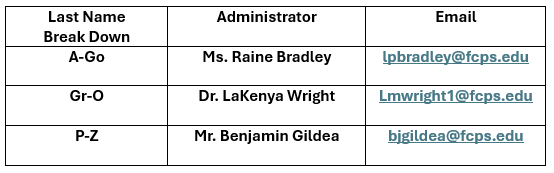
As a reminder, Dr. Simmons, our counselor for students with last names Re–Z, is currently on leave. We hope for her return soon. In her absence, please reach out to any of the other counselors or Mr. Zubieta for support.
Social and Emotional Learning Screener: Parent Reports Students in grades 3-12 took the SEL Screener last month, providing information on skills like achieving goals, understanding and managing emotions, establishing and maintaining relationships, and making responsible decisions. The screener also asks students how well their school community makes them feel valued, included, and supported.
Individual student SEL Screener results will be available to families in the Documents section of SIS ParentVUE the week of November 17. For families who do not have an active ParentVUE account, results will be shared by our school.
For support in understanding your individual student’s results or for ideas on how to support them at home, please review the Family Guide or reach out to school staff.
Graduation Status: New Feature in ParentVUE and StudentVUE A new Graduation Status tool is available in ParentVUE and StudentVUE. The tool helps parents and students monitor and track their progress in meeting graduation requirements.
Graduation Status includes progress toward the Standard or Advanced Studies diploma for high school students and middle school students who have enrolled in one or more high school courses. This new feature is available in addition to the course history and unofficial transcript options in ParentVUE and StudentVUE.
To view the Graduation Status section, which is only available for students who have enrolled in high school courses, please take the following steps:
- Login to your SIS ParentVUE/StudentVUE account.
- Go to “Course History.”
- Go to “Graduation Status” and toggle “on.”
For questions about graduation requirements, please contact your child’s school counselor. Learn more about ParentVUE.
Attendance Is Important Every Day! Every year, absences increase in the weeks before and after winter break. Give your child the gift of education and help build a habit of attendance. Visit the FCPS website for more attendance resources.
Food Assistance and Resource Guide Food insecurity impacts more than 96,000 Fairfax County residents. Learn how to help and discover the many resources available to support those who need food assistance or shelter. View the county’s Human Services Resource Guide.
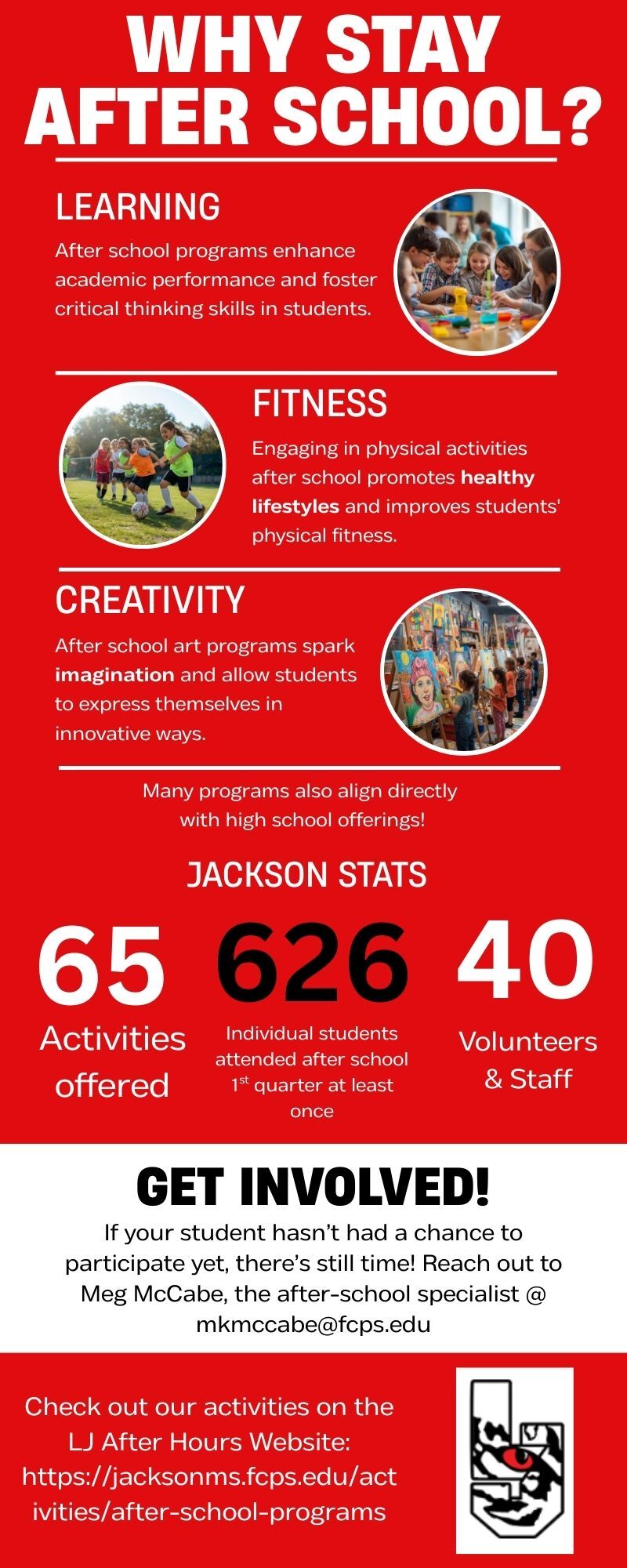
After School Update 12/15-12/19
We will be offering academics only after school and only Monday–Wednesday the week of December 15. Students who need to stay after with a teacher are welcome to do so, and late buses will be available on those days. The only exceptions are our competition-based clubs—TSA, Model UN, Science Olympiad and Theatre, which may still meet as needed. There will be no after-school programs on Thursday, 12/18 or Friday 12/19.
February 20: The Social Lives of Twice exceptional (2e) Students: Friendship, Belonging, and Identity
Families will understand how some 2e students navigate peer relationships and how to support them establishing authentic connections.
May 15: Beyond High School: Preparing Twice exceptional Students for College, Career, and Adult Life Through Executive Functioning and Essential Life Skills.
Families will learn strategies to support 2e students in developing executive functioning skills and essential life skills while empowering them to navigate college career, and independent adult life successfully.
Register here for the webinar series
Full-Time AAP Referral Window Reminder for Families
Parents/caretakers who would like their student to be screened for Full-Time Advanced Academic Program services may submit the Full-Time Referral Form (translations linked below) to their local school’s Advanced Academic Resource Teacher (AART) or principal no later than December 15, 2025. Late referrals will not be accepted.
The following sample communication is designed to be included in your school’s News You Choose/school email newsletter to remind families of the December 15, 2025, deadline. This communication should be shared with families by Monday, December 8, 2025.
Full-Time Referral Form (PDF)
Wizard of OZ Auditions:
Auditions for our spring musical, The Wizard of Oz, is Wednesday, Dec 10th & Thursday, Dec 11th. All students interested in trying out must come to both days. ALL are welcome- you do NOT have to be in theatre classes to participate. Please read all info before signing up using Google Form.
Crew interviews for backstage will be in January after break.
Las audiciones para nuestro musical de primavera, El Mago de Oz, se realizarán el miércoles 10 y el jueves 11 de diciembre. Todos los estudiantes interesados en participar deben asistir ambos días. Todos son bienvenidos; no es necesario asistir a clases de teatro para participar. Por favor, lean toda la información antes de inscribirse mediante el formulario de Google.
Las entrevistas con el equipo de backstage serán en enero, después de las vacaciones.
When students need to miss school, it is important for parents/guardians to communicate those absences with the school. This can be done by calling the attendance phone line at 703-204-8282.
Whether students miss school because of illness or any other reason, missing school leads to learning loss.
Help your child succeed by encouraging them to attend as many days as possible, but do make sure your child stays home if they are sick. Visit FCPS’ website for information on when to keep your child at home.
If your child has a chronic illness, make sure to notify their teacher so that support can be provided if needed. Also, keep an open line of communication with your school's public health staff.
Read about how families can help form good attendance habits. Attend today, achieve tomorrow!
📋 Permission Forms
Families can easily grant permission for their children to access a variety of school resources through the Parent Digital Consent system. Parents can opt their child in or out of resources including online educational tools, school counseling services, and tutoring services. They can also change how student information is managed. Visit the Parent Digital Consent webpage to access the system. See how to use the tool.
Synthetic Marijuana article-please click on the below link:
https://docs.google.com/document/d/1bsREIhKufZL6akzPkwKJD92OLvihyvpDUZuv3IfS4_w/edit?usp=sharing
Chromebook damage, procedures, and replacement costs
Students will receive a warning for the first instance of damage to a Chromebook as long as the case is on and the damage was not intentional. If the case is off or the damage was intentional, then they will be required to pay for the damage on the first offence. When this happens, Mr. Waldren will inform the student that they will be restricted to using a classroom loaner laptop in each class. He will also let the student know that he will email their administrator about the incident. The student's administrator will then meet with the student and contact their parents. If the student is required to pay for the damage, they will receive a replacement Chromebook after they pay for the damage. Pricing for damage and replacement Chromebook costs is listed below.
|
HP Chromebook Parts
|
Cost
|
|
Chromebook replacement
|
$481
|
|
Screen
|
$90
|
|
Charger
|
$30
|
|
Case
|
$34
|
|
Keyboard and palm rest
|
$37
|
|
System Board
|
$190
|
|
Touchpad
|
$22
|
|
Daughterboard
|
$17
|
|
Top Cover
|
$23
|
|
Bottom Cover
|
$17
|
|
Bezel
|
$18
|
|
Speaker
|
$46
|
|
Webcam
|
$25
|
|
WiFi Card
|
$19
|
Lightspeed Parent Portal parent controls
FCPS has enabled new parent controls within the Lightspeed Parent Portal to support families in managing screentime on FCPS devices. Parents can now manage their child's access to YouTube as well as pause web browsing on district-issued devices, during designated "After School Hours" while students are off the FCPS network.
These parental controls are only active Monday-Friday from 3:30 PM to 6:00 AM, and all day on weekends and student holidays when students are off the FCPS network. Parental controls do not interfere with district filtering policies during the instructional day. Parents can register for the Parent Portal using the link provided in their weekly Lightspeed Online Student Activity Report email.
For more information about the Parent Portal, please visit the Lightspeed Parent Portal page on the FCPS website.
Thank you Silver Diner!
Thank you to the Silver Diner in Merrifield for partnering with us for our restaurant night last week and for sponsoring today's holiday lunch for the LJMS staff! We appreciate the Silver Diner's support of the LJMS community!
Join us TODAY!
You are invited to join us at the LJMS PTA Gratitude Gathering this afternoon from 2:30 - 4:30 in the LJMS Cafeteria! We will hear from Principal Sherrill and will celebrate the contributions of PTA volunteers, parents and caregivers, LJMS staff, donors, sponsors, and community partners to the work of the LJMS PTA! Your support of our programs, initiatives, and events is greatly appreciated! Hope to see you this afternoon!
Fall 2025 screening is only available to students newly enrolled in FCPS after January 1, 2025, who were not screened in Spring 2025.
For information pertaining to the screening process, testing and identification timeline or identification and placement, please contact Laura Ballou at liballou@fcps.edu.
The "Discrimination and Harassment: Let's Talk" platform is an essential tool that allows anyone within our school community to report incidents of discrimination, harassment, or other concerning behaviors confidentially. More information about the platform, including how to access and use it, can be found at https://www.fcps.edu/submit-discrimination-and-harassment-report.

Families,
We Need Your Consent for Select Digital Resources
At Jackson Middle School, our teachers will use a variety of digital resources to support student learning and promote communication and collaboration with students and families. Some of the digital resources your child may use this year will require your consent before they can be used. Please find the link to the digital form, where you can give your consent, here:
https://digitalconsent.fcps.edu/ispb/is01/r/pdcp/
. You can find further direction here: a list of the resources that require parental consent here: https://www.fcps.edu/family-resources/technology/digital-resources/consent.
Need technical support? Call the Parent Technology Help Desk at 833-921-3277 (833-921-FCPS). This will be answered by staff members from 7 a.m. - 5 p.m. Monday-Friday.
|
|