 Dear Jackson Family,
Thank you all for an awesome start to the school year! We are so proud to share that our first week of school went smoothly, with no major incidents. This is a true testament to the teamwork, preparation, and positive energy of our students, staff, and families. Thank you for helping us kick off the year on such a strong note!
As we settle into our routines, I want to remind everyone about our safety procedures during arrival and dismissal. To keep our students safe, please remember:
- All kiss and ride students must be dropped off and picked up in the official kiss and ride loop.
- The kiss and ride loop is one way only. Please do not back up or drive counter to traffic in the loop.
- For everyone’s safety, students should not be dropped off on the sidewalk by Gallows Road, in the Unique Shopping Center, Bus Loop, or in the teacher’s parking lots.
- Please do not cut across parking spaces as you navigate our parking lot. This puts walkers and those trying to enter the building at risk.
These guidelines ensure that traffic flows smoothly and that our students remain safe during these busy times of day. Please note that Fairfax County Police will begin traffic enforcement at our school in the coming weeks, so it’s especially important that we all follow the procedures consistently.
Thank you for your continued partnership in making Jackson MS a safe and welcoming place for all our students. We are looking forward to a successful first semester!
Best,
RJ
August 29th- No school/ Labor Day Break (Holiday)
Sept. 1st--- No school/ Labor Day Break (Holiday)
If your child still has their Chromebook, please have them bring it on the first day of school and they can return it to room 502 or the main office.
LJMS families, please consider supporting our brand-new Faculty Fairies initiative, a small but meaningful way to show appreciation and encouragement to our dedicated school team throughout the school year. Go to https://tinyurl.com/ljmsfacultyfairy
Your support of the PTA through membership and volunteering is vital to our success this year! Join the PTA and purchase spiritwear including t-shirts and hoodies at: https://ljmspta.givebacks.com/shop
For questions about the LJMS PTA, please email PTA@jacksonmspta.org! Be sure to also join our Luther Jackson Middle School PTA Facebook group and like our PTA page on Facebook!
✨ Mark your calendars! The LJ After Hours Interest Meeting and Activities Fair will be after school on Thursday, September 11 from 2:30-4:30 PM. This is your chance to explore all of our amazing clubs and sports, meet coaches and sponsors, and find the activity that’s right for you. Every activity and sport will have a table so you can learn more and get connected. Late buses will be provided.
🏃♂️ Cross Country- If you love distance running, challenging yourself, or trying something new—cross country could be for you!
🏀 Basketball- Exciting news! Basketball is now an interscholastic sport at Luther Jackson! That means you’ll be competing against other schools, representing LJ on the court, and showing your Tiger pride just like Cross Country.
👉 Important Note: If you plan to participate in interscholastic sports (cross country or basketball), you must complete the required forms (linked below). Please see Mr. Klucker (Room 202) for cross country, Mr. Bailey (Gym) for basketball, or Ms. McCabe (Room 404) if you have questions.
For all other clubs and activities, no forms are needed—just come to the fair and get involved! We can't wait!
How to Register for MS Interscholastic Sports (Only Cross-Country and Basketball)
STEP 1- Complete AND Submit the FCPS MS Athletics Registration Google Form online (link)
STEP 2- Complete AND turn in the Middle School Athletics Physical Form (PPE) (link) to the After-School Specialist (Ms. McCabe in room 404)
-
Forms expire 14 months after they are signed. ALL PPE after July 1, 2025 NEED to be on the NEW FORMS *Be sure that your form doesn’t expire before your season ends! (Ex: Nov. 15th CC ends, so PPE needs to be after Sept 15, 2024)
STEP 3- Complete AND turn in the Emergency Care Card (ECC) (link) to the After-School Specialist (Ms. McCabe in room 404) -This MUST be filled out for EACH SEASON (siblings need their own)
The Thomas Jefferson High School for Science and Technology (TJHSST) online application portal will open Monday, October 20th, at 4:00PM. Representatives from TJHSST will be giving an information presentation on Monday, September 15th, at 2:30PM in the LJMS auditorium. The presentation is approximately 30 minutes with additional time for questions and answers. Both students and parents are invited to attend. No registration is necessary. Please note that students attending this information session will need to sign up for a second after school session if they are not leaving school with a parent after the presentation. For more information, please go to the TJ Admissions webpage at https://www.fcps.edu/tjadmissions. Please visit the TJHSST website to understand the required courses that students need to take in their 8th grade year in order to apply to TJHSS. Please contact Mr. Tickle at BRTickle@fcps.edu or 703 204 8124 for questions or for help with the application process.
Families, remember that when coming to the school to pick up your student, an official photo ID must be presented to the Main Office staff. Please understand that this is for security purposes. Driver’s licenses, passports, and military IDs are appropriate examples of official IDs.
Student Services Updates
Our counselors are working hard to update and adjust student schedules as needed. If your child’s schedule is changed, you will receive communication, and your child will be provided with a new copy. Teachers are aware of all updates.
If you have any questions about your child’s schedule, please reach out to Student Services at 703-204-8104 to speak with our registrar.
Everything You Need to Do Through SIS ParentVUE
Don’t forget your back-to-school forms and checklists! Make sure you have a SIS ParentVUE account for your family and log in to find important forms and updates.
If you do not have a ParentVUE account, contact our front office for an activation code and follow the directions on the SIS ParentVUE Account webpage.
☑️ Update Contact Information
Be among the first to know about weather closings, bus delays, and other critical communications from your school and FCPS by providing your cell phone number and email in SIS ParentVUE. To update your contact information in SIS ParentVUE, click the “Online Packets” tab in the upper right of the screen, then click the “Online Verification/Update” icon.
Parents/caregivers who do not have a ParentVUE account should contact our school for an activation code to create an account, or print and complete the Emergency Care Information Form and submit it to our front office.
☑️ Submit Absences
Parents/caregivers can submit daylong absences through SIS ParentVUE. Log in to the platform and click “Report Absence.” Partial day absences and changes of transportation should still be reported directly to our front office.
☑️ Review and Submit Immunization Forms
Parents/caregivers can check their child’s immunization compliance and submit immunization records in SIS ParentVUE. Records may also be delivered to our front office.
If needed, families may also provide other immunization documentation including a health care provider’s written statement of a permanent or temporary medical exemption or a notarized Religious Exemption Form.
Please visit the FCPS How to Submit Immunization Documentation webpage for step-by-step instructions on how to submit each of these items.
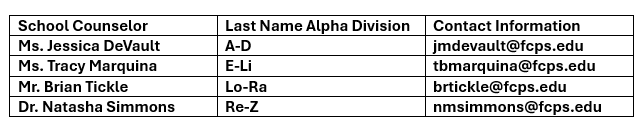
Counselors are assigned by alphabet and your first point of contact for any question or concerns you might have.
Updated Special Education and 504 Handbooks
The Department of Special Services has updated and translated key resources to help our families of students with an Individualized Education Program (IEP) and/or Section 504 Plan.
These resources help family and staff understand procedures, rights, and processes. Find additional information on Special Education Instruction and the Family Academy: Resources to Support Special Education and 504 Plans pages.
Help Your Child Navigate the Lunch Line
Help your child get through the lunch line quickly and have more time to eat:
- Teach your child their student ID number to receive meals at school.
- Sign up for and add money to MySchoolBucks to purchase meals at school.
-
Apply for free and reduced-price meals. Students who were approved for free and reduced-price meals last year are eligible for the first 30 days of school this year (or until a new application is processed). Families should submit a new application as soon as possible, so eligible students continue to receive meals at no cost.
If your child has any food allergies, learn how to submit accommodations for dietary restrictions and allergens.
Access menus for breakfast, lunch, and other school meals, as well as allergen and nutrition information.
🔍 See Where Your Child Goes Online With Lightspeed
Parents can access their child’s activity on FCPS devices through Lightspeed, the school division’s internet content filtering service. Parents may sign up for a weekly Parent Report, which will provide a list of the top sites their child visited.
The report also offers parents the ability to sign up for the Internet Use Parent Portal. Through the portal, parents may pause their child’s access to the internet on their FCPS device during non-school hours.
Learn more about Lightspeed Parent Reports.
Student Smart Watches and Cell Phones
Please remind your child that FCPS is phone-free! For elementary school students, this means:
- Smart watches that serve a dual purpose may be worn, but the phone features (texting, Internet viewing, and calls) are to be off when phone use is prohibited.
- Cell phones and personal devices (airpods, earbuds, headsets, other items connected to the internet) must be off and away for the entire school day (bell to bell).
If you need to reach your child during the school day, please call our main office at 703-204-8000. Learn more about FCPS’ cell phone and personal device policy.
FCPS’ Cell Phone Policy: Why It Matters
FCPS’ cell phone policy helps students focus, learn, and engage. When students put their phones away, they have more face-to-face interactions with their peers and teachers and more opportunities to develop resilience and problem-solving skills. Please remind your child that:
Cell phones and personal devices (airpods, earbuds, headsets, other items connected to the internet) must be off and away for the entire school day (bell to bell).
Smart watches that serve a dual purpose may be worn, but the phone features (texting, Internet viewing, and calls) are to be off when phone use is prohibited.
If you need to reach your child during the school day, please call our main office at 703-204-8000.
The "Discrimination and Harassment: Let's Talk" platform is an essential tool that allows anyone within our school community to report incidents of discrimination, harassment, or other concerning behaviors confidentially. More information about the platform, including how to access and use it, can be found at https://www.fcps.edu/submit-discrimination-and-harassment-report.
When students need to miss school, it is important for parents/guardians to communicate those absences with the school. This can be done by calling the attendance phone line at 703-204-8282.
Whether students miss school because of illness or any other reason, missing school leads to learning loss.
Help your child succeed by encouraging them to attend as many days as possible, but do make sure your child stays home if they are sick. Visit FCPS’ website for information on when to keep your child at home.
If your child has a chronic illness, make sure to notify their teacher so that support can be provided if needed. Also, keep an open line of communication with your school's public health staff.
Read about how families can help form good attendance habits. Attend today, achieve tomorrow!
📋 Permission Forms
Families can easily grant permission for their children to access a variety of school resources through the Parent Digital Consent system. Parents can opt their child in or out of resources including online educational tools, school counseling services, and tutoring services. They can also change how student information is managed. Visit the Parent Digital Consent webpage to access the system. See how to use the tool.
FALL PLAY INFORMATION
All those students interested in auditioning for the fall play, please signup to stay after on Wednesday, Sept 11th for B session after the after-school fair during A session. All are welcome- you do NOT have to be in theatre arts class to participate. If you cannot make the interest meeting- no worries, just email Ms. Stacey at: smjones3@fcps.edu
Auditions will run Wed Sept 17th & Thursday Sept 18th (You must attend just one day).
Questions? Email Ms. Stacey at: smjones3@fcps.edu
The backstage interest meeting for the fall play will be Tuesday, September 16th. Backstage interviews will be Wednesday the 24th . Questions? Please email Mr. McLellan at: lmclellan1@fcps.edu.

Families,
We Need Your Consent for Select Digital Resources
At Jackson Middle School, our teachers will use a variety of digital resources to support student learning and promote communication and collaboration with students and families. Some of the digital resources your child may use this year will require your consent before they can be used. Please find the link to the digital form, where you can give your consent, here:
https://digitalconsent.fcps.edu/ispb/is01/r/pdcp/
. You can find further direction here: a list of the resources that require parental consent here: https://www.fcps.edu/family-resources/technology/digital-resources/consent.
Need technical support? Call the Parent Technology Help Desk at 833-921-3277 (833-921-FCPS). This will be answered by staff members from 7 a.m. - 5 p.m. Monday-Friday.
|
|