|
This communication is being sent to GL Journal Processors and Approvers at Cardinal Financials Agencies. |
|
|
The General Ledger (GL) WorkCenter has been enhanced to include a Submit Journals for Approval in Mass page within the My Work section under Journal Processing. This feature allows you to submit journals individually or in mass. Eligible journal entries automatically populate on this page.
How to Submit Journals for Approval:
- Select the checkbox next to the journal(s) ready for approval
- Open the Actions menu
- Select Submit Journal
|
|
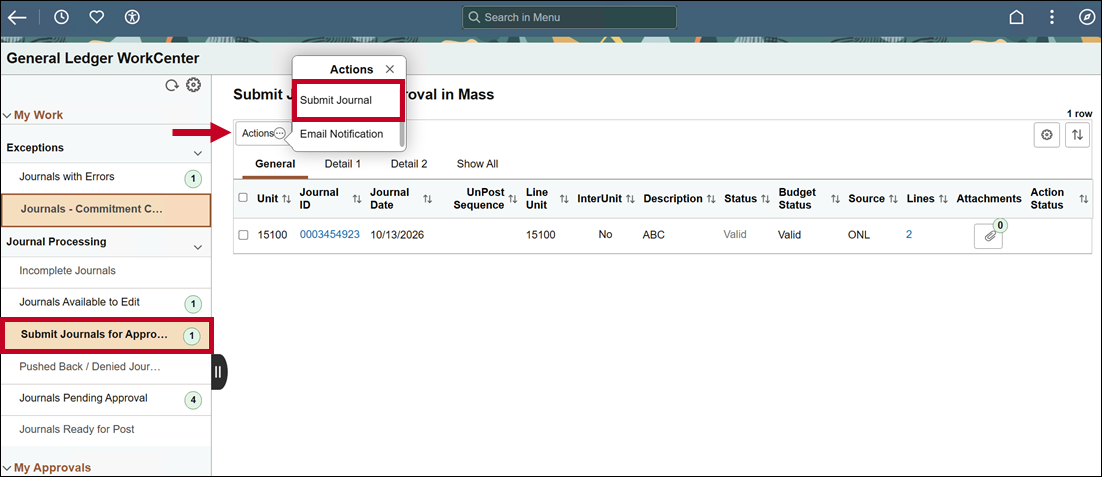 Once submitted, your journal(s) will move to the Journals Pending Approval page.
As with other Journal Processing pages in the GL WorkCenter, you can review journal entry details by clicking the Journal ID, or review line summaries by clicking the hyperlinked number in the Lines column.
Updated Cardinal Job Aids
For more detailed information about online journal entries or details about the GL WorkCenter, review the updated job aids by clicking the buttons below.
|
|
|
Regards,
The Cardinal Team
|
|

Questions?
|
If you have technical or functional questions, submit a help desk ticket by emailing vccc@vita.virginia.gov and include the following information:
Subject: Cardinal – [brief summary for routing]
Email Content: Detailed information about your issue (i.e., functional area, page, actions, error) Name, email address, and best contact phone number
|
|
Cardinal - Virginia's Enterprise Resource Planning System
You received this communication because of your role(s) or access in Cardinal.
|
|
|
|