|
This communication is being sent to HR Directors, HR Administrators, and Payroll Administrators at Cardinal HCM agencies that processed Legislative Salary Increases using the Cardinal Legislative Salary Increase Tool. |
|
|
Legislative Salary Increases were processed centrally on Saturday, July 25. Agencies must now revisit the Legislative Salary Increase Tool to complete follow-up activities and validations.
Steps to follow:
Navigation: Workforce Administration > Job Information > Legislative Salary Increase > Legislative Salary Inc Review
1. Check for Errors by selecting the Errors Only checkbox and clicking the Populate Grid button.
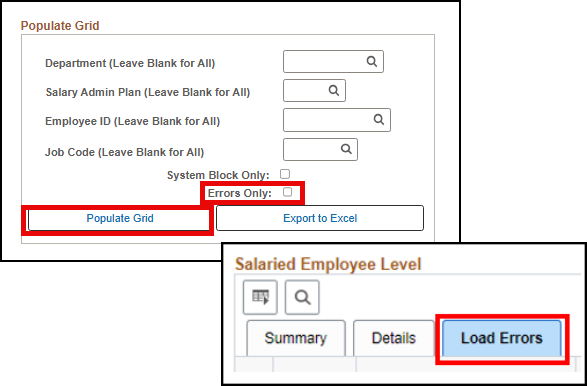 Errors?
-
No – The Load Errors tab will not display, and the Process Failed column in the Summary Statistics section will be “0”.
-
Yes – Review the Load Errors tab to identify any employees who did not process.
2. Check for unresolved System Blocks by selecting the System Block Only checkbox and clicking the Populate Grid button.
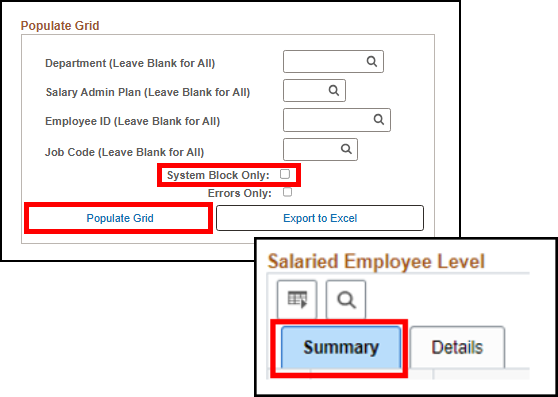 System Blocks?
-
No – The System Blocked column in the Summary Statistics section will be “0”.
-
Yes – Review the employees who were blocked from receiving the increase.
Action Required if Errors or System Blocks Exist:
If your agency answered “Yes” to either of the above scenarios, please review and TAKE ACTION immediately!
If an employee should have received the increase and did not, either because of a “System Block” or “Error”, agencies will need to manually add the pay rate change into Cardinal for those employees.
- Manually key the pay increase in the employee’s Job Data
-
Effective Date: July 25, 2026
-
Action: Pay Rate Change
-
Action Reason: FY27 Statewide Increase
- Update the State Compensation Amount accordingly
- If correction mode is needed, submit a VCCC ticket with a subject of “Cardinal – HR Correction”, OR
- For increases outside the employees’ pay grade threshold, contact DHRM iHelp by emailing ihelp@dhrm.virginia.gov
Keying Deadline: Wednesday, August 5, 2026
To ensure these pay increases are reflected in the August 14 paychecks, agencies must manually enter any failed (errored) records by Wednesday, August 5, 2026.
|
|
Minimizing Correction Tickets After Salary Increases
Before making any job data changes for affected employees, HR Administrators should review the guidance outlined in the HR354 Using the Legislative Salary Increase Tool job aid. Specifically, review the section titled “Ways to Minimize Correction Tickets after the Legislative Salary Increases have been entered into Cardinal” including the Typical Errors chart.
This proactive approach helps ensure accurate processing and reduces correction tickets sent to the Cardinal Post-Production Support (PPS) Team, which expects higher ticket volumes than normal.
VNAV Legislative Salary Increase File
Cardinal has provided VRS with a Legislative Salary Increase (SLI) File, which includes all SLI increases processed through the Legislative Salary Increase Tool. Please give VRS a few days to load the file if it is not already loaded.
Agencies are encouraged to review the Salary Changes File Error Report in VNAV to identify any increases that did not update as expected. These records will require manual updates directly in VNAV by the agency.
|
|
Cardinal Legislative Salary Increase Support
Refer to the Legislative Salary Increase Support webpage on the Cardinal website. This page features helpful resources including the HR354 Using the Legislative Salary Increase Tool job aid.
|
|
|
Regards,
The Cardinal Team
|
|
 |
|
Questions |
If you have technical or functional questions, submit a help desk ticket by emailing vccc@vita.virginia.gov and include the following information:
Subject: Cardinal – <brief summary for routing>
Email Content:
- Detailed information about your issue (i.e., functional area, page, actions, error)
- Name, email address, and best contact phone number
|
|
Cardinal - Virginia's Enterprise Resource Planning System
|
|
You received this communication because of your role(s) or access in Cardinal. |
|
|
|