|
The new Overtime Leave Compliance Report is now available in Cardinal to assist agencies in complying with DHRM Policy 3.20 – Overtime.
Per DHRM policy, employees may accumulate up to 240 hours of overtime (OT) leave during the fiscal year (up to 480 hours for FLSA non-exempt law enforcement or fire protection positions). However, all OT leave balances must be reduced to a maximum of 80 hours at fiscal year-end through either usage or payout.
Note: This requirement does not apply to Compensatory Leave balances.
How to Use the Overtime Leave Compliance Report
This report provides visibility into OT leave balances and calculates estimated payout amounts for employees whose balances exceed the 80-hour fiscal year-end limit, or who have OT leave earned/taken in Saved status, or with unapproved transactions (Approved = N). It is designed to help agencies and DHRM efficiently monitor balances, encourage leave usage, and manage fiscal year-end payouts and balance adjustments.
Non-Executive Branch agencies with OT leave policies that differ from DHRM policy may also utilize this report to support their specific tracking needs.
Navigation Path: Global Payroll & Absence Mgmt > Absence and Payroll Processing > Reports > Overtime Leave Compliance
Key Features
The report only shows employees who meet at least one of the following criteria:
- OT leave (earned or taken) is in Saved status or has unapproved transactions.
- OT leave balance exceeds the 80-hour fiscal year-end threshold.
Other key features include:
-
Payout Calculation: Determines the estimated payout amount required to reduce balances to the 80-hour limit based on the employee’s hourly rate (if the agency determines a payout is necessary).
-
Parameters: Run by Business Unit and select an “As of Date”.
-
Format: Generated as a CSV file for easy review, filtering, and processing.
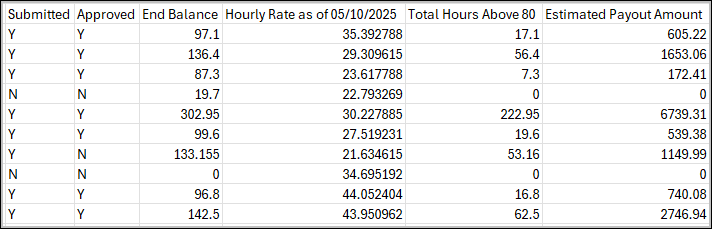
Sample Section of Report Output:
 Understanding Report Columns
-
Submitted: Displays “Y” if OT leave hours are in Submitted status and “N” if they are in Saved status.
-
Approved: Displays “Y” if all Submitted hours are approved and “N” if any hours are in Needs Approval or Saved status.
-
End Balance: Reflects the total balance, which may include unapproved hours.
-
Hourly Rate as of [date]: Reflects the employee’s hourly rate effective on the selected As of Date.
-
Estimated Payout Amount: Calculated using the hourly rate associated with the selected As of Date.
Agencies are responsible for reviewing the Estimated Payout Amount and confirming it is based on approved OT transactions and the appropriate hourly rate. All OT leave must be submitted and approved prior to processing any payout.
Tip: To quickly identify pending “Saved” or “Needs Approval” hours, run the Timesheet Report with the “Action Required Only” checkbox selected.
Navigation Path: Time and Labor > Reports > Timesheet Report
|