|
This communication is being sent to all Benefit Administrators at Cardinal HCM agencies and Decentralized localities. |
|
The Base Benefit Consistency Audit Report (RBN304) has been enhanced with new features to give Benefit Administrators more complete data and a more efficient reporting experience. |
|
What's New?
New Parameters: Benefit Administrators can now choose specific sections of the report instead of running the full version. Simply check the boxes for the needed section(s), such as identifying health benefit participants without a Social Security number and participants with invalid Social Security numbers.
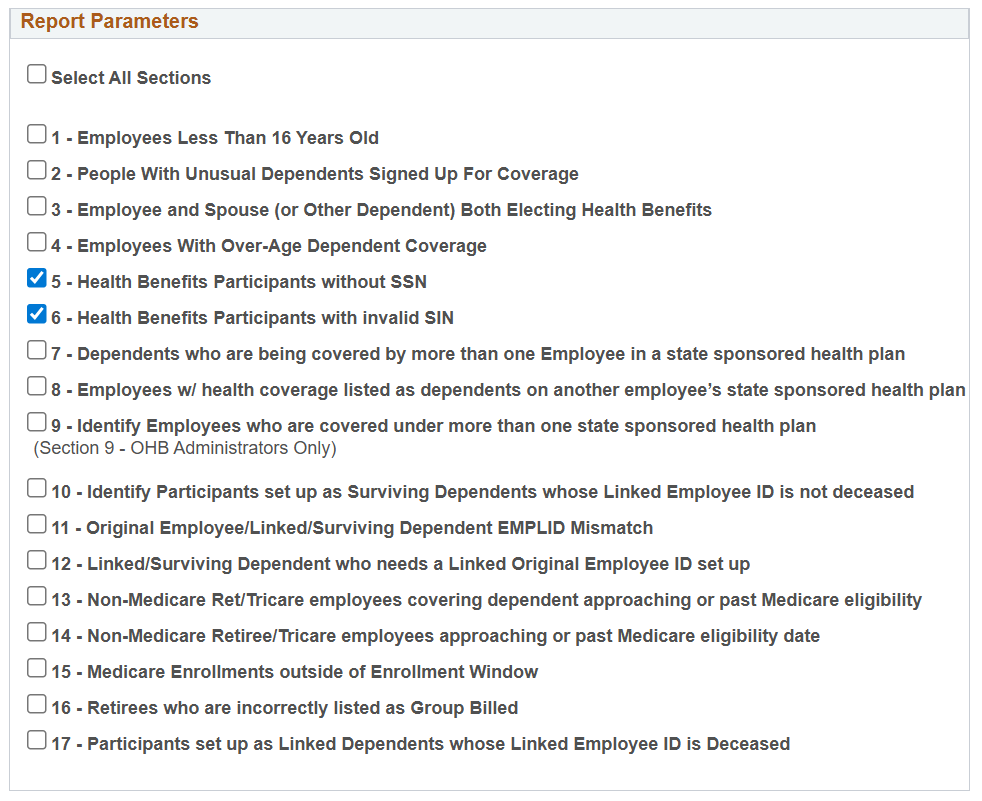 New Data Fields: The report now includes participant name and email address fields, providing more complete information in one place.
|
|
Important: New Run Control IDs are Required
Due to these updates, all previous Run Control IDs for this report are no longer valid. Benefit Administrators will need to create new Run Control IDs by following these steps:
- Navigate to Menu > Benefits > Reports > Audits > Base Benefit Consistency Audit.
- Click Add a New Value on the Run Control ID selection page for the Base Benefit Consistency Audit. This is a one-time step.
- Define new Run Control IDs with preferred parameters and values.
- Set the desired output format (PDF or CSV).
Need assistance running a report? Refer to the NAV225_Generating an HCM Report for step-by-step guidance.
|
|
|
Regards,
The Cardinal Team
|
|
 |
|
Questions |
If you have technical or functional questions, submit a help desk ticket by emailing vccc@vita.virginia.gov and include the following information:
Subject: Cardinal – <brief summary for routing>
Email Content:
- Detailed information about your issue (i.e., functional area, page, actions, error)
- Name, email address, and best contact phone number
|
|
Cardinal - Virginia's Enterprise Resource System
You are receiving this email as a result of the role(s) you hold in the Cardinal System.
|
|
|
|