|
This communication is being sent to HR Administrators and AM Administrators at all Cardinal HCM agencies, as well as TL Administrators at PSB agencies. |
|
|
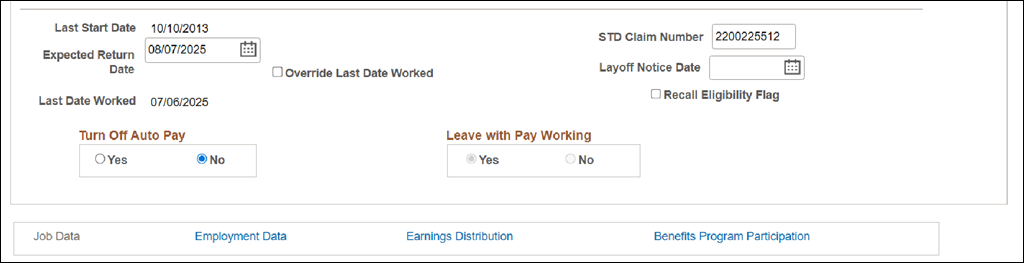
A new Leave with Pay Working field is now available in Job Data. This field will show “Yes” for all active employee job records currently in a status reflecting the employee is on paid leave while working, regardless of when the leave began. This field is read-only (grayed out) and cannot be directly edited by Administrators.
|
|
|
The Leave with Pay Working field will update automatically based on specific transactions:
- It will display as “Yes” when the following Paid Leave Action Reasons are entered:
- Short-Term Disability Working
- STD Working+WC
- Long-Term Disability Working
- LTD Working+WC
- Workers Comp Working No VSDP
- It will display as “No” by default and when “STD to LTD not working” or “Return from Leave” transactions are processed.
Note: Historical job records for employees who are no longer on this type of leave should not be updated.
This enhancement improves vacation accrual accuracy for employees in a Paid Leave Working status and provides clearer visibility within Job Data.
For more information about Paid Leave Action/Reason codes, please refer to the HR351_Action Reason Codes job aid.
|
|
Impacts to Absence Management and Vacation Accruals
Absence Management determines vacation accrual eligibility for employees on Paid Leave based on an employee’s Job Data Action/Reason and Payroll Status. In rare instances, some employees had missing vacation accruals.
To address this, Cardinal absence management processing has been updated to use the new Leave with Pay Working field. This change ensures accurate vacation accruals for employees who are in Paid Leave and in a working scenario (e.g., Short-Term Disability Working, Long-Term Disability Working, Worker's Compensation Working).
These updates took effect on July 25, 2025. Any missed accruals prior to July 25, 2025, can be given as a manual balance adjustment by an Absence Management Administrator.
|
|
Support
This change should not require agencies to take any action. For any corrections or questions about the displayed data, submit a help desk ticket by emailing vccc@vita.virginia.gov with “Cardinal” in the subject line.
|
|
|
Regards,
The Cardinal Team
|
|
 |
|
Questions |
If you have technical or functional questions, submit a help desk ticket by emailing vccc@vita.virginia.gov and include the following information:
Subject: Cardinal – <brief summary for routing>
Email Content:
- Detailed information about your issue (i.e., functional area, page, actions, error)
- Name, email address, and best contact phone number
|
|
Cardinal - Virginia's Enterprise Resource System
You are receiving this email as a result of the role(s) you hold in the Cardinal System.
|
|
|
|