|
This communication is being sent to all HR Administrators, Benefits Administrators, and HR Directors at Cardinal HCM agencies, as well as Functional and Technical Interface contacts for agencies that utilize the HR006 Position Data Upload. |
|
To enhance data accuracy, Cardinal has implemented a new rule to maintain synchronization between position and job data, as well as new Action/Reason codes to support downstream processing. |
|
New Position Effective Dating Rule
Updating key position fields (such as FLSA status or Department) requires a corresponding update to the incumbent’s job data. If the position update has an effective date before the most recent effective-dated row in the employee's job record, Cardinal cannot apply the change correctly. This causes the position and job data to become out of sync, leading to downstream errors and data integrity issues.
To prevent these issues, Cardinal now enforces a rule that blocks position changes with an effective date earlier than the most recent Job Data row. If this occurs, users will receive an error message. This rule applies to all position update methods, including:
- Online entry
- HR411 Position Mass Upload template
- HR006 Position Data Upload interface
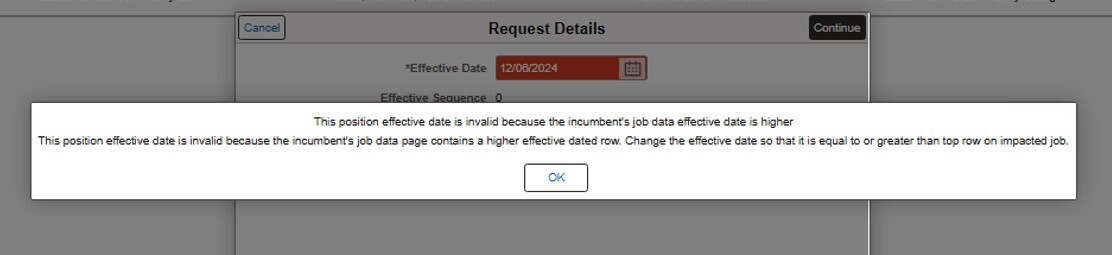 What to do if this error is encountered:
-
Adjust the Effective Date:Update the position change to have an effective date that is equal to or later than the employee’s most recent (top of stack) job data row.
-
Request a Retroactive Update: If a retroactive change is required, submit a help desk ticket by emailing vccc@vita.virginia.gov and be sure to include "Cardinal" in the subject line.
|
|
New Action/Reason Codes
Effective July 25, 2025, the following new Action/Reason codes are available for use to support downstream processing for benefits and absence management. Please note that corrections to applicable current or historical job data is neither necessary nor recommended. Moving forward, apply these new codes as needed for new transactions. The HR351_Action Reasons Codes job aid has been revised accordingly.
New Action/Reason Codes for Active Employees
|
|
Action (ACTION)
|
Action Description
|
Action Reason (ACTION_REASON)
|
Reason Description
|
Cardinal Comments
|
|
DTA
|
Data Change
|
FPP
|
Failure to Pay Premium
|
Use when the employee is responsible for paying the agency for health premiums and fails to pay after multiple written requests.
|
|
DTA
|
Data Change
|
LHE
|
Lost Health Eligibility
|
Use when an active state employee is on leave without pay (LOA) and exceeds max period to retain COV Health coverage.
|
|
PLA
|
Paid Leave of Absence
|
LWW
|
LTD Working + Workers Comp
|
Long-term Disability Working with concurrent Worker’s Comp Claim
|
|
PLA
|
Paid Leave of Absence
|
SWW
|
STD Working + Workers Comp
|
Short-Term Disability Working with concurrent Worker’s Comp Claim
|
|
TER
|
Termination
|
DRL
|
Did not return from leave
|
Use when employee did not return from leave for some reason that does not involve DHRM policy 1.60 Involuntary Term-failure to return
|
|
TER
|
Termination
|
DUP
|
Duplicate Record
|
Use when BU adds two employment records in error or when employee already as an EEID and new one was incorrectly created.
|
New Action/Reason Codes for Retirees
|
|
Action (ACTION)
|
Action Description
|
Action Reason (ACTION_REASON)
|
Reason Description
|
Cardinal Comments
|
|
DTA
|
Data Change
|
LIF
|
ORP Retiree Life Record
|
Use when an ORP Retiree drops COV Retiree health coverage and is not eligible for COBRA. The retiree HR and payroll record must remain active for life insurance W2 imputed income purposes.
|
|
TER
|
Termination
|
LDV
|
VRS/ORP Linked Dep Divorce
|
Use when a linked spouse has gotten a divorce, and you need to terminate their health coverage.
|
|
TER
|
Termination
|
LTR
|
VRS/ORP LTD to Retiree
|
Use when an ORP or VRS eligible LTD participant is no longer eligible for LTD and will be moving to the ORP or VRS retiree status.
|
|
TER
|
Termination
|
RDL
|
VRS/ORP Ret Death
|
VRS USE ONLY when a linked dependent of a deceased retiree needs to be terminated.
|
|
TER
|
Termination
|
RRA
|
VRS/ORP Return to Actv Empl
|
Use when a retiree/LTD participant's record is terminated because they are returning to active service.
|
|
TER
|
Termination
|
RRT
|
VRS/ORP Retiree Termination
|
Use when an ORP Retiree is no longer participating in the health plan and does not have the right to return to the plan.
|
|
|
|
Regards,
The Cardinal Team
|
|
 |
|
Questions |
If you have technical or functional questions, submit a help desk ticket by emailing vccc@vita.virginia.gov and include the following information:
Subject: Cardinal – <brief summary for routing>
Email Content:
- Detailed information about your issue (i.e., functional area, page, actions, error)
- Name, email address, and best contact phone number
|
|
Cardinal - Virginia's Enterprise Resource System
You are receiving this email as a result of the role(s) you hold in the Cardinal System.
|
|
|
|