|
This communication is being sent to HR Directors, HR Administrators, and Payroll Administrators at Cardinal HCM agencies that processed Legislative Salary Increases using the Cardinal Legislative Salary Increase Tool. |
|
Legislative Salary Increases were processed centrally on Saturday, June 7. Agencies must now revisit the Legislative Salary Increase Tool to complete follow-up activities and validations. |
|
Steps to follow:
Navigation: Workforce Administration > Job Information > Legislative Salary Increase > Legislative Salary Inc Review
-
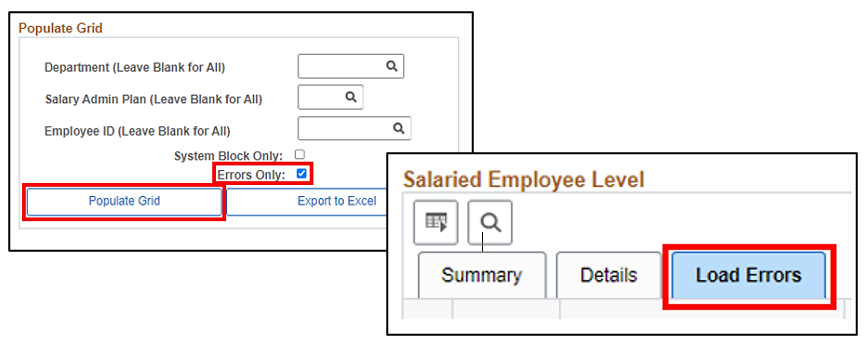
Check for Errors by selecting the Errors Only checkbox and clicking the Populate Grid button.
|
|
Errors?
-
No – The Load Errors tab will not display, and the Process Failed column in the Summary Statistics section will be “0”.
-
Yes – Review the Load Errors tab to identify any employees who did not process.
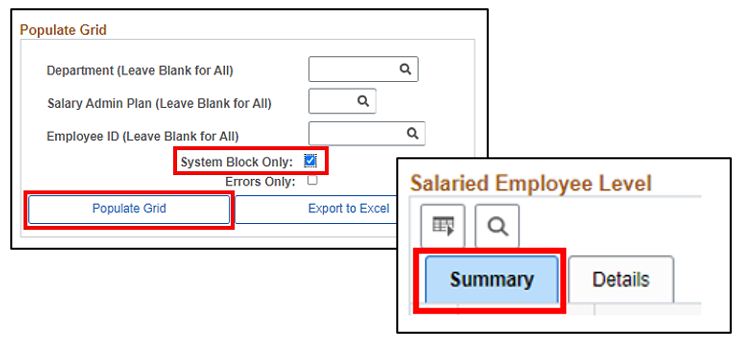
2. Check for unresolved System Blocks by selecting the System Block Only checkbox and clicking the Populate Grid button.
|
|
System Blocks?
-
No – The System Blocked column in the Summary Statistics section will be “0”.
-
Yes – Review the employees who were blocked from receiving the increase.
|
|
Action Required if Errors or System Blocks Exist:
If your agency answered “Yes” to either of the above scenarios, please review and TAKE ACTION immediately!
If an employee should have received the increase and did not, either because of a “System Block” or “Error”, agencies will need to manually add the pay rate change into Cardinal for those employees.
- Manually key the pay increase in the employee’s Job Data
-
Effective Date: June 10, 2025
-
Action: Pay Rate Change
-
Action Reason: FY26 June Statewide Increase
- Update the State Compensation Amount accordingly
-
If correction mode is needed, log a VCCC ticket with a subject of “Cardinal – HR Correction”, OR
- For increases outside the employees’ pay grade threshold, contact DHRM iHelp by sending an email to ihelp@dhrm.virginia.gov
|
|
Keying Deadlines
Agencies MUST manually enter pay increases that errored out (failed to load) by Friday, June 20, so they are reflected in the July 1 pay checks.
Minimizing Correction Tickets After Salary Increases
With over 65,000 job records now including a 6/10/2025 effective-dated row, Cardinal anticipates a significant increase in correction tickets submitted to the Post Production Support (PPS) Team.
Before making any job data changes for affected employee records, all HR Administrators should review and follow the guidance outlined in the HR354_ Using the Legislative Salary Increase Tool job aid. Specifically, refer to the section, “Ways to Minimize Correction Tickets after the Legislative Salary Increases have been entered into Cardinal”.
This proactive approach will help reduce the number of correction tickets and ensure accurate processing.
VNAV Legislative Salary Increase File
Cardinal has provided VRS with a Legislative Salary Increase (SLI) File, which includes all SLI increases processed through the Legislative Salary Increase Tool. VRS has successfully loaded this file into VNAV.
Agencies are encouraged to review the Salary Changes File Error Report in VNAV to identify any increases that did not update as expected. These records will require manual updates directly in VNAV by the agency.
|
|
Cardinal Legislative Salary Increase Support
Need guidance on processing salary increases in Cardinal? Visit our Legislative Salary Increase Support webpage on the Cardinal website! This page features quick links to helpful resources and new training modules, including a video on Addressing Errors after Salary Increase Load.
|
|
|
Regards,
The Cardinal Team
|
|
 |
|
Questions |
If you have technical or functional questions, submit a help desk ticket by emailing vccc@vita.virginia.gov and include the following information:
Subject: Cardinal – <brief summary for routing>
Email Content:
- Detailed information about your issue (i.e., functional area, page, actions, error)
- Name, email address, and best contact phone number
|
|
Cardinal - Virginia's Enterprise Resource System
You are receiving this email as a result of the role(s) you hold in the Cardinal System.
|
|
|
|