|
Staff,
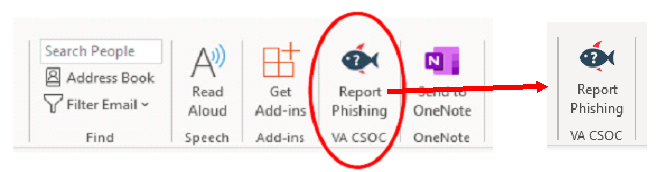
As part of VA’s efforts to combat all phishing attempts, OIT expedited the release of a new button in the Outlook toolbar on Thursday, April 9th: “Report Phishing - CSOC.” All VA employees and contractors can use this button for easy, one-click reporting of suspicious emails for review and analysis. This is particularly important given the exponential increase in phishing attempts related to the COVID-19 public health crisis.
We want to ensure that all of you understand how to recognize and use this new feature. Below is a screenshot showing what the new button looks like.
The “Report Phishing - CSOC” button streamlines the reporting process to the VA Cybersecurity Operations Center (CSOC). There are just three easy steps to report a phish:
1) Select the email in question, but don’t open it.
2) Click the “Report Phishing – CSOC” button located on the Outlook ribbon.
3) Click “Report.”
a. If you clicked the “Report Phishing – CSOC” button in error, simply click “Cancel”.
4) Once reported, the suspicious email message will automatically be removed from your Inbox.
OIT is continuously improving VA’s ability to protect and respond to digital threats VA staff face. Streamlining the phishing reporting system is the latest tool in our arsenal—but these tools are only valuable if we use them. Please remain vigilant and work with your ISSOs to secure your information and the VA network.
For more information about learning to identify phishing attempts, please visit: OIS Knowledge Service - Phishing: What You Need to Know
Sincerely,
Zulema Bolivar
Privacy Officer
Office of Resolution Management
Dept. of Veterans Affairs
(202) 461-6932
zulema.bolivar@va.gov
Office of Resolution Management Diversity & Inclusion (ORMDI)
1575 I Street NW Washington DC 20005
202-461-4064 / www.va.gov/orm
|