|
The 5600 Fishers Lane building evacuation process has been updated to reflect our hybrid work model. Please review these evacuation process instructions so that you are prepared for an evacuation event.
If the fire alarm is activated while you are working in the building, follow these steps:
1. STOP what you are doing, listen to the PA system, and follow the instructions given (see below) based on your physical location.
- The facility has a three floor evacuation process. The floor with the emergency event and the floors directly above and below it will receive evacuation messages. All other floors will receive stand-by messages.
2. If prompted by the evacuation message to leave the building:
- Using the closest stairwell to your location, walk down the stairs and exit the building promptly.
- Remember to take your PIV card to ensure you are able to return to the building easily.
- If you need assistance to evacuate, walk to the closest elevator bank and use the blue wall phone to alert security that you need assistance.
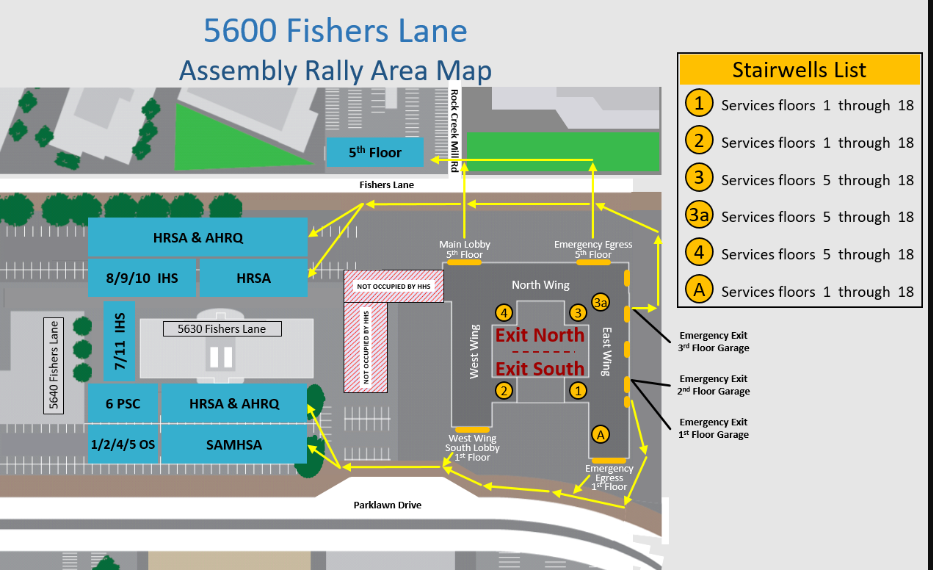
3. Once outside, walk to the HRSA assembly areas located next door at the 5630 Fishers Lane FDA facility.
- If you exit from the front/north side of the building (Fishers Lane), assemble at the 5630 north parking lot.
- If you exit from the rear/south side of the building (Parklawn Drive), assemble at 5630 south parking lot.
4. When you reach one of the HRSA assembly areas, check-in with HRSA safety personnel who will be wearing bright yellow vests. NOTE: This represents a change from the old process.
- Staff no longer meet at office rally points; they will meet in one of two agency rally points.
- All HRSA employees should report to one of the HRSA safety personnel (wearing a bright yellow vest), rather than to your direct supervisor.
- The HRSA safety personnel will ensure that all employees working in the building are present and accounted for.
5. HRSA will account for staff by using the Master Space List for those assigned a space and that day's Hotel Reservation List for those occupying a hotel space.
- For this reason, it is extremely important for hoteling staff to reserve space via the HRSA hoteling process and not “squat” in vacant spaces.
6. If you are not present in the building but are working remotely and receive an Alert HHS message, it is important that you respond to it.
- This helps HRSA account for all staff.
7. Employees who are not accounted for at the rally point will be reported to Montgomery County Department of Fire and Rescue as “missing.” In order to be accounted for, employees must do one of the following:
- Check in at the rally point; OR
- Inform their supervisor of their whereabouts; OR
- Respond to the Alert HHS message.
8. As a reminder:
- Keep your profile up-to-date in Alert HHS and include your personal contact information to ensure you receive important messages. You can update your profile in the Alert HHS (scroll down to access your Alert HHS Portal).
- If you are on-site when an evacuation occurs, ensure you are accounted for.
- Remain patient and be alert.
For more information on HRSA’s Occupant Emergency plan, visit the Division of Security Services SharePoint page. You will have the opportunity to ask questions and learn more about this evacuation plan during the next BPHC All-Hands on Wednesday, June 22.
|