Dear Site Admin Partner,
The following information
is intended to keep you up-to-date on the Homeland Security Information Network
(HSIN) Release 3’s (R3) progress and provide guidance for you and your users.
HSIN Welcomes the Terrorist Screening Center

On
August 21, the Terrorist Screening Center (TSC) joined the HSIN community.
“It’s a big deal to join HSIN. The Watch Commanders are ecstatic because HSIN
will help them accomplish their missions faster and with greater accuracy while
reducing administrative tasks,” reported TSC National Fusion Center Coordinator
SSA Jim Ackley. TSC has nearly 200 active members
in its community of interest (COI) on HSIN. If you are interested in joining
the TSC COI and you are a member of a fusion center or the Joint Terrorism Task
Force, contact Jim Ackley.
|
Roles & Permissions Update – Feedback Wanted
Based on
feedback from HSIN users and governance bodies, HSIN is looking to roll out an
updated User Roles and Permission structure. We’d like to get your feedback on
the changes.
In short,
the new permission structure:
-
Makes it easier for site owners to assign user
roles
- Enhances site security
-
Allows for easier troubleshooting
-
Enhances HSIN functionality and performance
-
Provides freedom to site owners to create custom
roles and permissions
While these changes will
not affect most Site Administrators and sites, we wanted to get your feedback
on these important changes before they are finalized. For more information, a fact
sheet, slide
deck and answers to frequently
asked questions are now on HSIN
Central under the Governance site.
Jabber Thick Client Installation
Jabber Messenger is now available for
download and use on HSIN Release 3. Now is the time to update Jabber to make
sure it's compatible with the new version of HSIN. Jabber allows secure
communication between HSIN users.
The best
resource for installing the Jabber Thick client is the page on HSIN Central at
this link. There you will find links
to the download files, detailed installation instructions and online resources
to help you use the program. This page also includes configuration instructions
and a user guide. Keep in mind, you might need to work with your network
administrator to ensure the Jabber Thick Client Version 3.2 is on the list of
approved software end users can download to their workstations.
Jabber Training Available on HSIN Central
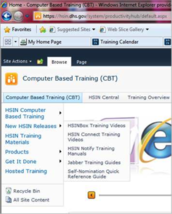
Now that Jabber updates are available for users,
it’s the perfect time to learn all you can about the Jabber Instant Messaging
Tool and how it works. Jabber Training Guides can be found on HSIN Central in the Computer Based
Training (CBT) section under the “New HSIN Releases.” You will be prompted to log in to HSIN
Connect to access these materials.
|
Save the Date: Sept 26 HSIN R3 Launch
Celebration
Invitations are going out soon,
but mark your calendars for the HSIN R3 Launch Celebration!
When: September 26, 9 a.m. – 11 a.m. EST
Where: Crystal City, Virginia and via HSIN Connect
Who: All
are WELCOME!
Speakers include:
- Richard
Chavez, Director, DHS Office of Operations Coordination and Planning
- Bill
Tarry, Principal Deputy Under Secretary, DHS Office of Intelligence and
Analysis
-
Charles
Werner, Chief of Charlottesville, VA, Fire Department
-
Donna
Roy, HSIN Program Director
You Asked, We Answered
Q: If I am not able or don’t want to be put “on hold” after calling the
Help Desk, what are my options?
A: HSIN’s new Help Desk has
a robust call handling system. The new
system will advise you of your estimated hold time and give you the option to
leave a voice mail prior to placing your call in the hold queue. Once you are placed in the hold queue, the
system will periodically update you of your expected hold time and again give
you the option to leave a message. This
process will continue until your call is answered by HSIN representative.
HSIN Community: Appearing at a
Location Near You!
- Sept 17-18: Washington State Fusion Center Analyst Conference,
Vancouver, WA – Mission Advocate Michael Zagyva
- Sept 23: Oregon Criminal Justice Information Services (CJIS) User
Workshop, Seaside, OR – Mission Advocate Michael Zagyva
- Sept 24: Big Data Symposium, Washington DC – HSIN Program Director
Donna Roy
Have an event you’ll be
going to and want to share news about HSIN? Let us know and we’ll get the word
out and/or share how it went! Please email us at HSIN.Outreach@hq.dhs.gov.
Updating Your Password is Quick and Easy!
Need to update your password? The whole process is
built into HSIN, making it easy. No call to the Help Desk is needed! From the
main login screen, select Reset Your Password. During the process,
you'll be asked for your User Login and the answers to three Challenge
Questions you provided when you signed up. Finally, you'll be asked to pick
a new password that conforms to the rules that are provided on that page. It’s
that easy!
Upcoming Outages
Please note that
the HSIN R3 system outages are always subject to change. However, be advised of
the following, currently planned outages. Final notice of an outage will always
be provided by the HSIN Service Operations Team:
-
Thursday, 8/29 (9:00 PM –
5:00 AM EDT)
| 



