Dear Site Admin Partner,
The following information is intended to keep
you up-to-date on the Homeland Security Information Network’s (HSIN) progress
and provide guidance for you and your users.
 Fusion
Centers Use HSIN to ‘Connect the Dots’ in Important Exercise
Intelligence
and Analysis, State and Local Program Office, Great Lakes Region recently
participated in the DHS Chief Intelligence Officer Table Top Exercise (CINT
TTX), from July 22 - Aug 2 which was a prevention/protection exercise. The Exercise included more than 55
participants across six states, which brought together 11 fusion centers.
To facilitate fusion center threat and incident information
sharing, coordination, and analysis, the National Network of Fusion Centers
(National Network) leveraged HSIN to establish the “National Situational
Awareness Room”. The National Situational Awareness Room is a standing
HSIN Connect capability designed to support fusion centers, agencies, and
partners with real-time information sharing and analysis. In response to
CINT TTX threat injects, Great Lakes region fusion centers, successfully used
the National Situational Awareness Room to regionally share threat information,
inform partners of critical information, and conduct analysis necessary to
successfully respond to several complex threat streams.
The CINT TTX, an exercise series managed by DHS’ Office of
Intelligence and Analysis, examines the DHS Intelligence Enterprise (IE) leadership’s
ability to communicate, coordinate, and respond to an emerging threat. This
year’s CINT TTX was expanded to provide participating fusion centers an
opportunity to receive, analyze, and share threat information with National
Network partners to develop a regional threat assessment and work with federal
partners to contribute to a comprehensive national threat assessment.
|
NOTICE: ALL HSIN Legacy Servers will be Shut Down Aug
18. Download all Connect, JABBER, Notify content before Aug 16!
All HSIN Site migrations are complete and we are preparing
to shut down the HSIN Legacy Platform. If there is any content on Legacy that
you might want to use in new site activations, you must download the content
BEFORE Friday, August 16.
By August 16, please download all recorded meeting content
housed within HSIN Legacy Connect (old system), including JABBER and Notify,
that you would like to keep for future use. Meetings and content created
before January 1, 2013 were migrated to HSIN Adobe Connect in Release 3, but
items created since then in HSIN Connect have to be downloaded manually to
save.
It’s easy to save your HSIN
Legacy Connect content (and you’ll want to do it before August 16!). The HSIN
Legacy system will be shut off at midnight on August 18. Super helpful
instructions on how to download and save all your content and recorded meetings
in HSIN Connect on Legacy can be found here: HSIN Legacy Connect Instructions.pdf.
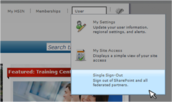 Use Single Sign-Out to Protect Data and Avoid Sign On
Challenges
Some
users who have been closing their browsers instead of using the Single Sign-Out
tool have been experiencing problems trying to get back in to the system. The
reason for this is the use of session-based cookies (small files temporarily
stored on your machine to hold data for the period you’re signed in) to manage
your experience. Skipping the Single Sign-Out step can cause these cookies to
temporarily persist, keeping a new system from starting.
If you did not previously use Single Sign-Out and are having
trouble logging back in, the best solution is to clear your browser’s cookies.
For Internet Explorer 7, 8 and 9, follow these steps:
- Select Tools
> Delete Browsing History
-
Make sure the Cookies option is selected
Note: Depending on how long your browser has been
collecting cookies, the final processing could take up to a minute.
Why Single Sign-Out
is Important
HSIN provides the Single Sign-Out feature that enables you
to protect your data when you are using a public computer. HSIN has a timeout
feature after 30 minutes. This means that, if there is no activity on your HSIN
screen for 30 minutes, the system will log you out and prompt you for your
UserID/Password. However, during the 30 minutes, if you had an active session
and just closed your browser to exit then someone else can open that browser
session and access your HSIN data.
Security
Tip: Use Single Sign-Out if you are using a public computer, need to access
and use a HSIN session and don’t plan on being on the system for longer than 30
minutes. Just closing out the browser leaves an active session for the next 30
minutes and allows someone else to open that same browser session.
Bottom
Line: It’s a good security practice to always use Single Sign-Out to exit a
HSIN session.
|
Don’t Forget: HSIN
User Working Group (HUWG) Meeting
The
next HSIN User Working Group (HUWG) meeting is
scheduled for August 20, 2013. The HUWG provides strategic guidance to
the HSIN Program on all issues pertaining to its communications, stakeholder
management, policy/governance functions, etc. For more information about the
upcoming HUWG meetings, please contact the HSIN Outreach Team: hsin.outreach@hq.dhs.gov.
HSIN Training Materials
Available
We are pleased to announce
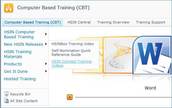
that HSIN Connect training materials are available on HSIN. The HSIN
Connect training videos and user guide can be found on the Computer Based
Training (CBT) site under the New HSIN Releases section (CBT site link below). Please note that you will be prompted to log into HSIN Connect using your HSIN
R3 credentials in order to access these videos. Once the Jabber and
ListServ materials are completed, we will add those materials/videos to the CBT
site: https://hsin.dhs.gov/system/productivityhub/default.aspx.
|
HSIN Community: Appearing at a Location Near You!
-
Aug 13-15: Northwest Tribal Emergency Management
Council (NWTEMC) Tribal Emergency Preparedness Conference, Spokane, WA.
Speakers: Michael Zagyva, Mission Advocate
- Aug 13-17: International Association of Fire
Chiefs (IAFC) Annual Conference & Expo Fire-Rescue International (FRI),
Chicago, IL. Speakers: Fire Chief Charles Werner, City of Charlottesville and
HSIN Policy, Outreach and Communications Manager Michael Brody will brief the
IAFC Terrorism and Homeland Security Committee.
-
Aug 15: High Intensity Drug Trafficking Areas
(HIDTA) Directors’ Meeting, San Francisco, CA. Speaker: Andy Sloan, Mission Advocate
- Aug 20-21: Law Enforcement Intelligence and
Security Informatics (LEISSI), Washington, DC,
Roundtable – HSIN Program Director Donna Roy
Have an event you’ll be
going to and want to share news about HSIN? Let us know and we’ll get the word
out and/or share how it went! Please email us at hsin.outreach@hq.dhs.gov.
You Asked,
We Answered
Q: When I log in to HSIN, sometimes the system appears to hang up and
then it times out. Why does this happen and what can I do to fix the problem?
A: This is a known issue and we are working to identify the root cause
of the problem. In the meantime, the workaround solution is log out of HSIN and
log back in to correct the error message.
Q: What is HSIN is doing to ensure higher tiers of support are
available (or at least on call), especially during high profile days such as
holidays with numerous special events (i.e. July 4th)?
A: HSIN provides 24/7 call center support. Currently, our call
center resolves more than 75 percent (industry average is 63 percent) of all
calls during the initial call for support. For issues that cannot be
resolved during the initial call, our call center will escalate your issue to
an application support specialist. The application support specialist
works to resolve all escalated issues. In most cases, scheduled
appointments will be made to ensure the resolution meets expectation.
For special events, HSIN has additional support staff on call to ensure
sufficient support to the HSIN community.
UPDATE Upcoming Outages
Please note that the HSIN R3 system outages are always subject to change.
However, be advised of the following, currently planned outages. Final notice
of an outage will always be provided by the HSIN Service Operations Team:
- Thursday, 8/15 (9:00 PM – 5:00 AM EDT)
-
Monday, 8/19 (9:00 PM – 5:00 AM EDT)
-
Tuesday,
8/20 (9:00 PM – 5:00 AM EDT
 Help Desk is Just an Email Away!
A great way to reach the Help Desk
is through email: hsin.helpdesk@hq.dhs.gov. Just send a quick note
explaining your question or issue and the Help Desk will respond. Be sure to
include your question/issue in the subject line and always provide contact
information. Following these simple guidelines will ensure a prompt
response from the Help Desk and expedite the resolution of your problem.
Please contact the HSIN Outreach Team at hsin.outreach@hq.dhs.gov with comments and/or questions. Thank you for your
interest in HSIN R3!
|




