Dear Valued HSIN Partner,
The Number of Approved HSIN Release 3 (R3) Users in Primary Sites Reaches Record Numbers
We are pleased to announce that over 12,000 users are now approved into their primary site on HSIN R3!
Another Big Week for Large-Scale Migrations to HSIN R3
We are pleased to welcome the following large-scale migration to HSIN R3:
National Protection and Programs Directorate (NPPD): leads the national effort to protect and enhance the resilience of the nation’s physical and cyber infrastructure.
HSIN Used to Securely Share Fourth of July Information
The Major Cities Chiefs Association (MCAA) connected 20 major police departments across the country using HSIN Adobe Connect during Fourth of July festivities to monitor for emerging trends in suspicious incidents, and instantly share threat assessments, documents, and images. “HSIN’s tools allowed us to share information and collaborate in real-time with trusted, vetted individuals around the country,” said Las Vegas Metro Police Assistant Sheriff Greg McCurdy, the chair of the MCAA Intel Commanders Group. “Before HSIN, we would have to send emails and respond to phone calls in order to update our law enforcement counterparts across the country. The efficiency of sharing information real time in a secure space significantly improves our prevention and response capabilities.” For more information on HSIN’s use during this year’s Fourth of July festivities, please contact the HSIN Outreach office: hsin.outreach@hq.dhs.gov
Training Opportunities
Remember that we are continuing to expand the number of HSIN R3 training opportunities. Currently there are two types of training: Instructor-Led and Computer Based Training (CBT). You can register for training sessions by logging into HSIN R3 and following the link: https://hsin.dhs.gov/Training/Pages/Overview.aspx. CBTs are also now available on new HSIN releases at: https://hsin.dhs.gov/system/productivityhub/default.aspx . If you have any questions regarding training, contact the HSIN Outreach Team at hsin.outreach@hq.dhs.gov for assistance.
|
You Asked…We Answered:
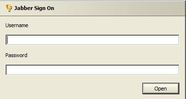
”How do I login to Jabber Thin Client?
First you need to make sure that you add “chat.dhs.gov” to your trusted sites in your browser settings to allow pop-ups from this site. Then, follow these two steps:
Step 1) Navigate to Jabber Thin Client: https://chat.dhs.gov/JMWeb/ Or from HSIN R3, click on the Toolbox Icon and Click on the Instant Messaging (Jabber) link.
Step 2) Login with your HSIN R3 credentials.
|
|
 |
Upcoming Outages
Please note that the HSIN R3 system outages are always subject to change. However, be advised of the following, currently planned outages. Final notice of an outage will always be provided by the HSIN Service Operations Team:
-
7/19/13- 7/20/13 – 11PM EDT to 5 AM EDT
Please contact the HSIN Outreach Team at hsin.outreach@hq.dhs.gov with comments and/or questions.
Thank you for your interest in HSIN R3!
| 



