|
Password Reset Is Now
Easier In E-Verify! |
|

E-Verify has updated its password reset process to enhance the security of user accounts. You can now request that a password reset message be sent to the email address associated with your User ID.
Please review your User Profile regularly to confirm it has the correct email address, name, and telephone number associated with your User ID.
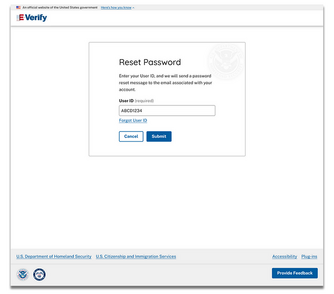
To reset a password, select the “Forgot Password” link from the E-Verify login page and you will be directed to the “Reset Password” page.
|
Image: "Reset Password" screen capture.
Then, enter your User ID into the “User ID” field and select the “Submit” button.
- E-Verify will send a password reset message to the email address associated with the User ID.
- The password reset email will include a clickable link with a one-time code that will direct you to the “Change Password” page in E-Verify.
- You will be prompted to enter a new password.
- Once a new password is established, you will be signed out of all current sessions and prompted to return to the E-Verify login page.
- The password reset link will be available for 30 minutes. If a new password is not created within 30 minutes, you will need to repeat the process to reset your password.
If you receive notice that your account is locked due to incorrect password attempts or 270 days of inactivity, you will automatically be directed to the “Account Locked” page.
- Select the “Reset Password” button and follow the steps outlined above.
You will no longer establish and maintain security questions in your profile. Previously established security questions along with the option to “Change Security Questions” will be removed from the “User Profile” page. You may still contact a program administrator to reset a password.
If you have questions, please email E-Verify@uscis.dhs.gov.
|
|
|
|