
Direct Access Known Issue: XMLP Error When Trying to Generate Reports/PDFs (EERs, Orders, Contracts, etc.)
U.S. Coast Guard sent this bulletin at 05/17/2017 12:09 PM EDT
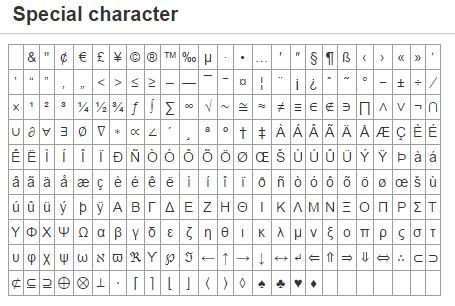
Direct Access does NOT tolerate special characters in text fields. We have had several tickets submitted stating EER Counseling Reports, Orders, Contracts, and other reports return an "XMLP" error and would not generate or would be blank when printed. Words like "décor and entrée" are considered special characters due to the "e" being like the Latin "e". LOTS of people use email to draft the comments and then paste them into DA. The default font in Outlook (and/or MS Word) will automatically put in special characters in certain words.
If you have any report, i.e. Orders, EERs, CG Member Info, contracts, extension, etc, that return an "XMLP" error and will not generate or are blank when printed, carefully look at all the text entered to ensure no special characters have been used. Special characters, which cannot be used in Direct Access text fields are shown below:
This is an update from the U. S. Coast Guard Pay & Personnel Center in Topeka, KS. We use this distribution list to keep our customers informed about USCG Travel policy, the TPAX travel claim system, the Direct Access HR system, and matters pertaining to military pay and benefits.If you are no longer interested in receiving updates from PPC, please follow the link (at the end of this message) in the SUBSCRIBER SERVICES section to unsubscribe. Address any comments, concerns, or questions to richard.a.etheridge@uscg.mil. Also, please contact me by email if you have an announcement you would like to share with our customers

 |
Questions for the Coast Guard? Contact Us |
For more Coast Guard news, visit our online newsroom here.
| STAY CONNECTED: | ||||
 |
 |
 |
 |
|
SUBSCRIBER SERVICES:
Manage Preferences | Unsubscribe | Help
Privacy Policy | GovDelivery is providing this information on behalf of U.S. Department of Homeland Security, and may not use the information for any other purposes.
This email was sent to Email Address