Quarterly Sponsor Call
Join us for the next sponsor call hosted on *Wednesday, Feb. 26, at 3 p.m. ET. This will be an exciting call, as we will kick off the celebration and recognition of the AmeriCorps VISTA program's 60th anniversary. An outline of the call is included below.
- Program Updates
- AmeriCorps VISTA Budget
- Updated Sponsor and Member Handbooks
- VISTA Progress Report Supplement Highlight
- Upcoming Sponsor and Member Training Opportunities
- AmeriCorps VISTA 60th Anniversary Highlight
- Panel Discussion: The Early Years of AmeriCorps VISTA - Alumni Stories from the 60s, 70s, and 80s
Webinar ID: 161 025 4452
Passcode: 614205
Dial-in Number: 833-568-8864 (toll free)
*Beginning in February, the time for the sponsor calls will be increased by 30 minutes. The calls will begin at 3 p.m. ET and will end at 4:30 p.m. ET. This will allow more time to share information and answer questions.
NEW: IRS Direct File
With tax season starting on Monday, Jan. 27, we want to make sure you’re aware of the IRS’s tax filing service, IRS Direct File. We have teamed up with the IRS to get the word out about this important program. Eligible people can choose this online option to file their federal taxes directly with the IRS for free! It’s available in English and Spanish, works on mobile devices as well as it does on tablets and personal computers, and includes dedicated live chat support from IRS customer service specialists.
If you’re interested, get ready to use Direct File starting on the first day of the tax filing season if you are ready to file. The Direct File’s Eligibility Checker will quickly help you find out if your tax situation is supported before you file, and if you’re not eligible to use Direct File this year, the service will connect you to alternative filing options. More information about the tax situations supported by Direct File is available at directfile.irs.gov. Direct File is open to people who lived in one of Direct File’s 25 states in 2024 for the entire year, including Alaska, Arizona, California, Connecticut, Florida, Idaho, Illinois, Kansas, Maine, Maryland, Massachusetts, Nevada, New Hampshire, New Jersey, New Mexico, New York, North Carolina, Oregon, Pennsylvania, South Dakota, Tennessee, Texas, Washington, Wisconsin, and Wyoming.
For more information about IRS Direct File, please visit directfile.irs.gov.
NEW: Recognition Program
for Afterschool and Summer Learning Programs
Applications are now live for the U.S. Department of Education's 2024-25 Recognition Program. This program recognizes nonprofit organizations, city municipalities or local government entities, and local educational agencies working together to engage students in high-quality afterschool and summer learning programs. The application closes on Friday, Jan. 31, at 11:59 p.m. ET.
NEW: AmeriCorps Recruitment Call
Join AmeriCorps' next recruitment call, “Cross Program and Collaborative Recruitment Efforts.” The AmeriCorps Centralized Recruitment Unit will share how to cultivate reciprocal partnerships with other AmeriCorps programs in your community, state, and region to boost recruitment across programs. The call will include optional breakout room discussion time from 2:45 p.m. to 3 p.m. ET.
Cross Program and Collaborative Recruitment Efforts
Wednesday, Feb. 19, 2 p.m. ET
Explore our schedule of upcoming recruitment calls. Interested in sharing your recruitment best practices during an upcoming call? Email join@americorps.gov.
Change to Member Health Insurance
Beginning in January, IMG Health Insurance is changing the company that has been providing insurance services to AmeriCorps VISTA members. IMG is moving from First Health to United Healthcare for coverage.
Due to United Healthcare’s more expansive network, IMG anticipates greater coverage for members and minimal changes to members' current providers while improving benefits and reducing costs.
After Wednesday, Jan. 1, members should dispose of their hard copy IMG First Health cards and/or saved electronic IMG ID cards and obtain a new electronic copy from their IMG portal account. If they’d like a new hard copy of the card, they can email IMG to request one.
More details will be available on the AmeriCorps IMG portal. IMG can be contacted at 1.855.851.2974 and VISTAcare@imglobal.com.
Member Service Gear
All new AmeriCorps members serving in the VISTA program should receive an invitation to order their AmeriCorps gear no later than two weeks after each member orientation. Members need to access their account within 30 days and are eligible to receive a polo shirt, t-shirt, hoodie, winter hat, water bottle, journal, and lapel pin.
If members cannot find their invitations or need more assistance with ordering their gear, contact VISTAGear@americorps.gov.
NEW: AmeriCorps Announces
New Digital Asset Manager: Aprimo
You can now access AmeriCorps photos, videos, factsheets, and other brand resources and materials on Aprimo. This resource will continuously be updated as we receive more assets.
AmeriCorps VISTA Sponsor Toolkit
Do you need help telling your AmeriCorps VISTA story? With the AmeriCorps VISTA Sponsor Toolkit, you can share your AmeriCorps story and encourage more individuals to meet the urgent needs of their communities. You can find messaging, recruitment resources, social media graphics, and more in the toolkit.
AmeriCorps VISTA is Social
Follow us on the platforms below to join the conversation and to see how AmeriCorps VISTA partners - like you - are making a difference.
Facebook | X (formerly Twitter) | LinkedIn | Instagram
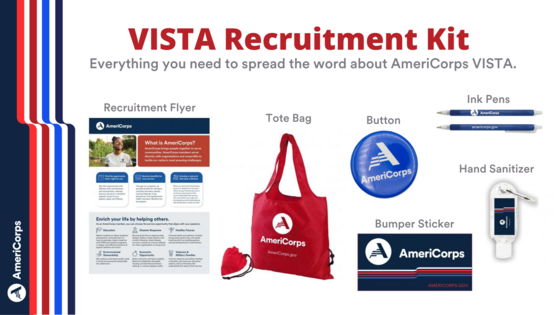
Order Your Recruitment Kit
Recruitment promotional items are now available to support your recruitment and outreach efforts. To place an order:
- Create an account on the AmeriCorps promotional items website
- Use Item Name or SKU Number to easily search for each item:
AmeriCorps VISTA Bumper Sticker - VM1016 (Max order is 50)
AmeriCorps VISTA Round Button - VM10002 (Max order is 50)
AmeriCorps VISTA Ink Pen - VM1014 (Max order is 100)
AmeriCorps VISTA Hand Sanitizer - VM1126 (Max order is 50)
AmeriCorps VISTA Foldable Tote - VM1027 (Max order is 50)
3. After filling your basket, click “Check Out.”
4. Enter your shipping address. No PO Boxes will be accepted.
5. Click “Continue to Review.”
In the Order Justification box, please include the following: Name of your organization + SPONKITFY25.
|