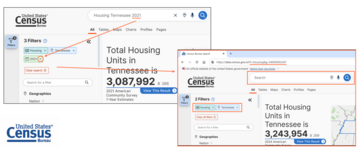
We’ve introduced several highly requested updates to make navigation easier and improve your overall experience. These enhancements focus on usability and give you more control.
Lock Icon Removed
Users can now click the X icon to remove any selected filter, even if that filter was created through text entered in the single search bar. This means you no longer have to clear your entire search and start over. You can remove individual filters quickly and continue refining results more efficiently.
Reordered Table Toolbar
We’ve reordered the table toolbar to improve usability and better match how users interact with tables.
When viewing hierarchical tables (like Decennial Census or American Community Survey tables), table-specific options are now presented first. We put actions like download, share, and cite first so you can use the table right away, since hierarchical tables are usually ready to go as-is.
When viewing flat tables (like Economic or Population Estimates Program tables), we show table editing options first, including filtering data, sorting columns, or adding extra codes. Because these tables are large and complex, you often need to customize them before using them.
Alphabetical Scroll Bars
New alphabetical A to Z scroll bars have been added to filter panels. You can click or tap a letter to jump to that section of the list. This feature is now found in many of the filter panels to select geographies and population groups in data.census.gov and the Microdata Access Tool. This is especially useful for users who already know the geography they’re looking for.
Can I modify tables, download data, and print data?
Currently, you can transpose columns and rows in data tables as well as hide columns. For some tables, the site allows you to also rearrange columns, apply pivots, and apply custom filters to keep rows of data that meet certain criteria.
The site also offers the ability to download data tables in Excel, CSV, and ZIP formats (with the ability to download multiple years bundled together in the same ZIP file). You can also copy parts of a table, with or without headers, and paste those parts into Excel.
You can print maps or small tables and their respective notes by clicking the “Print” button. The first page of the table will print, so far larger tables, we recommend exporting the table to Excel and printing from there.
Join us on January 27 as we highlight the latest enhancements to data.census.gov, featuring our December 2025 release as well as a comprehensive review of the most significant improvements of 2025.
Data.census.gov is the primary platform to access data and digital content from the U.S. Census Bureau. We continuously update data.census.gov with new data from our most popular survey and programs, as well as system enhancements to improve your experience on the platform.