
Software Update Required: New Versions of AESPcLink Available
April 4, 2012
Broadcast #2012028
Software Update Required: New Versions of AESPcLink Available
This message is for AESPcLink users only
AESPcLink Standard and Network Edition have been updated to improve functionality. You must update the program manually.
AESPcLink Standard Edition Version 8.3.
AESPcLink Network Edition Version 3.2.
How to upgrade to the new versions
AESPcLink Standard Edition
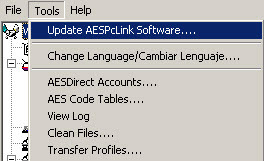
Go to the Tools Menu and click on “Update AESPCLink Software”
Windows 7 and Windows Vista Users
If you are running on Windows Vista or Windows 7, you will need to run AESPCLink as an administrator to launch the update.
1) Right click on the "Launch AESPcLink" icon.
2) Choose the "Run as administrator" option.
For additional help, contact technical support at -1-877-715-4433.
AESPcLink Network Edition
Designated Administrators must download the new versions of the Server and Client by using the “Update Software” function on the “Advanced Options” tab of the Server admin utility. Both the client and the server need to be upgraded to Version 3.2.
Once administrators have upgraded, instruct users to upgrade their installations of the program by going to the Tools menu and clicking on “Update AESPCLink Software…”
For further information or questions, contact the U.S. Census Bureau's AES Branch.
Telephone: (800) 549-0595, select option 1 for AES
Email: askaes@census.gov
Online: www.census.gov/trade.
Blog: blogs.census.gov/globalreach


