



Ysgol Clywedog May 2020

YCTopBanner

Newsletter  35 - May 2020

Distance Learning

COVID Update

Stay Home, Stay Safe - Ysgol Clywedog Edition


visors

Increased production of NHS Face Shields

Wrexham Secondary Schools have risen to the challenge to create protective equipment for doctors and nurses on the front line during the corona-virus pandemic, with many Design and Technology Departments creating face shields and visors for Healthcare Workers.

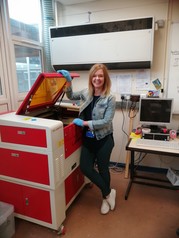
At Ysgol Clywedog, Joan Brown and Nick Clarke in the Design and Technology Department have been using the department’s laser cutter to make face shields to protect healthcare workers from Covid-19 alongside 3D printed visors.

Headteacher Matt Vickery said: "Joan and Nick deserve all the credit for making the face shields and delivering them to a variety of healthcare settings across Wrexham. The school has also donated its stock of science safety goggles to the Maelor Hospital in Wrexham."

Across the county, secondary schools have made over 3500 visors that are now being used by front-line staff and other key workers.


Summer 2020 Exam results consultation from Qualifications Wales.

Qualification Wales are currently running a consultation setting out how, in the absence of exams, this year’s GCSE, AS and A level grades will be standardised across the country and how the appeals process will work. 

They are seeking views on two key aspects for summer 2020. 

  • The aims which will underpin the statistical standardisation model that will be used for the award of grades for learners taking the affected qualifications. This will be developed and used by WJEC to ensure that grades submitted by centres across Wales are judged at the same level. 

  • The specific appeals process that is needed for the 2020 summer exam series given that papers will not be marked in the usual way. 

They do realise there are no perfect solutions and are conscious that these proposals may be seen as less desirable than the normal arrangements. But if you disagree with the proposals and have viable alternatives or suggestions, they want to hear them. 

The consultation runs until 5pm on Wednesday 13 May. Full details are on their website.


Distance Learning


How to use our school’s Google Classroom

Follow these steps so your child can continue to complete learning activities, hand them in, and get feedback from teachers while they can’t come into school.

A help page can be found here and if you need any assistance, please email vle@clywedog.org  

We have created a weekly timetable structure for years, 7, 8 and 9 here and for year 10 here.

Smartphones and tablets: download the free Google Classroom app

Android devices iOS devices (iPhones, iPods, and iPads)
  Open the Play Store app


Search for ‘Google Classroom’

Tap ‘Google Classroom’

Tap ‘Install’

  Open the App Store app


Search for ‘Google Classroom’

Tap ‘Google Classroom’

Tap ‘Get’


Once the app has downloaded, open it and log in to your child’s G Suite for Education account.

  • Tap the ‘+’ icon (in the top-right corner), then ‘Join class’
  • Enter the class code that your child’s teacher has sent to you, then tap ‘Join


Computers and laptops: log in to Google Classroom

  • Go to classroom.google.com
  • Log in with your child’s G Suite for Education account (their 2S account)
  • Click the ‘+’ icon (in the top-right corner), then ‘Join class’
  • Enter the class code that your child’s teacher has sent to you, then click ‘Join’
  • All codes are available here

If you can’t remember your child’s log-in details, contact vle@clywedog.org


How to get and hand in work (computers and laptops)

  • Go to Google Classroom
  • Click ‘Classwork’
  • Click on an assignment, then ‘View assignment’
  • On the right-hand side of the page, click ‘Add or create’. Depending on the type of work the teacher has set:
  • You can take photos of your child’s completed work, upload them to your computer and then upload the photos in Google Classroom – click ‘File’, then ‘Select files from your device’, then ‘Upload’
  • Or, your child can type up their answers in a Google Doc – click ‘Docs’ to load a new Google Doc
  • Once your child has finished their work, click ‘Hand in’, then ‘Hand in’ again to confirm

If you’ve made a mistake, you can click ‘Unsubmit’ to return the work to you, then follow steps 4 and 5 to resubmit work.


How to hand in work (mobile devices – Android or iOS)

  • Open the Google Classroom app
  • Tap on your child’s class, then ‘Classwork’ (at the bottom)
  • Tap on an assignment, then the arrow at the bottom
  • Tap ‘Add attachment’. Depending on the type of work the teacher has set:
  • You can take photos of your child’s completed work, upload them to your computer and then upload the photos in Google Classroom – click ‘File’, then tap the file on your device
  • Or, your child can type up their answers in a Google Doc – tap ‘New Doc’ to load a new Google Doc
  • Once your child has finished their work, tap ‘Hand in’, then ‘Hand in’ again to confirm

If you’ve made a mistake, you can click ‘Unsubmit’ to return the work to you, then follow steps 4 and 5 to resubmit work.

Once work has been marked, your child will be told by email

You can also find all their returned work by following the steps below.

On a computer or laptop

  • Go to Google Classroom, then click ‘Classwork’
  • Click ‘View your work’
  • Click ‘Returned with grade’ on the left-hand side

On a mobile device (Android or iOS)

  • Open the Google Classroom app
  • Tap on your child’s class, then ‘Classwork’

Once you’ve found the assignment, click or tap on any attached files to see the teacher’s feedback.

Ysgol Clywedog


Coronavirus; supporting child wellbeing

Wellbeing tips for schools from Wrexham Educational Psychology Service:

  • Give some time to talk and process what is happening, with children and as a group too. But also make sure that Coronavirus is not the only thing being talked about. Some people may wish to talk a lot about this, and others may not.
  • Consider asking about what children have heard about the virus and the situation so that you can correct possible misconceptions and reassure them.
  • Remember to keep things positive and give children hope. For example, tell children that now many people are working to make this better and that even though it is serious, everyone is doing their best to help people.
  • Remember that people react differently to significant events. Some people – children and staff – may feel worried, some excited, some nothing much at all. Reassure children that this is all normal and okay.
  • Keep to daily school routines as much as possible. Well-known routines in everyday life provide security and stability. Routine during unrest can be therapeutic, and changes particularly unsettling for some. If there are changes to routine, consider which children may need some extra help with this.
  • Identify colleagues whose wellbeing may be more at risk. For example, there may be people who have experienced anxiety in the past.
  • Stay informed by sticking to trusted sources of information. Avoid being too immersed in media coverage. Be mindful of the amount of things you are reading and watching, including social media – as this may add to worry and anxiety. Consider a few updates every day from trusted sources.
  • As an adult you may be concerned yourself. Take care of yourself and make sure you have breaks, time to relax, and ask for help from others if you need.

Some useful links:

NHS advice:

https://www.nhs.uk/conditions/coronavirus-covid-19/

Talking to children about Coronavirus

Advice on talking to children about Coronavirus, by British Psychological Society:

https://www.bps.org.uk/news-and-policy/bps-highlights-importance-talking-children-about-coronavirus

How to talk to your child about coronavirus, by Childmind:

https://childmind.org/article/talking-to-kids-about-the-coronavirus/

A child-friendly video explaining Coronavirus: https://www.brainpop.com/health/diseasesinjuriesandconditions/coronavirus/

Child-friendly explanation of Coronavirus for Primary age students:

https://660919d3-b85b-43c3-a3ad-3de6a9d37099.filesusr.com/ugd/64c685_319c5acf38d34604b537ac9fae37fc80.pdf

Information video on Coronavirus for older children/adults, by WHO:

https://www.youtube.com/watch?v=mOV1aBVYKGA&feature=youtu.be

Supporting Children/Adolescents Wellbeing

https://youngminds.org.uk/blog/what-to-do-if-you-re-anxious-about-coronavirus/

Your wellbeing

Coronavirus and your wellbeing, by Mind UK:

https://www.mind.org.uk/information-support/coronavirus-and-your-wellbeing/

5 ways to wellbeing, by Mindkit:

https://www.mindkit.org.uk/5-ways-to-wellbeing/


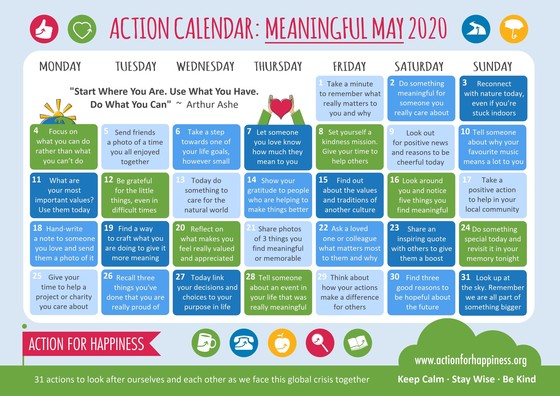
Mindful May

What's On


  • May - School closed - Open for children of Key Workers or vulnerable students.
  • The School Calendar and term dates for 2019-2020 can be found here
