Less Than Full Pack Size Order Requests Processed as Transfers
Full pack size orders and less than full pack size orders of COVID-19 vaccine are processed in VAOS differently. The two distinct processes are outlined below:
When a provider places a full pack size order of vaccine in VAOS, DSHS processes the order request, and the manufacturer of the vaccine sends the full pack of vaccine to the provider. Upon receiving the shipment, the provider confirms receipt of shipment in VAOS.
When a provider places a less than full pack size order in VAOS, the order is processed as a transfer and providers do not need to confirm receipt of shipment in VAOS. This is because DSHS receives the order and fulfills the request from the state supply of vaccine. Either Health Hero America will deliver the shipment, or a local health department will arrange delivery or pickup. If Health Hero America delivers the shipment, then the following Monday the provider will receive two emails notifying them that a transfer has been initiated and approved. These emails refer to the shipment they already received. At this point their vaccine inventory in VAOS will be updated and they may begin to administer the doses received in the shipment.
For more details about these two ordering processes, please view our COVID-19 Vaccine Order Requests in VAOS job aid.
Pfizer COVID-19 Vaccine Booster Dose
The US Food and Drug Administration has scheduled the following meetings with its Vaccines and Related Biological Products Advisory Committee:
- October 14, 2021: Moderna COVID-19 Boosters
- October 15, 2021: Janssen COVID-19 Boosters
- October 26, 2021: Pfizer COVID-19 Vaccine for 5-11 years of age
These FDA meetings are considered the first step in the authorization and approval process. Should the FDA decide to authorize any or all of the aforementioned boosters or vaccines, then the CDC’s Advisory Committee on Immunization Practices (ACIP) will meet to make a formal recommendation.
Attend our Texas Providers Webinars every Tuesday from 12:00 p.m. to 1:00 p.m. Central Time to stay up to date on the latest booster dose updates.
Reminder: Reporting Vaccine Waste
In the October 5th DSHS Texas Providers Webinar, subject matter experts discussed how and when to report COVID-19 vaccine waste in VAOS.
As a reminder, it is important to report waste in VAOS daily. Navigate to the Vaccine Loss module in VAOS, select New, and enter the required information in the New Vaccine Use pop-up window.
For a step-by-step guide to reporting vaccine waste in VAOS, visit our COVID-19 Vaccine Waste job aid.
Stay One Step Ahead and Begin Placing Separate Order Requests for Different Vaccine Presentations
Starting next week, VAOS will undergo an update which will require providers to place a separate order request for each COVID-19 vaccine presentation they wish to order. For example, if a provider wants to order both Moderna and Pfizer COVID-19 vaccine, they will need to place two separate order requests in VAOS, one for each vaccine presentation. This change will allow vaccine order requests to be tracked more effectively and will result in more efficient delivery turnaround.
In preparation of this change, providers are encouraged to begin placing separate orders when ordering two or more vaccine presentations in VAOS. Please note that once the change has gone into effect, you will see an error message if you try to order more than one vaccine presentation in the same order request.
Expert Tip: Magnifying Glass Tool in VAOS
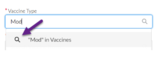
Have you ever started typing into a field in VAOS and the number or word you are searching for doesn’t appear in the menu of options below? The magnifying glass tool is here to help!
To use the magnifying glass tool, begin typing in the search field whatever you are searching for, whether that’s a facility name, a vaccine type, or a VI number. Then, select the magnifying glass that appears below and a pop-up window will appear with a list of relevant search results you can choose from.
|
|