What Happens in eXPRS?
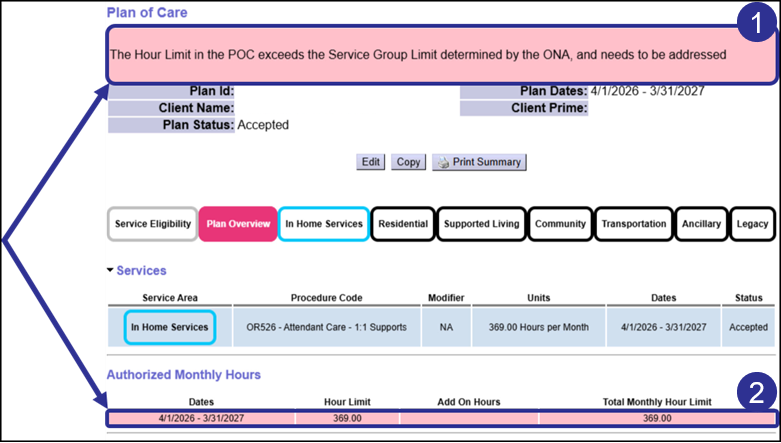
When an individual’s Service Group decreases in the middle of their plan year, eXPRS may display a new message on the Plan of Care. This will occur when an existing Authorized Monthly Hours > In-Home Hours segment is now above the individual’s new Service Group hour limit. In these instances:
- (1) A pink banner will appear at the top of the page.
- (2) Any hours segments that are above the individual’s new Service Group limit will also highlight pink.
These alerts do not affect how the Plan of Care functions. Instead, they indicate to Case Management Entity staff that one or more Authorized Monthly Hours segments on the Plan of Care exceeds the Service Group hour limit, and that this needs to be addressed.
For example, in the screenshot above, the individual was an Adult in Service Group 4. After receiving a new assessment on 5/15/2026, they were assigned to Service Group 2. This new service group becomes active on 7/1/2026. As a result, the page has the pink banner (1), and the previous Hour Limit Segment is highlighted pink (2), indicating that action is needed.
Before making changes to lower the Authorized Monthly Hours, analysis needs to be completed on Plan Lines and Service Prior Authorizations that are on the Plan of Care. This is because:
- Hour limits on Service Prior Authorizations reconcile to the Plan Line hour limit
- Hour limits on Plan Lines reconcile to the Authorized Monthly Hour limit.
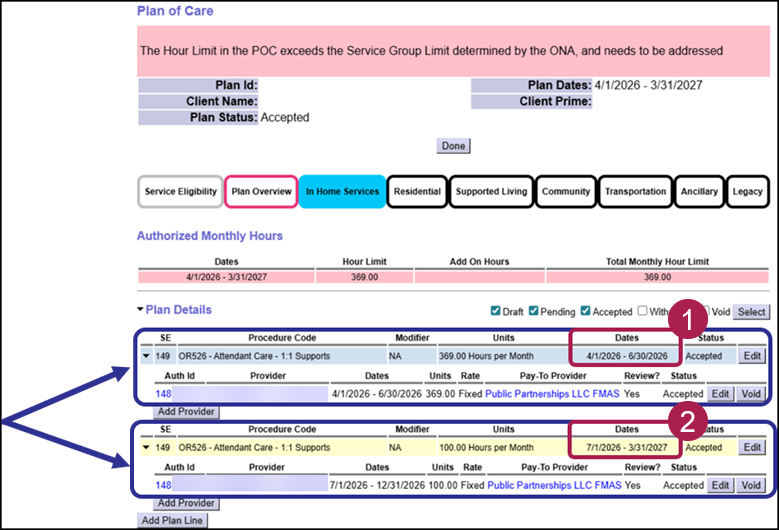
Case Management Entity staff may need to make changes to Service Prior Authorization and Plan Line hour limits in order to allow the Authorized Monthly Hours to be updated. For example, in the Screenshot below, a Plan of Care Super User has split the original Plan Line and authorization (1) as of 6/30/2026. This allows a new Plan Line and authorization (2) to be created that starts on 7/1/2026, which is the day that the individual’s new, lower Service Group takes effect.
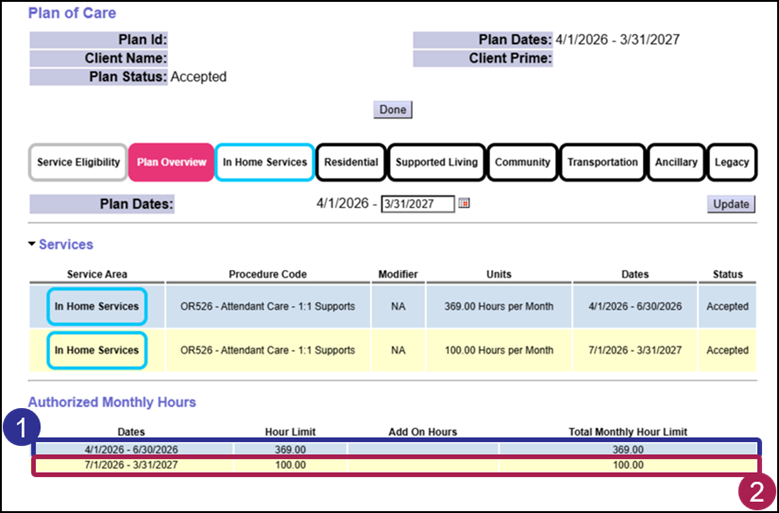
Once that is complete, then the Authorized Monthly Hours segments can be adjusted. In the example below, the first hour segment is from 4/1/2026 to 6/30/2026, and is for 369 hours. Then, the second hour segment starts on 7/1/2026, and is for 100 hours. It goes to the end of the plan year.
Once the Plan of Care has been adjusted, the pink banner and highlights no longer appear, because the Authorized Monthly Hours segments are within the expected range allowed by the individual’s service group.
In summary, whenever the pink banner message appears on a Plan of Care, Case Management Entity Staff will need to review and adjust the Authorized Monthly Hours limits.
Using the View Change in Service Group Report
Any Case Management Entity user with permissions to see the Plan of Care can also access the View Change in Service Group Report. This report can be used to bring back a list of individuals who have had a service group increase or decrease.
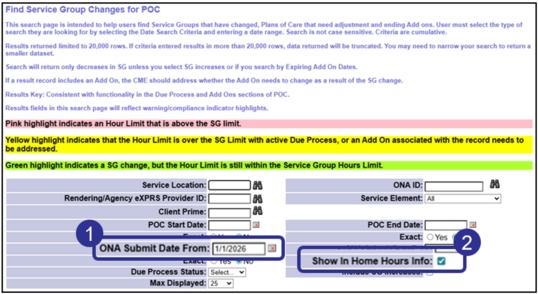
For example, in the screenshot below there are two criteria that have been entered:
-
ONA Submit From: 1/1/2026
-
Show In Home Hours Info: Checked
With these two criteria set, any individual with an Oregon Needs Assessment that was submitted on or after 1/1/2026 whose Service Group decreased will return.
From the results list shown below, we see the Current Hour Limit field highlighted in pink. This indicates that the Plan of Care needs to be reviewed.
 Keep in mind that currently, the pink highlighted row will still appear on this report even after making an adjustment to the Authorized Monthly Hour segments for an individual’s Plan of Care. This means the report is useful as a means to track changes in Service Group for individuals served by your Case Management Entity, and not as an indicator of the current state of the Hour Limit on the associated Plans of Care.
Additional Resources
What will we cover in future communications?
Here’s what's coming next:
-
January 2026 – An explanation of In-Home Hour Add Ons, including how they are created and how they impact a Plan of Care.
-
February 2026 – Additional guidance for specific situations that might occur when creating or updating Plans of Care.
-
March 2026 – A review of all available resources, including trainings, guides and other eXPRS and ODDS content.
-
April 2026 – Any additional updates or guidance that is available.
Click the Survey button below to share your eXPRS-related questions or topics you'd like to learn more about.
Need Assistance?
Our team is always here to assist you! If you encounter issues or need help with working in eXPRS, please submit a Technical Assistance Request by selecting Customer Service > eXPRS Technical Assistance Request from the top menu bar.
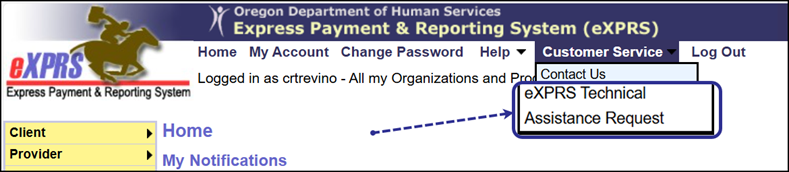 These get routed to the eXPRS Technical Assistance Unit for follow up and resolution of your issues. You can also email us at our Info.eXPRS@odhsoha.oregon.gov inbox.
For any policy related questions, email ODDS.Questions@odhsoha.oregon.gov
|