Maximum Password Length Increased
Previously, eXPRS passwords had to be within 15-20 characters long. Now, beginning with this new release, the maximum password length has been increased. Passwords can now be between 15-32 characters long.
As a reminder, eXPRS Passwords must meet the following criteria:
- Must be between 15-32 characters long
- Must contain at least one letter and one number
- Cannot be a password used in the last five years
Even though the maximum password length has been increased, users do not have to change their passwords as a result of this update, and they do not have to use all 32 characters for their password.
If you have additional questions, please contact the eXPRS Team using the Info.eXPRS@odhsoha.oregon.gov email inbox.
Another Batch of Improvements!
Here’s a few quick highlights for what's changed in the system:
-
Authorizations: In line with ODDS Policy, SPAs for Behavior Support Services (OR310 and OR570) can now have a combined limit that exceeds $3200 dollars.
-
Individual: Resolved an application error that could occur on a PSWs Service Prior Authorizations (SPAs) which would create an issue with Aggregation.
-
Provider: The Weekly Hours Default for PSWs is now saved to the eXPRS database.
-
Service Delivered Billing Entry: The Plan Line Unit Limit validation now functions correctly for services with a Frequency type of Day or Event, such as OR507 or OR401.
-
Service Delivered Billing Entry: The total Service Hours or Units now appears in the Search Results on the View Service Delivered page and Update Service Delivered to Out of Cycle page.
-
System Services: Completed implementation of Claim and Provider changes for CMS mandated compliance around claim submission.
Service Delivered Billing Entries (SDs)
New Functionality When Submitting SDs
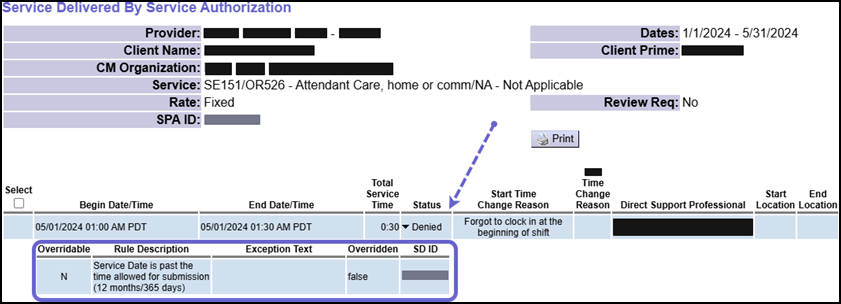
There have been changes to processing SDs in order to comply with rules for Medicaid billing. Now, SDs that are created and submitted twelve (12) months after the service date will now move to Denied Status instead of Suspended Status.
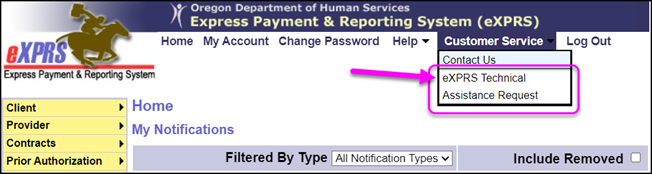
If any provider's billings are Denied for this reason and they believe it should be paid, they can submit a Technical Assistance Request (TAR). In the TAR, the provider can share details about the billing and why it should be paid. The request will be reviewed and ODDS staff will determine if it should be paid.
New Fields Available When Viewing or Searching for SDs
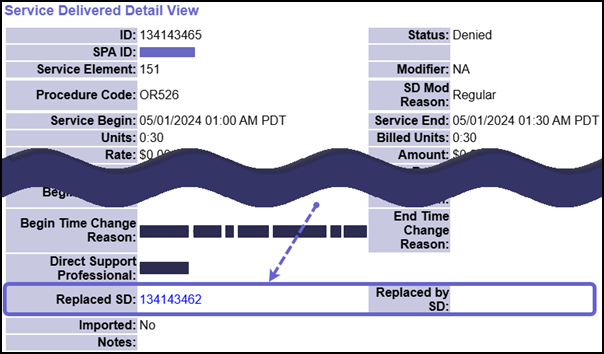
Because SDs that are denied for the reason above may later be copied, we've added new fields to the View Service Delivered Detail page, including:
-
Replaced SD: Displays the ID # of original Denied SD that the current SD was copied from (if applicable).
-
Replaced By SD: Displays the ID #s of SDs that were created by the copy process (if applicable).
-
Copied: This field is available to specific users, and will display either True or False. If the SD has not been copied, it will display as "False". If the SD has been copied, it will display as "True".
And now, when searching for SDs on the View Service Delivered page, some users will be able to use new search criteria:
-
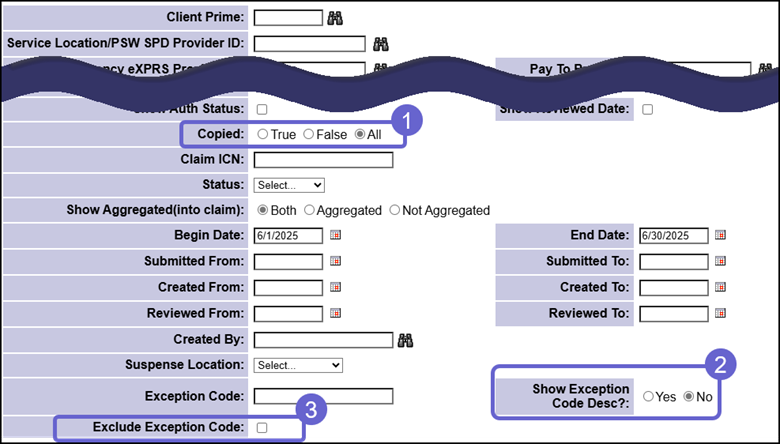
Copied: These radio buttons are available to specific users, and allow them to search by whether an SD has been copied or not.
-
Show Exception Code Desc? (Yes/No): When Yes is selected, the written text description of an exception is added into the results list.
-
Exclude Exception Code: Excludes SDs with the entered Exception Code from the results list.
The results list will also display some of this updated information, depending on a user's permissions.
Help Menu Changes and Release Notes
Click the buttons below to see the full Release Notes and all the updates to the Help Menu.
|