|
 Medicaid 1915(i) Newsletter
January 21, 2025
|
|

ALL providers must enter case notes in Therap
There are four active case note templates (the first three now include a billable units field.):
- Care Coordination
- Non-Medical Transportation (NMT)
- Supportive Services (except NMT)
- Non-Billable *NEW at the request of providers* - use this case note to keep track of non-billable things
Why is entering case notes in Therap important?
Because care coordinators must review service notes monthly. When case notes are in Therap, it is easy and secure for care coordinators to review case notes and communicate with supportive service providers (use SComms).
Individual Plan Agendas for Quarterly Plan Reviews
ALL Plans of Care need to be reviewed quarterly. Use Individual Plan Agendas to do this in Therap.
There is an updated Plan of Care Creation and Changes guide on the Provider Resources webpage. This guide includes screenshots to walk you through Plan of Care (POC) creation, Quarterly Reviews/Individual Plan Agendas, and Plan updates/changes using the Change Form option.
2.2024 Plans of Care need to be updated to the new January 2025 POC template.
All 2.2024 Plans of Care coming up for Quarterly Review need to be transferred to the new January 2025 template when doing Quarterly Reviews.
All new initial and annual Plans of Care must be created in the January 2025 POC template.
|

Make sure you're prepared for this! We need all providers to send and receive referrals in Therap for this to be successful.
It's quick, easy, and secure. Learn more at our last remaining Therap referrals webinar on Wednesday, Jan. 22 at 1 p.m. CT. Register here.
There is also a new Therap Referral Walkthrough posted on the Provider Training and Guidance webpage.
Therap referrals will eliminate:
- Emailing the Service Provider Request form and waiting for a response.
- Needing to send the Service Provider Request form to 1915(i) staff. Accepting a referral in Therap links your service provider account to the member.
|

Create Plans of Care and Individual Plan Agendas in your Oversight Account. This is important because it allows linked supportive service providers to view Plans of Care, get notifications about updates, and see Individual Plan Agendas. You can also use the SComm feature to securely communicate with service providers and attach plan documents.
Use your Internal Account only for case notes.
|

New Care Coordinator State-Sponsored Training (all new care coordinators must have this training)
- Upcoming in-person training in Fargo, ND, March 17-20.
- Registration closes March 5.
- Training capped at 50 participants.
|
Parent and Caregiver Peer Support Training (Family Peer Support)
- Upcoming in-person training in Mandan, ND, April 1-3.
- Priority will be given to peers already hired within a child or family serving system.
- Application deadline is February 3.
Peer Support Supervision Training Opportunity
- FREE training at a virtual two-day workshop, April 8-9 from 9 a.m. - 5 p.m. CT each day.

Providers: When you are terminating a member's services (for whatever reason) AND you have completed your service notes/documentation, you can discharge the member from your Therap caseload.
NOTE: If you are providing multiple supportive services to members, you only need to do one discharge - a discharge breaks the link between the member and your agency in Therap. So do not discharge from peer support if you are going to continue providing the member with housing support.
Why is this important?
Because discharging the member yourself means you don't have to submit anything to 1915(i) staff UNLESS you are discharging a member from care coordination AND there is no new care coordination agency taking the member's referral. You only need to notify 1915(i) staff of a member discharge if you are discharging a member for care coordination and there is no care coordination agency taking your place. This ensures we are able to navigate members who need a new care coordinator or find out whether these members should be discharged for not meeting eligibility criteria.
It keeps your caseload clean and only with active members.
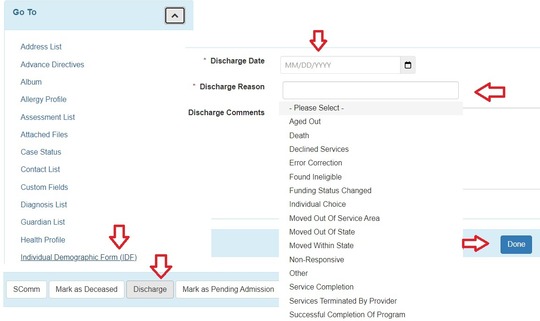
To discharge a member, go to their Individual Demographic Form (IDF) page from the Go To area on the left-hand side of Therap.
If you are discharging from care coordination, you will use your care coordination account and if you are discharging from a supportive service, you will discharge from your supportive service account.
- Once on the IDF page you will scroll down and click the Discharge button.
- Then select the discharge date, select a reason for discharge and add any helpful comments about the discharge if your selected reason needs context. i.e. if you select "Services Terminated by Provider" and it's due to staff unavailability/termination, note that. If it's due to member safety concerns, you would note that in comments.
|

Not only can you securely communicate in Therap using the SComms feature, but you can also set up notifications for different events happening associated with your members in Therap.
You can receive emails about new referrals, accepted referrals, updated Plans of Care, Plan of Care approvals and more. See everything you may be able to get notifications for on Therap's notifications overview webpage.
|
|
|
|
|