Announcements
Cataloging Knowledge Base Article Updates
We separated our single SmartPort Knowledge Base (KB) article into three new ones to make the content easier to use and to allow us to add additional instruction:
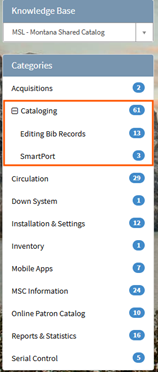
Additionally, we added two subcategories to our Cataloging main category to improve browsing. You can expand the Cataloging category to more easily view our Editing Bib Record KBs and our SmartPort KBs. Note that all cataloging KBs remain browsable from the main category.
Knowledge Base categories list with new subcategories menu
MSC Quarterly Webinar: SmartPort and Transferring
A recording of the latest quarterly webinar training on SmartPort and transferring is available on the MSL YouTube channel: https://youtu.be/XzTk7oQ3pAY. Linked timestamps are in the video description. You can also get to the video from any of the articles on SmartPort or the article on transferring.
The following KB articles were referenced during the training:
BLUEcloud Analytics (BCA) Autorenewal Report
For libraries that have signed up for Autorenewal, there is a new BLUEcloud Analytics (BCA) report that you can use to track what items were not renewed along with their reason. It is available in the following folder pathway: Shared Reports > Circulation > Current Checkouts > Auto-Renewal – Items not Renewed.
If you are not currently using Autorenewal, but are interested in more information, please open a help desk ticket.
Enterprise Online Patron Catalog Updates
Displaying Items Available on the Shelf
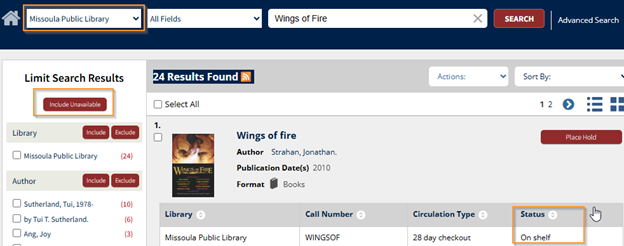
Patrons will now be able to use a new function in the Enterprise catalog in the search results called the ‘Only Show Available’ button. This button will only show items that are on shelf in the library at the time of the patron’s search. If you are a part of a sharing group, you will want to make sure your patrons are searching on your library specific option in the dropdown menu. If they search under the entire sharing group, it will show results for items available throughout all the libraries.
Enterprise search results screen
Series Display
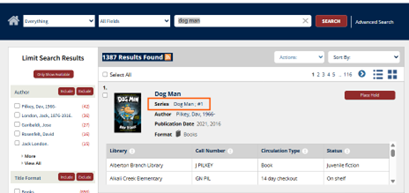
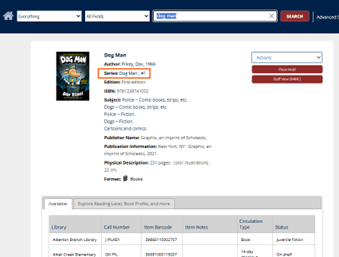
In May, we updated series linking in Enterprise so that a series name can simply be clicked to search for the specific series. The search will use the series name and ignore the volume or series numbering.
We now updated the search result display and item detail display in Enterprise to include series statements for all libraries. It had previously been available for only some libraries. Please open a help desk ticket for questions.
Search Result Display
Item Detail Display
MSC Office Hours - Tuesday, 2/3
Join us Tuesday, 2/3 at either 10 am or 2 pm for MSC Office Hours. We will be available the whole hour to troubleshoot specific issues, help brainstorm how to get a new project started, or answer any questions you may have! Drop in for a few minutes or stay for the whole time.
Meeting information can be found on ASPeN or simply join using this link.
Did You Know?
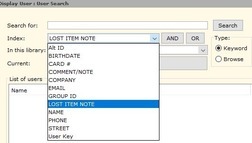
You can search for patrons with LOST items by the lost item barcode number. Open Modify User, click the User Search icon, change the search to 'Lost Item Note' and enter the item barcode number. The note is found on the Extended Info tab of the patron record. |
|
 |
Upcoming Events
MSC Office Hours on Tuesday, February 3rd at 10 am & 2 pm
Location: Zoom. Meeting details can be found on the ASPeN Events calendar.
KB Articles
|