Announcements
Marking Items Lost
In Workflows, if a patron or a student reports that they cannot return an item because they’ve lost it, library staff can use the ‘Mark Item Lost’ wizard to update the item status and charge the user a replacement fee. The system will change the item to the current location of LOST-CLAIM and connect a bill to the checkout. If the bill is paid, the system will instantly check it in off the user’s account and update the status to LOST-PAID at the end of the day. However, if the bill is not paid, it will remain on the user’s account until the bill is paid or until the item is updated by a Process Lost Item report. If your library does not have the automated Process Lost Item report set-up and you would like more information, please open a help desk ticket.
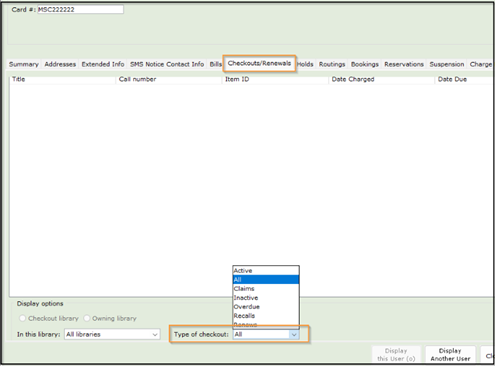
To view items that are in a LOST-CLAIM status on an individual patron account in WorkFlows, you may need to adjust your settings in the ‘Display User’ wizard. Under the checkouts tab, you may need to scroll down and change the ‘Type of Checkout’ from ACTIVE to ALL.
To see a list of any items in the LOST-CLAIM status, you can use the ‘LOST-ASSUM & LOST-CLAIM List’ report located in BLUEcloud Analytics (BCA). The report can be found in the following folder pathway: Shared Reports> Cataloging> Catalog Clean-up Reports.
MSC Quarterly Webinar: SmartPort and Transferring - January 22 at 12:00 pm
When you are trying to catalog something but cannot find the right record in the MSC, you need to import the record from OCLC using the SmartPort wizard in WorkFlows. This webinar will cover SmartPort settings, searching in SmartPort, importing a record, and handling the most common error messages.
After discussing SmartPort we will review how to transfer records in WorkFlows, for those times when you accidentally attach to the wrong record and are not sure what to do.
A recording will be made available after the session.
1 CE Credit – Collection Management and Technical Services
MSC Office Hours - Friday, January 16
Join us Friday, 1/16 at either 10 am or 2 pm for MSC Office Hours. We will be available the whole hour to troubleshoot specific issues, help brainstorm how to get a new project started, or answer any questions you may have! Drop in for a few minutes or stay for the whole time.
Note with our holiday schedule we will hold Office Hours on just one day in January. We will resume our regular schedule of two days per month in February.
Meeting information can be found on ASPeN or simply join using this link.
Did You Know?
|
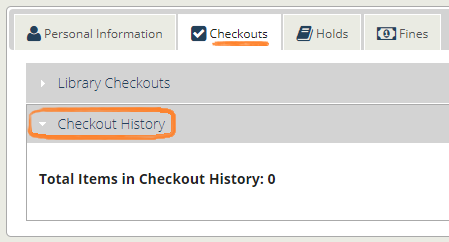
Patrons can opt-in to save their checkout history. By opting in patrons are able to see what they checked out in the past from their library account in Enterprise.
Check out our article for more information or open a help desk ticket for questions.
|
|
 |
Upcoming Events
MSC Office Hours on Friday, January 16 at 10 am & 2 pm
MSC Quarterly Webinar: SmartPort and Transferring on Thursday, January 22 at 12:00 pm
KB Articles
|