Montana State Library sent this bulletin at 06/03/2024 03:14 PM MDT
Date: 6/3/2024
Updates from the Montana Shared Catalog
The MSC is completing the transition to our new Help Desk. Users will need to have an Okta login to access the ticket system, but not for the Knowledge Base. For more information or to open a ticket, please visit: https://msl.mt.gov/libraries/library_services_support
Announcements
MSC Library Support
The MSC and other MSL programs have been using the state system for help desk tickets and knowledge base articles since late April. We received a one-month extension for our current system, Zoho, so we are taking June to finish updating the Knowledge Base articles and to move over in-progress tickets. As we move toward the end of June, new tickets that you open in Zoho may be moved to our new system by the MSC team.
We recommend saving information from past tickets you refer back to as we will not be able to access Zoho after June 30.
Automated Catalog Clean-Up webinar on Tuesday, June 11 from 10:00-10:30 am
Not sure how or if your library is set up on the system side to handle "tricky" items, e.g., ones that have gone missing/lost, been in transit forever, etc.? During this session you'll learn:
Why regular catalog clean-up is important in the MSC
Where to find lists of these items when needed
What your options are for having the system handle clean-up automatically
What staff intervention is required (if any) to complete clean-up
CE credit: 0.5 Collection Management and Technical Services
New BLUEcloud Analytics (BCA) Report
Want to see how users interacted with your library yesterday? Check out the new DailyDashboard Snapshot located in the 'Circulation' folder in BCA.This report shows a daily total of checkouts, users who interacted with your library, numberof holds placedas well as other data points.
Please note that the report does prompt you to enter in your library 5 times in order to populate the results. Remember you can create what is referred to as a Personal View of any BCA reports to avoid having to enter your library each time you run the report. To create a Personal View follow the steps found in this Knowledge Base article.
Did You Know?
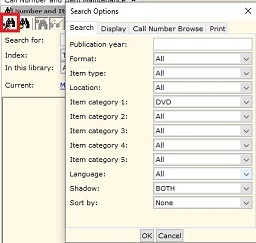
You can limit a search in WorkFlows by item categories and/or other selections using the 'Configure Options for Item Search' helper.
Just click the helper in cataloging or circulation searches and make your selections.
Upcoming Events
Automated Catalog Clean-Up webinar on Tuesday, June 11 at 10 am
Location: Zoom. Meeting details can be found on the ASPeN Events calendar.
MSC Office Hours on Friday, June 21 at 10 am & 2 pm
Location: Zoom. Meeting details can be found on the ASPeN Events calendar.