|
|
The Montana Memory Project (MMP) continues to provide information on ways to successfully use the new site through this Highlights newsletter and the Highlights section on the home page.
Library staff members are encouraged to share these with patrons by adding these ideas to your website and sharing through social media outlets.
|
|
The Montana Memory Project website is a great resource for searching images. We have over 36,000 photographs on the website, from nearly 100 different institutions around the state. Imagery makes up about the half the content on the MMP site. As such, we get a lot of questions, particularly about how to view the details on some of the higher resolution images that might not appear obvious when you open an item page. Here's a quick tutorial to help you with some of our zooming functionality. |
|
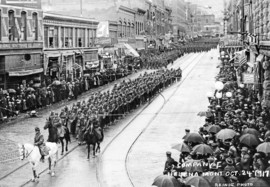
One of the most common things people like to look for on our site is photos of family and ancestors. Frequently, people from days past are seen together in large group photos. We'd like to show you how to zoom in on very small details of an image, and will use this photo of soldiers marching in Helena in 1917 as our example. |
|
On the left edge of every image on the MMP website, you will see a toolbar - it looks like the small screenshot here at right. These buttons will help you zoom your image as needed. The top 4 buttons on that toolbar will allow you to automatically fit the image to the page in various ways. The circular arrow will allow you to rotate as needed. The next button, the little dark box, is very powerful. Click on this button, and you'll open a full page viewer for the image, allowing you to zoom in to great detail. And lastly, there is a small slider that allows you to move the image size manually. |
|
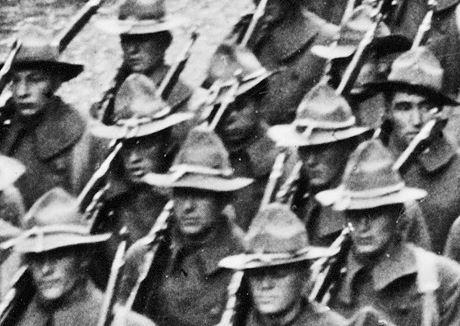
Using our 1917 marching soldiers photo as the example, we can see how powerful the zoom functionality on the MMP site is. The original photo viewed at full size seems to show faceless men. At right, a screenshot of the zoomed version of this photo shows great detail - individual faces and expressions are now plainly visible. We hope this brief tutorial has been helpful - happy zooming! |
|
|
|